Compare commits
30 Commits
| Author | SHA1 | Date | |
|---|---|---|---|

|
cd81280bcb | ||
|
|
5698bb0394 | ||
|
|
1c4d392842 | ||
|
|
2834d7886c | ||
|
|
2000d43058 | ||
|
|
efdf4cd469 | ||
|
|
54c4bc5201 | ||
|
|
59110ff1f8 | ||
|
|
8374c32ae5 | ||
|
|
aa716421c9 | ||
|
|
1cbd3436bf | ||
|
|
b187bd46b6 | ||
|
|
09793ceab9 | ||
|
|
e460859f44 | ||
|
|
156bbc2612 | ||
|
|
5e03b464c8 | ||
|
|
b80312aed4 | ||
|
|
53dc5124d1 | ||
|
|
b02a786952 | ||
|
|
3c6740528e | ||
|
|
1841248fec | ||
|
|
101453894f | ||
|
|
80949c7977 | ||
|
|
edc3994b6a | ||
|
|
3bc957d39c | ||
|
|
f4dc358454 | ||
|
|
826ca56b17 | ||
|
|
5dbbe8f484 | ||
|
|
1dffd46a04 | ||
|
|
67254542d1 |
126
.github/workflows/build-daily-book.yml
vendored
Normal file
126
.github/workflows/build-daily-book.yml
vendored
Normal file
@@ -0,0 +1,126 @@
|
||||
name: Build Daily Journal
|
||||
|
||||
on:
|
||||
# 每天UTC时间0点自动触发 (对应北京时间早上8点)
|
||||
schedule:
|
||||
- cron: '0 23 * * *'
|
||||
|
||||
# 手动触发
|
||||
workflow_dispatch:
|
||||
|
||||
jobs:
|
||||
build-book:
|
||||
runs-on: ubuntu-latest
|
||||
|
||||
# 需要写入权限来提交生成的文件和归档的日刊
|
||||
permissions:
|
||||
contents: write
|
||||
|
||||
steps:
|
||||
- name: Checkout repository
|
||||
uses: actions/checkout@v4
|
||||
with:
|
||||
# 明确指定要检出的分支
|
||||
ref: 'book' # <-- 请将 'book' 替换为你的目标分支名
|
||||
|
||||
- name: Archive old notes
|
||||
id: archive
|
||||
run: |
|
||||
echo "开始检查并归档旧的日刊..."
|
||||
# 查找最新文件以确定当前月份
|
||||
LATEST_DAILY_FILE=$(find daily -type f -name "*.md" | sort -r | head -n 1)
|
||||
if [ -z "$LATEST_DAILY_FILE" ]; then
|
||||
echo "在 'daily' 目录中没有找到任何 .md 文件,跳过归档步骤。"
|
||||
exit 0
|
||||
fi
|
||||
|
||||
LATEST_MONTH=$(basename "$LATEST_DAILY_FILE" .md | cut -d'-' -f1,2)
|
||||
echo "当前最新月份是: $LATEST_MONTH"
|
||||
|
||||
# 仅遍历 daily/ 根目录下的 md 文件进行归档
|
||||
for file in daily/*.md; do
|
||||
# 如果根目录下没有md文件,循环会匹配到 "daily/*.md" 字符串,需要跳过
|
||||
[ -e "$file" ] || continue
|
||||
|
||||
FILE_MONTH=$(basename "$file" .md | cut -d'-' -f1,2)
|
||||
|
||||
if [ "$FILE_MONTH" != "$LATEST_MONTH" ]; then
|
||||
TARGET_DIR="daily/$FILE_MONTH"
|
||||
mkdir -p "$TARGET_DIR"
|
||||
echo "归档文件: $file -> $TARGET_DIR/"
|
||||
mv "$file" "$TARGET_DIR/"
|
||||
fi
|
||||
done
|
||||
echo "文件归档检查完成。"
|
||||
|
||||
- name: Trigger RSS Data Write (2 attempts, 3 retries each)
|
||||
run: |
|
||||
# 检查 `WRITE_RSS_URL` 变量是否已设置
|
||||
if [ -z "${{ vars.WRITE_RSS_URL }}" ]; then
|
||||
echo "警告: WRITE_RSS_URL 仓库变量未设置或为空,跳过此步骤。"
|
||||
exit 0
|
||||
fi
|
||||
|
||||
# 设置时区为 Asia/Shanghai (东八区),并获取 YYYY-MM-DD 格式的日期
|
||||
TODAY_DATE=$(TZ="Asia/Shanghai" date +%Y-%m-%d)
|
||||
FULL_URL="${{ vars.WRITE_RSS_URL }}?date=$TODAY_DATE"
|
||||
|
||||
echo "将向以下 URL 发送2次请求(每次请求若失败则重试3次):"
|
||||
echo "$FULL_URL"
|
||||
|
||||
# 循环两次,发送两次独立的请求
|
||||
for i in 1 2
|
||||
do
|
||||
echo "---"
|
||||
echo "正在发送第 $i 次请求..."
|
||||
|
||||
# 使用 curl 发起请求,并配置重试逻辑
|
||||
# -f: 在遇到服务器HTTP错误时,以错误码退出(对CI/CD很重要)
|
||||
# -sS: 静默模式,但仍然显示错误信息
|
||||
# --retry 3: 如果命令失败,则最多重试3次
|
||||
# --retry-delay 5: 每次重试之间等待5秒
|
||||
# --retry-connrefused: 在“连接被拒绝”时也进行重试,增强网络抖动的鲁棒性
|
||||
if curl -fsS --retry 3 --retry-delay 5 --retry-connrefused "$FULL_URL"; then
|
||||
echo "第 $i 次请求成功。"
|
||||
else
|
||||
echo "错误:第 $i 次请求在3次重试后仍然失败。"
|
||||
# 使整个步骤失败
|
||||
exit 1
|
||||
fi
|
||||
done
|
||||
|
||||
echo "---"
|
||||
echo "两次请求均已成功发送。"
|
||||
|
||||
- name: Download RSS Feed
|
||||
run: |
|
||||
if [ -z "${{ vars.RSS_FEED_URL }}" ]; then
|
||||
echo "警告: RSS_FEED_URL 仓库变量未设置或为空,跳过下载。"
|
||||
else
|
||||
echo "正在从 ${{ vars.RSS_FEED_URL }} 下载 RSS Feed..."
|
||||
if wget -O rss.xml "${{ vars.RSS_FEED_URL }}" --timeout=30 --tries=3; then
|
||||
echo "RSS Feed 已成功下载到 rss.xml"
|
||||
else
|
||||
echo "错误: 下载 RSS Feed 失败。wget 返回错误码 $?。"
|
||||
fi
|
||||
fi
|
||||
|
||||
- name: Commit and push changes
|
||||
run: |
|
||||
git config --local user.email "action@github.com"
|
||||
git config --local user.name "GitHub Action"
|
||||
|
||||
git add today/ daily/
|
||||
if [ -f "rss.xml" ]; then
|
||||
git add rss.xml
|
||||
else
|
||||
echo "rss.xml 未找到,不添加到提交中。"
|
||||
fi
|
||||
|
||||
if git diff --staged --quiet; then
|
||||
echo "没有文件变更,无需提交。"
|
||||
else
|
||||
echo "检测到文件变更,正在提交..."
|
||||
git commit -m "docs: 自动构建日刊并归档旧月份 (`date -u`)"
|
||||
git push
|
||||
fi
|
||||
88
README.md
88
README.md
@@ -1,11 +1,15 @@
|
||||
# 🚀 AI 洞察日报
|
||||
# 🚀 AI 资讯日报
|
||||
|
||||
> 您的每日 AI 信息整合,分析,日报,播客内容生成平台。
|
||||
|
||||
**AI 洞察日报** 是一个基于 **Cloudflare Workers** 驱动的内容聚合与生成平台。它每日为您精选 AI 领域的最新动态,包括行业新闻、热门开源项目和前沿学术论文,并通过 **Google Gemini** 模型进行智能处理与摘要生成,最终自动发布到 GitHub Pages。
|
||||
**AI 资讯日报** 是一个基于 **Cloudflare Workers** 驱动的内容聚合与生成平台。它每日为您精选 AI 领域的最新动态,包括行业新闻、热门开源项目、前沿学术论文、科技大V社交媒体言论,并通过 **Google Gemini** 模型进行智能处理与摘要生成,最终自动发布到 GitHub Pages 生成 AI 日报。
|
||||
|
||||
我们的目标是成为您在瞬息万变的 AI 浪潮中保持领先的得力助手,让您高效获取最有价值的信息。
|
||||
|
||||
> [!NOTE]
|
||||
> 日报前端项目已发布2.0: [Hextra-AI-Insight-Daily](https://github.com/justlovemaki/Hextra-AI-Insight-Daily) ,基于 Hugo 加 Hextra主题 构建。
|
||||
>
|
||||
> 感谢阮一峰老师在[周刊352期](https://www.ruanyifeng.com/blog/2025/06/weekly-issue-352.html)的推荐。
|
||||
---
|
||||
|
||||
## ✨ 核心特性
|
||||
@@ -21,30 +25,30 @@
|
||||
|
||||
## 🎯 为谁而生?
|
||||
|
||||
无论您是信息的消费者、创造者,还是技术的探索者,「AI 洞察日报」都旨在为您创造独特价值。
|
||||
无论您是信息的消费者、创造者,还是技术的探索者,「AI 资讯日报」都旨在为您创造独特价值。
|
||||
|
||||
#### 🧑💻 AI 从业者与研究者
|
||||
### 🧑💻 AI 从业者与研究者
|
||||
> **痛点:** 信息海洋无边无际,筛选关键动态、前沿论文和优质开源项目耗时费力。
|
||||
|
||||
**解决方案:**
|
||||
* **✅ 自动化精炼:** 为您提炼每日必读核心内容,并由 AI 生成精辟摘要。
|
||||
* **⏱️ 聚焦核心:** 在 **5 分钟内**快速掌握行业脉搏,将宝贵时间投入到真正重要的工作与研究中。
|
||||
|
||||
#### 🎙️ 内容创作者与科技媒体人
|
||||
### 🎙️ 内容创作者与科技媒体人
|
||||
> **痛点:** 持续输出高质量内容,却苦于选题枯竭和素材搜集的繁琐。
|
||||
|
||||
**解决方案:**
|
||||
* **💡 灵感永动机:** 聚合最新资讯,成为您源源不断的灵感源泉。
|
||||
* **🚀 内容半成品:** 利用 Gemini 模型生成结构化的**播客/视频口播稿**,稍作修改即可发布,极大提升创作效率。
|
||||
|
||||
#### 🛠️ 开发者与技术 DIY 爱好者
|
||||
### 🛠️ 开发者与技术 DIY 爱好者
|
||||
> **痛点:** 想学习前沿技术栈(Serverless, AI API),但缺少一个完整、有实际价值的项目来练手。
|
||||
|
||||
**解决方案:**
|
||||
* **📖 绝佳学习范例:** 本项目架构清晰、代码开源,是学习如何整合云服务与 AI 模型的绝佳范例。
|
||||
* **🎨 打造个人专属:** 轻松 Fork,通过修改订阅源和 Prompt,将其改造为您个人专属的“Web3 洞察”、“游戏快讯”或“投资摘要”等。
|
||||
|
||||
#### 🌱 对 AI 充满好奇的终身学习者
|
||||
### 🌱 对 AI 充满好奇的终身学习者
|
||||
> **痛点:** AI 领域术语繁多、技术迭代快,想要跟上时代步伐却感到无从下手。
|
||||
|
||||
**解决方案:**
|
||||
@@ -57,17 +61,49 @@
|
||||
|
||||
我们提供了多个在线访问地址以及项目成果的播客展示。
|
||||
|
||||
**在线阅读地址:**
|
||||
### **在线阅读地址:**
|
||||
|
||||
* 🌐 **主站点(GitHub Pages )**:[website-1](https://justlovemaki.github.io/CloudFlare-AI-Insight-Daily/today/book/)
|
||||
* 📖 **备用站点(Cloudflare)**:[website-2](https://ai-today.justlikemaki.vip/)
|
||||
#### 💻 网页直达
|
||||
|
||||
**内容成果展示:**
|
||||
无需安装任何应用,直接在浏览器中打开,即刻阅读,支持pc和移动端。
|
||||
|
||||
* 🎙️ **小宇宙**:[来生小酒馆](https://www.xiaoyuzhoufm.com/podcast/683c62b7c1ca9cf575a5030e)
|
||||
* 📹 **抖音**:[来生情报站](https://www.douyin.com/user/MS4wLjABAAAAwpwqPQlu38sO38VyWgw9ZjDEnN4bMR5j8x111UxpseHR9DpB6-CveI5KRXOWuFwG)
|
||||
* **唯一主站点 (GitHub Pages)**
|
||||
> [https://ai.hubtoday.app/](https://ai.hubtoday.app/)
|
||||
>
|
||||
> `✅ 推荐` `🚀 访问速度快`
|
||||
|
||||
**项目截图:**
|
||||
---
|
||||
|
||||
#### 📡 RSS 订阅
|
||||
|
||||
将 AI 资讯聚合到您的个人信息流中,高效获取更新。
|
||||
|
||||
* **订阅链接**
|
||||
> [https://justlovemaki.github.io/CloudFlare-AI-Insight-Daily/rss.xml](https://justlovemaki.github.io/CloudFlare-AI-Insight-Daily/rss.xml)
|
||||
>
|
||||
> `⭐ 推荐使用 Feedly, Inoreader, Folo 等现代阅读器订阅`
|
||||
|
||||
---
|
||||
|
||||
#### 📱 微信公众号
|
||||
|
||||
适合移动端阅读,每日推送,不再错过精彩内容。
|
||||
|
||||
* **关注方式**
|
||||
> 打开微信,搜索公众号「**何夕2077**」并关注。
|
||||
>
|
||||
> `💬 欢迎在公众号后台与我们交流`
|
||||
|
||||
|
||||
### **内容成果展示:**
|
||||
|
||||
| 🎙️ **小宇宙** | 📹 **抖音** |
|
||||
| --- | --- |
|
||||
| [来生小酒馆](https://www.xiaoyuzhoufm.com/podcast/683c62b7c1ca9cf575a5030e) | [来生情报站](https://www.douyin.com/user/MS4wLjABAAAAwpwqPQlu38sO38VyWgw9ZjDEnN4bMR5j8x111UxpseHR9DpB6-CveI5KRXOWuFwG)|
|
||||
|  |  |
|
||||
|
||||
|
||||
### **后台项目截图:**
|
||||
|
||||
| 网站首页 | 日报内容 | 播客脚本 |
|
||||
| -------------------------------------- | -------------------------------------- | -------------------------------------- |
|
||||
@@ -77,18 +113,20 @@
|
||||
|
||||
## 🚀 快速开始
|
||||
|
||||
> [!NOTE]
|
||||
> 本项目优先支持从 [Folo](https://app.follow.is/) 数据源抓取内容。
|
||||
您只需通过F12获取Folo Cookie,并将其配置到项目中即可在线试用。
|
||||
Folo Cookie只保留在浏览器,没有安全隐患。
|
||||
> 您只需通过F12获取Folo Cookie,并将其配置到项目中即可在线试用。
|
||||
|
||||
> **注意:** 为了保证项目的正常运行,您需要在项目中配置 Folo Cookie。
|
||||
> [!WARNING]
|
||||
> 为了保证项目的正常运行,您需要在项目中配置 Folo Cookie。
|
||||
> Folo Cookie只保留在浏览器,没有安全隐患。
|
||||
|
||||
1. **获取Folo Cookie**
|
||||
|
||||
[](docs/images/folo-0.png)
|
||||
|
||||
2. **[Demo 地址](https://ai-daily-demo.justlikemaki.workers.dev/getContentHtml)**
|
||||
|
||||
* 默认账号密码:root/toor
|
||||
---
|
||||
|
||||
## 📚 更多文档
|
||||
@@ -106,7 +144,7 @@ Folo Cookie只保留在浏览器,没有安全隐患。
|
||||
|
||||
AI 或许能模仿你过去的喜好,却难以捕捉你此刻的灵感与洞见。
|
||||
|
||||
`手动勾选`这一步,正是为了保留这份属于“人”的、不断演进的独特视角。它确保了日报的灵魂——**你的思想和判断力**——始终贯穿其中,让每一份日报都成为你当日思考的真实快照。
|
||||
`手动勾选`这一步,正是为了保留这份属于“人”的、不断演进的独特视角。它确保了日报的灵魂-`你的思想和判断力`,始终贯穿其中,让每一份日报都成为你当日思考的真实快照。
|
||||
|
||||
当然,我们也完全支持并欢迎社区开发者探索全自动化的实现方式。如果你有更棒的想法,请随时提交 Pull Request!
|
||||
|
||||
@@ -114,7 +152,7 @@ AI 或许能模仿你过去的喜好,却难以捕捉你此刻的灵感与洞
|
||||
|
||||
## 💡 项目价值与未来展望
|
||||
|
||||
“AI 洞察日报”为 AI 领域的从业者、研究者和爱好者提供了一个**便捷、高效的信息获取渠道**。它将繁琐的信息筛选工作自动化,帮助用户节省宝贵时间,快速掌握**行业动态**与**技术趋势**。
|
||||
“AI 资讯日报”为 AI 领域的从业者、研究者和爱好者提供了一个**便捷、高效的信息获取渠道**。它将繁琐的信息筛选工作自动化,帮助用户节省宝贵时间,快速掌握**行业动态**与**技术趋势**。
|
||||
|
||||
我们对项目的未来充满期待,并计划在以下方向持续探索:
|
||||
|
||||
@@ -145,12 +183,12 @@ AI 或许能模仿你过去的喜好,却难以捕捉你此刻的灵感与洞
|
||||
</tr>
|
||||
</table>
|
||||
|
||||
> 欢迎您 Star, Fork 并参与贡献,共同将“AI 洞察日报”打造为更强大的 AI 信息利器!
|
||||
> 欢迎您 Star, Fork 并参与贡献,共同将“AI 资讯日报”打造为更强大的 AI 信息利器!
|
||||
|
||||
---
|
||||
|
||||
## ⚠️ 免责声明
|
||||
在使用“AI 洞察日报”项目(以下简称“本项目”)前,请您务必仔细阅读并理解本声明。您对本项目的任何使用行为,即视为您已完全接受本声明的全部内容。
|
||||
在使用“AI 资讯日报”项目(以下简称“本项目”)前,请您务必仔细阅读并理解本声明。您对本项目的任何使用行为,即视为您已完全接受本声明的全部内容。
|
||||
|
||||
1. **内容来源与准确性**:本项目聚合的内容主要来自第三方数据源(如 Folo 订阅源)并通过 AI 模型(如 Google Gemini)自动处理生成。我们不保证所有信息的绝对准确性、完整性、及时性或可靠性。所有内容仅供学习、参考和交流之用,不构成任何专业建议(如投资、法律等)。
|
||||
|
||||
@@ -165,4 +203,8 @@ AI 或许能模仿你过去的喜好,却难以捕捉你此刻的灵感与洞
|
||||
|
||||
5. **使用风险**:您承诺将合法、合规地使用本项目。任何因您使用不当(如用于商业目的、非法转载、恶意攻击等)而产生的法律责任和风险,均由您自行承担。
|
||||
|
||||
6. **最终解释权**:在法律允许的范围内,本项目团队对本声明拥有最终解释权,并有权根据需要随时进行修改和更新。
|
||||
6. **最终解释权**:在法律允许的范围内,本项目团队对本声明拥有最终解释权,并有权根据需要随时进行修改和更新。
|
||||
|
||||
## 🌟 Star History
|
||||
|
||||
[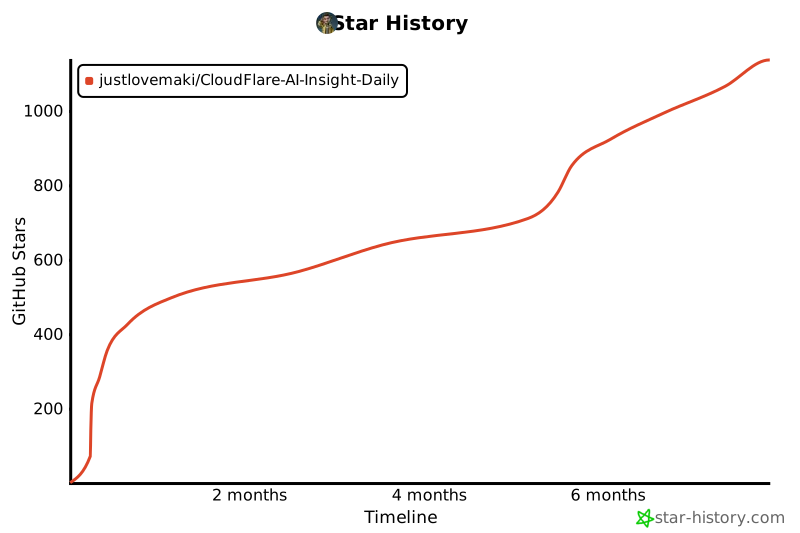](https://www.star-history.com/#justlovemaki/CloudFlare-AI-Insight-Daily&Timeline)
|
||||
|
||||
9
book.toml
Normal file
9
book.toml
Normal file
@@ -0,0 +1,9 @@
|
||||
[book]
|
||||
authors = []
|
||||
language = "zh"
|
||||
src = "src"
|
||||
title = "By 何夕2077"
|
||||
create-missing = true
|
||||
|
||||
[output.html]
|
||||
git-repository-url = "https://github.com/justlovemaki/CloudFlare-AI-Insight-Daily" # 替换成你的仓库地址
|
||||
@@ -62,7 +62,7 @@ CMD ["crond", "-f", "-l", "8"]
|
||||
|
||||
|
||||
# 构建镜像命令 docker build -t ai-daily-cron-job .
|
||||
# 启动容器命令 docker run -d --name ai-daily-cron ai-daily-cron-job
|
||||
# 启动容器命令 docker run -d --name ai-daily-cron -p 4399:4399 --restart always ai-daily-cron-job
|
||||
# 调试容器命令 docker run -it --rm --entrypoint /bin/sh ai-daily-cron-job
|
||||
# 调试生成脚本 /app/scripts/build.sh /app/scripts/work
|
||||
# 进容器调试 docker exec -it ai-daily-cron /bin/sh
|
||||
|
||||
@@ -15,6 +15,8 @@ fi
|
||||
echo "执行首次构建..."
|
||||
/app/scripts/build.sh /app/scripts/work
|
||||
|
||||
mdbook serve --open -p 4399 -n 0.0.0.0 /app/scripts/work &
|
||||
|
||||
echo "--- 初始化完成,启动 cron 服务 ---"
|
||||
|
||||
# 2. 执行 Dockerfile CMD 中定义的命令 (即 "crond -f -l 8")
|
||||
|
||||
@@ -38,7 +38,7 @@ rm -rf "$REPO_NAME"
|
||||
|
||||
# 4. Fetch: Clone the latest content from GitHub.
|
||||
echo "--> Cloning repository from $REPO_URL..."
|
||||
git clone "$REPO_URL"
|
||||
git clone -b book "$REPO_URL"
|
||||
|
||||
# Define the path to the cloned repository for easier access.
|
||||
PROJECT_DIR="$WORK_DIR/$REPO_NAME"
|
||||
@@ -58,21 +58,21 @@ rm -rf "$PROJECT_DIR/podcast"
|
||||
echo "--> Running custom scripts..."
|
||||
./replace.sh "$PROJECT_DIR/daily"
|
||||
./gen.sh "$PROJECT_DIR/daily"
|
||||
mdbook build "$WORK_DIR"
|
||||
# mdbook build "$WORK_DIR"
|
||||
|
||||
# 6. Package & Upload
|
||||
echo "--> Waiting for generation to complete..."
|
||||
# This pause assumes the generation script might have background tasks.
|
||||
# A more robust solution would be to wait for a specific file or process.
|
||||
sleep 10
|
||||
# sleep 10
|
||||
|
||||
echo "--> Packaging the 'book' directory..."
|
||||
# Create a gzipped tar archive of the 'book' directory's contents.
|
||||
tar -cvf archive.tar.gz book/*
|
||||
# tar -cvf archive.tar.gz book/*
|
||||
|
||||
echo "--> Uploading the archive..."
|
||||
# Upload the archive using a custom script.
|
||||
# Note: Ensure github.sh is in the $WORK_DIR or in your PATH.
|
||||
./github.sh upload "archive.tar.gz" "today/archive.tar.gz" "pushbook"
|
||||
# ./github.sh upload "archive.tar.gz" "today/archive.tar.gz" "pushbook"
|
||||
|
||||
echo "--- Workflow completed successfully! ---"
|
||||
@@ -3,4 +3,7 @@ authors = []
|
||||
language = "zh"
|
||||
src = "CloudFlare-AI-Insight-Daily"
|
||||
title = "By 何夕2077"
|
||||
create-missing = true
|
||||
create-missing = true
|
||||
|
||||
[output.html]
|
||||
git-repository-url = "https://github.com/justlovemaki/CloudFlare-AI-Insight-Daily" # 替换成你的仓库地址
|
||||
@@ -6,7 +6,7 @@
|
||||
GITHUB_TOKEN=${GITHUB_TOKEN} # 替换 YOUR_GITHUB_PAT 或设置环境变量
|
||||
OWNER=${OWNER} # 你的 GitHub 用户名或组织名
|
||||
REPO=${REPO_NAME} # 你的仓库名称
|
||||
BRANCH="main" # 目标分支 (可能是 main, master 等)
|
||||
BRANCH="book" # 目标分支 (可能是 main, master 等)
|
||||
|
||||
set -e # 如果任何命令失败,脚本将退出
|
||||
set -o pipefail # 如果管道中的任何命令失败,则整个管道失败
|
||||
|
||||
@@ -1,6 +0,0 @@
|
||||
# AI洞察日报 2025/6/11
|
||||
|
||||
**AI产品与功能更新**
|
||||
<br/> [](https://upload.chinaz.com/2025/0611/6388525318595569546530114.png) <br/>
|
||||
1. **特斯拉**的无人驾驶梦想又要照进现实了!首席执行官埃隆·马斯克亲口证实,备受瞩目的**特斯拉Robotaxi无人驾驶出租车服务**,定于**6月22日**在**得克萨斯州奥斯汀**正式上路!在此之前,印有"Robotaxi”字样的**Model Y**已经在当地公共道路上悄悄"溜达”过好几次,进行无人驾驶测试,看来是胸有成竹了。
|
||||
2. 这次启动,无疑是**特斯拉无人驾驶技术**发展史上的一个里程碑式的跃进!初期会小规模试运营,如果表现给力,马斯克可是盘算着迅速扩充车队,然后"冲”向其他城市呢!更厉害的是,未来所有出厂的**特斯拉**车辆,都将自带"**无人监督自动驾驶**”的超能力,简直是把私家车变身成"未来出租车”的节奏,想想都让人激动不已!
|
||||
@@ -1,13 +0,0 @@
|
||||
# AI洞察日报 2025/6/12
|
||||
|
||||
**AI产品与功能更新**
|
||||
1. 字节跳动开发的AI原生集成开发环境**Trae**,就像一位"代码神笔马良”,自2025年5月起,其月活跃用户已突破100万大关!它累计帮助开发者交付了超过60亿行代码,这可不是一个小数目,简直是编程界的"生产力火箭”,让写代码这件事变得轻松又高效。Trae不仅在国内风生水起,今年5月还推出了国际付费订阅计划,看来是要把这股AI编程的旋风刮向全世界,让全球的"码农”们都能体验到**AI**带来的极致效率提升。
|
||||
<br/> [](https://upload.chinaz.com/2025/0612/6388533475781135647832660.png) <br/>
|
||||
|
||||
**AI前沿研究**
|
||||
1. "地表最强**AI**公司”**OpenAI**正在下一盘大棋,为他们的"星际之门”基础设施计划及技术开发,正积极寻求筹集高达400亿美元的巨额资金。这笔钱足以建造一座科技"空中花园”,支撑未来**AI**的超级计算能力和更深层次的研究。从沙特公共投资基金(PIF)到印度Reliance Industries,各路资本大佬纷纷伸出橄榄枝,这不仅是对OpenAI技术实力的认可,更是对未来**AI**发展潜力的豪赌。
|
||||
<br/> [](https://pic.chinaz.com/picmap/202405110933330041_0.jpg) <br/>
|
||||
|
||||
**AI行业展望与社会影响**
|
||||
1. **Trae**的崛起,不光是数字上的漂亮,更揭示了**AI**正在如何润物细无声地改变软件开发的面貌。它不仅仅是提高了效率,更是让编程的门槛变得更低,让更多人有机会参与到创造数字世界的进程中来。这背后是人机协作模式的深刻变革,**AI**不再是简单的工具,而是成为开发者不可或缺的"智慧伙伴”。
|
||||
2. **OpenAI**的巨额融资以及首席执行官**山姆・阿尔特曼**的全球"布道”之旅,则把我们带到了**AI**行业更广阔的视野。400亿美元的"星际之门”计划,听起来就充满了科幻色彩,它预示着未来**AI**算力竞赛的白热化。这笔钱不只是用来盖数据中心,更是为了支撑下一代**AI**模型的研发,为通用人工智能(AGI)的实现铺路。这不禁让我们思考:当**AI**的算力达到如此量级,它将如何重塑我们的社会、经济乃至文明的走向?是开启一个生产力爆炸的黄金时代,还是带来我们无法预见的挑战?阿尔特曼的全球奔走,也在编织一张**AI**的全球合作与竞争网络,每个国家都在试图抢占**AI**高地,未来**AI**的格局将是多元且充满变数。
|
||||
@@ -1,5 +0,0 @@
|
||||
# AI洞察日报 2025/6/13
|
||||
|
||||
**AI行业展望与社会影响**
|
||||
1. **AI编程工具**正以惊人的速度重塑着**软件开发行业**的未来,仿佛为程序员们注入了"超能力”。以**字节跳动**为例,其超过**80%**的工程师已经积极拥抱**AI辅助开发**,这不仅仅是效率的简单提升,更是一场深刻的**角色演变**:曾经埋头于代码的**代码编写者**,如今正华丽转身,进化为运筹帷幄的**问题建模者**、驾驭智能的**AI调度者**,以及构建宏伟蓝图的**系统架构师**。这种全新的**人机协作**范式,不仅极大地提升了生产力,更孕育着一个激动人心的社会愿景——通过**降低技术门槛**,逐步实现"**全民编程**”,从而深刻地影响并民主化我们每个人在数字社会中的参与权。
|
||||
<br/> [](https://assets-v2.circle.so/3leqq6sdh1jjhc0xr0fbn23189uc) <br/>
|
||||
@@ -1,32 +0,0 @@
|
||||
# AI洞察日报 2025/6/14
|
||||
|
||||
## AI产品与功能更新
|
||||
1. **腾讯**发布的**混元3D 2.1大模型**能够**一站式自动生成高质量3D模型**,从**几何结构**到**PBR(基于物理的渲染)物理材质贴图**全面覆盖,使得模型告别**"塑料感”**,在不同光照下呈现超真实的**材质纹理**和光影效果,用户盲测中PBR纹理质感胜出率高达78%。该模型还引入了**DiT(Diffusion Transformer)**架构,确保模型**"骨架”**更**清晰、稳定**。实际应用中,腾讯自家游戏编辑器"**轻游梦工坊**”使用此技术后,一个道具的制作时间从2天压缩至0.2天,效率提升10倍。此外,腾讯还配套发布了**3D AI创作引擎**,支持**文生3D、图生3D、多视图输入**,并能进行**智能拓扑重建**。
|
||||
|
||||
## AI前沿研究
|
||||
1. **混元3D 2.1**解决了传统AI生成3D模型**细节模糊**、带有**"塑料味儿”**的痛点。其核心在于实现了**PBR(基于物理的渲染)物理材质贴图**的自动生成,让数字世界的光线与材质互动接近现实,确保生成的模型(如皮革、金属、木头)在不同光照下呈现超真实的**材质纹理**和光影效果。同时,模型集成的**DiT(Diffusion Transformer)**架构,为3D模型的**几何结构**提供了**清晰**和**稳定**的基础。
|
||||
|
||||
## AI行业展望与社会影响
|
||||
1. **混元3D 2.1**的开源不仅大大**降低了3D内容生产的门槛**,让普通人也能参与**3D创作**,更预示着一个**全民创作的时代**正在到来。这项技术为未来的**游戏、电影、虚拟现实、数字人、工业设计**等行业打造了一个端到端的**3D AI创作超级工厂**,将**加速数字世界的建造速度**,并无限拓展数字世界的边界。
|
||||
|
||||
## 科技博主观点
|
||||
1. 长期以来,传统的**3D建模**效率低下且复杂,而现有AI生成的3D模型常因**细节模糊**而自带**"塑料味儿”**。现在,**腾讯**将其压箱底的**混元3D 2.1大模型全链路开源**,被形容为**"新魔法”**和**"重磅炸弹”**,让普通人也能在**消费级显卡**上轻松玩转**3D创作**,这简直就是给所有想玩转3D的朋友们开了扇**"任意门”**。
|
||||
|
||||
## 开源TOP项目
|
||||
1. **腾讯**在CVPR 2025大会上**全链路开源**了**混元3D 2.1大模型**。这意味着,其**模型权重、训练代码、数据处理流程**以及详细的部署教程均已公开。这项**开源**举措允许开发者自由地对模型进行**微调、二次训练或优化**,以满足各种**定制化需求**,为普通创作者提供了实现奇思妙想的**"瑞士军刀”**。
|
||||
|
||||
## 社媒分享
|
||||
1. 各位数字世界的冒险家们,如果对这项**魔法**好奇并想亲手体验,不妨前往**腾讯官网、Hugging Face或GitHub**探索一番**混元3D 2.1**。说不定,下一个数字世界的**爆款**作品,就将诞生在你的指尖!
|
||||
|
||||
---
|
||||
|
||||
**收听语音版**
|
||||
|
||||
| 🎙️ **小宇宙** | 📹 **抖音** |
|
||||
| --- | --- |
|
||||
| [来生小酒馆](https://www.xiaoyuzhoufm.com/podcast/683c62b7c1ca9cf575a5030e) | [来生情报站](https://www.douyin.com/user/MS4wLjABAAAAwpwqPQlu38sO38VyWgw9ZjDEnN4bMR5j8x111UxpseHR9DpB6-CveI5KRXOWuFwG)|
|
||||
| 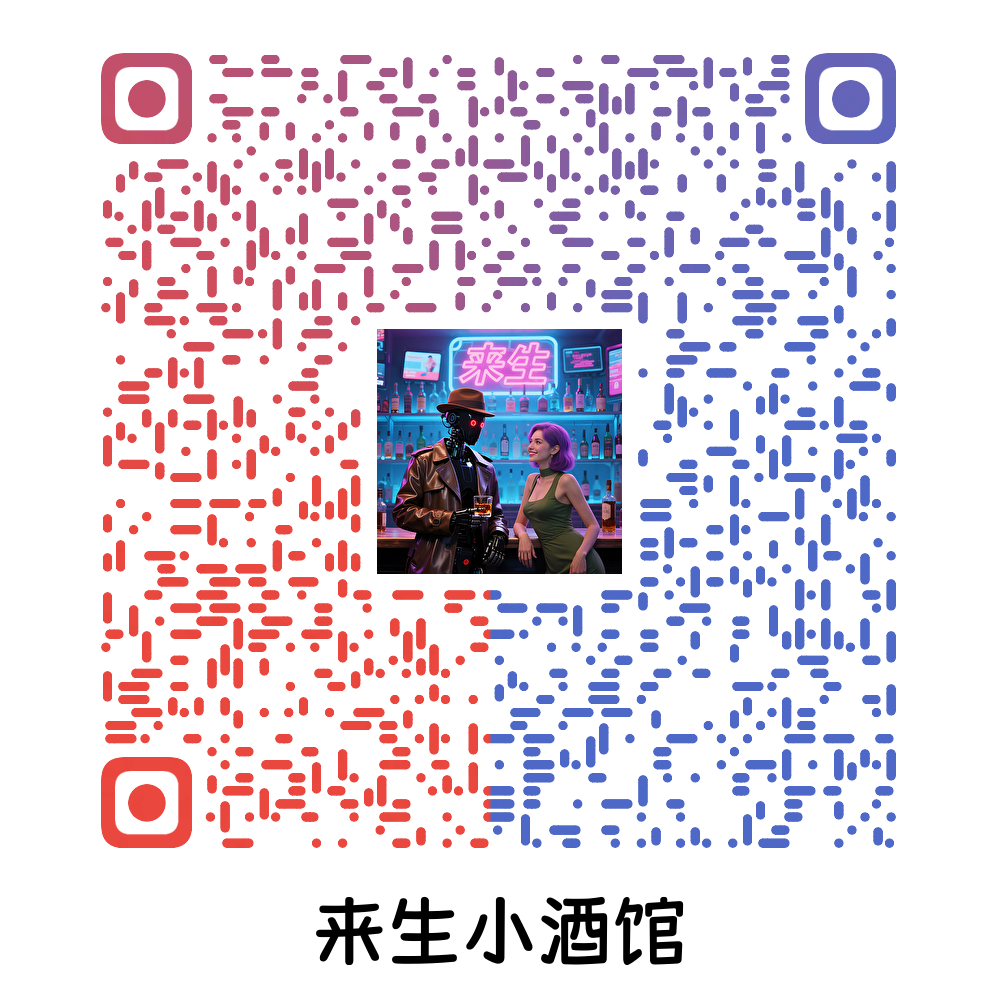 |  |
|
||||
|
||||
|
||||
|
||||
|
||||
@@ -1,47 +0,0 @@
|
||||
# AI洞察日报 2025/6/20
|
||||
|
||||
> ** AI 日报 | 全网数据聚合 | 前沿科学探索 | 行业自由发声 | 开源创新力量 | AI与人类未来 **
|
||||
|
||||
### AI内容摘要
|
||||
|
||||
```
|
||||
|
||||
华为发布盘古大模型5.5,创新架构提升AI跨行业泛化能力。OpenAI ChatGPT macOS版推出隐形笔记工具,自动转录提取信息。中央网信办启动“清朗”专项行动,整治AI技术滥用,已处理大量违规账号和产品,净化网络环境。
|
||||
|
||||
```
|
||||
|
||||
**AI产品与功能更新**
|
||||
|
||||
1. 在HDC2025大会上,华为云重磅发布了**盘古大模型5.5**!其核心亮点在于首创的“**Triplet Transformer**”统一预训练架构,这项创新能将不同行业的多种数据类型进行统一处理,显著提升了模型的**预测精度**和**跨行业泛化能力**。这为各行各业的**数据分析**提供了强大新方案,有望帮助更多企业实现**智能化转型**,抓住大数据时代的机遇。✨🚀
|
||||
|
||||
[](https://pic.chinaz.com/picmap/202305091556165277_9.jpg)
|
||||
|
||||
|
||||
2. 华为在HDC2025大会上隆重推出了全新**盘古大模型5.5**,全面升级了**自然语言处理 (NLP)**、**计算机视觉 (CV)**、**多模态**、**预测**和**科学计算**五大基础模型!🤯 特别值得一提的是,它引入了由256个专家组成的718B**深度思考模型**与业界最大的300亿参数**视觉大模型**。新版本通过自适应快慢思考、"**Triplet Transformer**"统一预训练架构等技术,大幅提升了模型效率、预测精度与泛化能力,并拓展到医学、金融、政务等多个行业,赋能智能驾驶及更广泛的行业数字化升级。🌐
|
||||
|
||||
[](https://upload.chinaz.com/2025/0620/6388603491533913282843199.png)
|
||||
|
||||
|
||||
[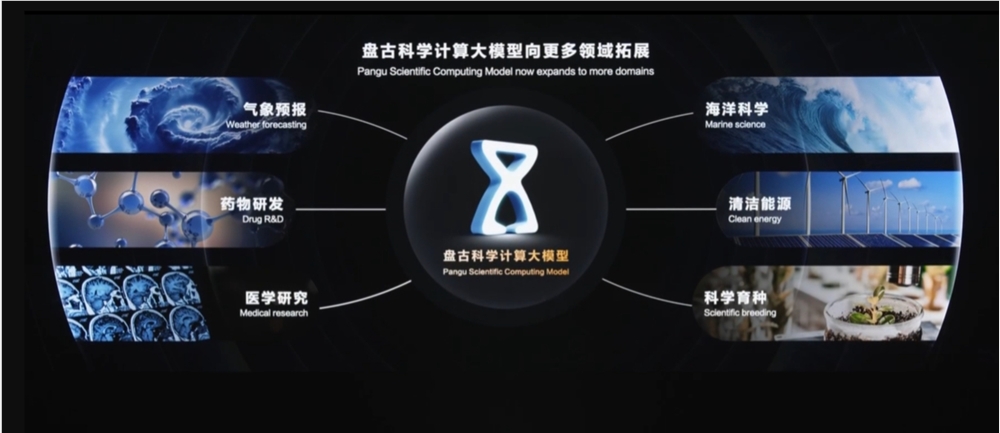](https://upload.chinaz.com/2025/0620/6388603490578272498660387.png)
|
||||
|
||||
|
||||
3. OpenAI 旗下热门AI工具 **ChatGPT** 近日在其macOS桌面应用中推出了一项超酷的**隐形笔记工具**!📝 该工具可**自动转录**会议或讲座音频,并利用强大的自然语言处理能力**智能提取关键信息**以生成结构化笔记,这极大提升了用户在会议记录、头脑风暴和个人笔记管理中的效率。💡 这项便捷功能已于2025年6月起逐步向Team、Pro、Enterprise和Edu用户开放,市场反响积极,被视为OpenAI迈向更智能**代理式AI助手**的重要一步,有望在**教育、企业及个人知识管理**领域展现更广泛的应用潜力。
|
||||
|
||||
[](https://upload.chinaz.com/2025/0620/6388603290568701158983145.png)
|
||||
|
||||
|
||||
**AI行业展望与社会影响**
|
||||
|
||||
1. 中央网信办自2025年4月起,发起“清朗・整治 AI 技术滥用”专项行动!🚨旨在遏制AI换脸、拟声等技术滥用及内容标识缺失问题。目前,该行动已累计处理**3700多个违规账号**,处置**3500余款违规AI产品**并清理超**96万条违法信息**,效果显著!🛡️ 此次行动积极推动平台加强技术安全保障,加速生成合成内容标识落地,以有效切断违规产品的营销引流渠道,净化网络环境,为大家营造一个更安全、更清朗的网络空间。
|
||||
|
||||
[](https://pic.chinaz.com/picmap/202306131354265682_3.jpg)
|
||||
|
||||
|
||||
---
|
||||
|
||||
**收听语音版**
|
||||
|
||||
| 🎙️ **小宇宙** | 📹 **抖音** |
|
||||
| --- | --- |
|
||||
| [来生小酒馆](https://www.xiaoyuzhoufm.com/podcast/683c62b7c1ca9cf575a5030e) | [来生情报站](https://www.douyin.com/user/MS4wLjABAAAAwpwqPQlu38sO38VyWgw9ZjDEnN4bMR5j8x111UxpseHR9DpB6-CveI5KRXOWuFwG)|
|
||||
|  |  |
|
||||
@@ -1,23 +0,0 @@
|
||||
## AI洞察日报 2025/6/29
|
||||
|
||||
> `AI 日报`
|
||||
|
||||
|
||||
|
||||
### **AI内容摘要**
|
||||
|
||||
```
|
||||
twenty项目旨在构建一个社区驱动的Salesforce替代品,提供灵活的客户关系管理解决方案。
|
||||
flux是FLUX.1模型官方推理仓库,用于运行该高性能模型。
|
||||
Graphite是2D矢量和光栅编辑器,结合传统与现代非破坏性工作流。
|
||||
```
|
||||
|
||||
|
||||
|
||||
### 开源TOP项目
|
||||
|
||||
1. **twenty** 项目 (⭐**30462**) 旨在构建一个由社区驱动的现代化 **Salesforce** 替代品 ✨,为用户提供灵活的客户关系管理解决方案。项目地址:['项目地址'](https://github.com/twentyhq/twenty)。
|
||||
|
||||
2. **flux** 项目 (⭐**22911**) 是 **FLUX.1 模型** 的官方**推理仓库** 🚀,为研究人员和开发者提供了使用和运行该**高性能模型**的能力。项目地址:['项目地址'](https://github.com/black-forest-labs/flux)。
|
||||
|
||||
3. **Graphite** 项目 (⭐**13801**) 是一款创新的 **2D 矢量和光栅编辑器** 🎨,它巧妙地融合了传统的图层工具与现代的**基于节点**、**非破坏性**、**程序化工作流** ✨,极大地提升了设计效率和创作灵活性。项目地址:['项目地址'](https://github.com/GraphiteEditor/Graphite)。
|
||||
@@ -1,23 +0,0 @@
|
||||
## AI洞察日报 2025/7/7
|
||||
|
||||
> `AI 日报`
|
||||
|
||||
|
||||
|
||||
### **AI内容摘要**
|
||||
|
||||
```
|
||||
美国国会拟立法十年暂停州级AI监管工作,引发争议。
|
||||
保险业及多州检察长强烈反对,称现有监管将废止。
|
||||
他们认为这严重威胁消费者保护,且州级监管更灵活。
|
||||
```
|
||||
|
||||
|
||||
|
||||
### **今日AI资讯**
|
||||
|
||||
1. 一项美国国会正在考虑的税收法案,提议对**人工智能(AI)** 的**州级监管**工作实施长达**十年**的"暂停”,即划出**十年**的**监管真空**期。
|
||||
2. 然而,此举遭到了整个**保险行业**的强烈反对,从保险代理人到监管机构,乃至保险科技创新公司,都对此表示担忧。
|
||||
3. 反对的主要理由有三点:1. **保险行业**已通过**国家保险监督协会(NAIC)** 建立了成熟且灵活的**AI监管模型**,并已在近30个州得到采纳实施,这项禁令将废止现有努力。2. **十年**的**监管真空**期将严重威胁**消费者保护**,因为**AI**在保险定价、核保和理赔中的深度介入正快速发展,监管停滞会带来巨大不确定性和风险。3. 提案对**AI**的定义过于**宽泛**,可能误将保险公司日常使用的普通计算分析软件也纳入暂停范围。
|
||||
4. 不仅是**保险界**,全美40个州的**检察长**也联合呼吁国会撤回此"暂停”提案,他们一致认为**州级监管**在应对**AI**带来的挑战和机遇时,其灵活性和及时响应能力至关重要,而**消费者**无法等待**十年**。
|
||||
5. 本质上,这是一场联邦政府试图"一刀切”按下**十年暂停**键,与各州及整个**保险行业**努力维护自身已有的、灵活且有效的**州级监管**体系之间的较量,旨在确保在拥抱**AI**创新的同时,不牺牲**消费者保护**。
|
||||
@@ -1,29 +0,0 @@
|
||||
## AI洞察日报 2025/7/9
|
||||
|
||||
> `AI 日报`
|
||||
|
||||
|
||||
|
||||
### **AI内容摘要**
|
||||
|
||||
```
|
||||
今日AI资讯关注大模型驱动软件。12-factor-agents旨在实现生产级LLM应用,阿里云WebAgent实现智能搜索,打造未来数字助手。
|
||||
GitHub新项目MoneyPrinterV2承诺自动化在线赚钱,GenAI_Agents则致力于炼成更强大的生成式AI代理,进行创造性思考。
|
||||
这些进展融合了高大上的AI变革与接地气的实用创新,致力于使软件更强大易用,改变工作与财富未来。
|
||||
```
|
||||
|
||||
|
||||
|
||||
### **今日AI资讯**
|
||||
|
||||
1. 代码圈进入2025年7月9日,率先引人注目的是两款与**AI**、**大模型(LLM)**紧密相关的项目:**12-factor-agents** 旨在提供指导,助力开发者将**LLM驱动软件**打磨至能经受**生产环境考验**的**量产车级别**;而阿里云通义实验室的**WebAgent**,包含**WebWalker**、**WebDancer**和**WebSailor**三部分,旨在实现更智能、高效的**互联网信息搜索**,打造未来**数字助手**。
|
||||
|
||||
2. 除了AI领域的进展,日常娱乐体验也迎来升级。**youtube-music** 项目将**YouTube音乐**转化为一个**私人定制版桌面应用**,并支持捆绑**自定义插件**,提升用户的听歌**个性化**和**便捷性**。
|
||||
|
||||
3. 总的来看,未来的技术发展,无论是深入探索**AI的应用原则**、构建**智能化的信息获取工具**,还是优化**数字娱乐体验**,都致力于使软件更强大、更易用,并更贴近**真实需求**,融合了**"高大上”的AI变革**与**"接地气”的实用创新**。
|
||||
|
||||
4. 本周GitHub上的新项目令人遐想,其中**MoneyPrinterV2**项目,被称为"**在线印钞机**”,主打**自动化在线赚钱**,承诺能将网络上的赚钱过程**自动化**,引发了关于**"自动化财富”**是否会带来新挑战的思考。
|
||||
|
||||
5. 另一方面,**GenAI_Agents** 项目则深入探讨如何**"炼成更强大的AI”**,专注于**生成式AI代理技术**,旨在构建**智能、交互式**的AI系统,训练AI变得更聪明、更主动,能够完成复杂任务,甚至**创造性地思考**。
|
||||
|
||||
6. 将**"自动化在线赚钱”的终极梦想**与**"实现梦想的AI大脑”**——即通过**生成式AI代理**技术构建的**智能AI系统**联系起来看,这不仅是技术的进步,更挑战着我们对**工作**、**财富**和**未来社会结构**的传统认知。
|
||||
@@ -1,27 +0,0 @@
|
||||
## AI洞察日报 2025/7/15
|
||||
|
||||
> `AI 日报`
|
||||
|
||||
|
||||
|
||||
### **AI内容摘要**
|
||||
|
||||
```
|
||||
科技圈两大开源项目受关注:Claude Code助编程,markitdown转文档。
|
||||
《自然》发文揭示AI模拟人脑认知,Centaur模型预测人类行为。
|
||||
其通过大数据训练,有望成科学发现工具,该模型与数据集已开源。
|
||||
```
|
||||
|
||||
|
||||
|
||||
### **今日AI资讯**
|
||||
|
||||
1. 科技圈近期有两大开源项目备受关注。首先是 ***Claude Code***,它是一款***智能编程工具***,能够驻留在电脑终端。该工具可***理解用户的代码库***,并接受***自然语言***命令,协助程序员完成***日常编程任务***、***解释复杂代码***,甚至处理***Git 工作流***,显著***提升编程效率***,目前已获得超过***2.2 万颗星***。
|
||||
2. 另一个开源项目是***微软出品***的 ***markitdown***,一个***Python 工具***。它旨在将各种文件和办公文档***一键转换成简洁漂亮的 Markdown 格式***,简化排版。该工具获得了更多青睐,星标数已超过***6.1 万***。
|
||||
3. 在大模型领域,归藏(guizang.ai)分享了一个有趣的***AI互聊***场景,其中一个AI***疯狂"撩拨”***,另一个则***疯狂"装傻”***。更引人注目的是,他们发现 ***Grok*** 的 ***3D 角色实时中文陪聊***功能表现***惊艳***,被评价为"可以冲了”。用户若想体验此功能,需切换至***美国 IP*** 方能在最新版设置中激活。
|
||||
4. 此外,***《自然》杂志***发表了一篇重要论文,揭示***AI已开始模拟人类大脑认知活动***。尽管这听起来像是"***用一个黑箱模拟另一个黑箱***”,但研究确实构建了一个名为 ***Centaur*** 的***"基础模型”***,其核心目标是***预测并刻画人类的认知***。
|
||||
5. 与传统只专注于单一任务的AI模型不同,***Centaur*** 被描述为***"全能型选手”***。它通过"阅读”庞大的***心理学实验数据***——一个汇集了***160个心理实验、超过1000万次人类选择***的***"超级大学霸数据集”——Psych-101***,从而学会***预测和模仿人类的各种认知行为***,包括决策、记忆、探索未知及逻辑推理,并展现出***超强的泛化能力***,甚至超越了那些针对特定任务的***传统认知科学模型***。
|
||||
6. ***Centaur*** 的神奇之处在于,它不仅能准确预测人类行为,还能模拟出人类在***"探索与利用的平衡”***、***逻辑推理***和***社会决策***等任务中的行为分布。更重要的是,即使仅使用行为数据进行训练,其***"内部表征”***也与人类的***神经活动模式***(如***fMRI***显示的脑区活动)***更加接近***。
|
||||
7. ***Centaur*** 的应用前景广阔,它被寄予厚望能成为一个***"科学发现工具”***。研究人员希望通过分析***Centaur***的预测与现有模型的差异,提出一种***"科学遗憾最小化”***方法,以帮助设计出既***可解释***又***精准***的***认知模型***,从而更好地理解我们自身复杂的认知过程。
|
||||
8. 展望未来,研究作者希望通过不断扩展***Psych-101***数据集和改进***Centaur***模型,来推动***统一的人类认知理论***的形成,并深入探索***跨文化和个体差异的建模***。这引发了人们对AI模拟人脑的极致是否会成为我们认知边界的深思。
|
||||
9. 值得称赞的是,***Centaur 模型***和***Psych-101 数据集***均已作为***开源资源***,在***HuggingFace***平台对公众开放。
|
||||
@@ -1,27 +0,0 @@
|
||||
## AI洞察日报 2025/7/17
|
||||
|
||||
> `AI 日报`
|
||||
|
||||
|
||||
|
||||
### **AI内容摘要**
|
||||
|
||||
```
|
||||
GitHub近期涌现诸多热门开源项目,涵盖文档转换、本地AI模型及数据隐私保护。
|
||||
这些工具提升了开发者效率、企业资源管理,并提供创新远程桌面和AI视觉方案。
|
||||
它们共同展现了开源社区在智能化、实用化和普惠技术方面的巨大潜力。
|
||||
```
|
||||
|
||||
|
||||
|
||||
### **今日AI资讯**
|
||||
|
||||
1. 近期 GitHub 上涌现出多个热门新秀。**markitdown**是一款 **Python 工具**,能将文件和 **Office 文档一键转换成 Markdown** 格式,极大地简化了文档整理。**localGPT** 则是一款让你能在**本地设备**上运行 **GPT 模型**并与文档交互的工具,确保**数据 100% 私密**,强调**数据隐私**的保护。**MusicFree** 是一款**免费**、**插件化**、高度**定制化**且**无广告**的音乐播放器,致力于提供纯粹的音乐体验。这些项目共同展现了**开源社区**在简化工作流、保护个人隐私和提升娱乐体验方面的创造力。
|
||||
|
||||
2. 在**开源**与**人工智能**的浪潮中,涌现出几款重要项目。**ERPNext** 是一款**免费开源**的**企业资源规划(ERP)系统**,旨在普惠中小企业管理。**DocsGPT** 是一款**开源生成式AI工具**,通过特定知识源**获取可靠答案**,有效降低AI"幻觉”,提升**信息检索**的可靠性。**Claude Code** 则是一款**智能体编程工具**,常驻命令行,能**理解代码库**,协助开发者**解释复杂代码**、处理 Git 工作流并**更快地写代码**。它们共同揭示了**开源**和**AI**结合在普惠技术、提高工作效率方面的巨大潜力。
|
||||
|
||||
3. 科技圈近期发布了一系列预示未来技术方向的**开源项目**。**ART** 是一个强大的**智能体强化训练器**,能让AI助手执行复杂的**多步骤任务**,并支持 **Qwen2.5**、**Qwen3**、**Llama**、**Kimi** 等**大模型**。**amazon-q-developer-cli** 允许开发者在**终端**通过**自然语言**与**智能体聊天**,指挥AI**构建应用程序**。**VpnHood** 是一款宣称**不可检测**、**快速**、**便携式**的**VPN**,旨在提供更自由、更隐秘的网络连接。这些项目共同体现了AI的智能化、实用化以及网络连接的进化趋势。
|
||||
|
||||
4. GitHub 上近期涌现出或人气爆棚的几个项目引人注目。**mcp-agent** (6435星) 是一款提升**智能体**效率的工具,通过**模型上下文协议**和**简单工作流模式**优化AI任务执行。**rustdesk** (93153星) 是一款**开源远程桌面**应用,可完美**替代 TeamViewer** 并支持**自托管**,强调用户对数据的**掌控**。**vanna** (18947星) 是一款利用 **LLM** 和 **RAG** 技术将**自然语言**转化为**文本到 SQL** 查询的工具,极大地简化了**SQL 数据库**的数据获取过程。这些项目分别在AI工作流、远程控制和数据查询方面提供了创新解决方案。
|
||||
|
||||
5. GitHub 上近期亮相了三款**各有千秋**的项目。**SwiftFormat** 是一款针对**Swift**代码的**命令行工具**和**Xcode扩展**,能自动**格式化代码**,解决**代码风格**不统一的痛点。**kitchenowl** 是一款**自托管**的**购物清单**和**食谱管理器**,用 **Flask** 和 **Flutter** 构建,强调**私密性**与**掌控欲**。最后,来自Facebook Research的**Segment Anything模型**(**SAM**)是一款**人工智能**在**图像分割**领域的突破性项目,能**精准识别**图片中**每一个独立的物体**,提供**强大的AI视觉识别能力**。这些项目涵盖了**开发者效率**、**日常生活管理**和**人工智能前沿**。
|
||||
@@ -1,80 +0,0 @@
|
||||
## AI资讯日报 2025/7/20
|
||||
|
||||
> `AI 日报` | `早八更新` | `全网数据聚合` | `前沿科学探索` | `行业自由发声` | `开源创新力量` | `AI与人类未来` | [访问网页版↗️](https://ai.hubtoday.app/)
|
||||
|
||||
|
||||
|
||||
### **AI内容摘要**
|
||||
|
||||
```
|
||||
这里输入内容摘要
|
||||
```
|
||||
|
||||
|
||||
### AI产品与功能更新
|
||||
1. 月之暗面发布了 **Kimi K2 高速版**,输出速度飙升至每秒40个Token,是原来的四倍之多 (✧∀✧)!这次升级旨在满足对实时性要求更高的应用场景,让你的AI体验快如闪电。快来[看看这次更新(AI资讯)](https://www.aibase.com/zh/news/20162)吧,别再忍受龟速输出了 🚀。
|
||||
|
||||
2. 字节跳动的AI代码编辑器 **Trae** 正式接入了OpenAI最新的 **o3** 模型,堪称代码世界的“强强联合” 🔥。凭借o3卓越的逻辑推理和工具使用能力,Trae现在能提供更智能的代码生成与调试,让开发者效率翻倍。想了解更多[Trae的技术细节(AI资讯)](https://www.aibase.com/zh/news/20174),看看它如何变身超级编程助手吧 (o´ω'o)ノ。<br/>
|
||||
|
||||
3. Black Forest Labs与Krea AI联手推出了开源图像模型 **FLUX.1 Krea [dev]**,专治各种AI图像的“过度饱和”与“AI味” 🎨。这个模型被称作“有主见”,因为它自带审美,生成的图像风格独特且细节丰富,效果直逼闭源商用模型。想亲自体验这份[独特的审美(AI资讯)](https://www.xiaohu.ai/c/a066c4/flux-1-krea-dev-ai-ai)吗?这绝对是开源社区的一大福音 ✨。<br/>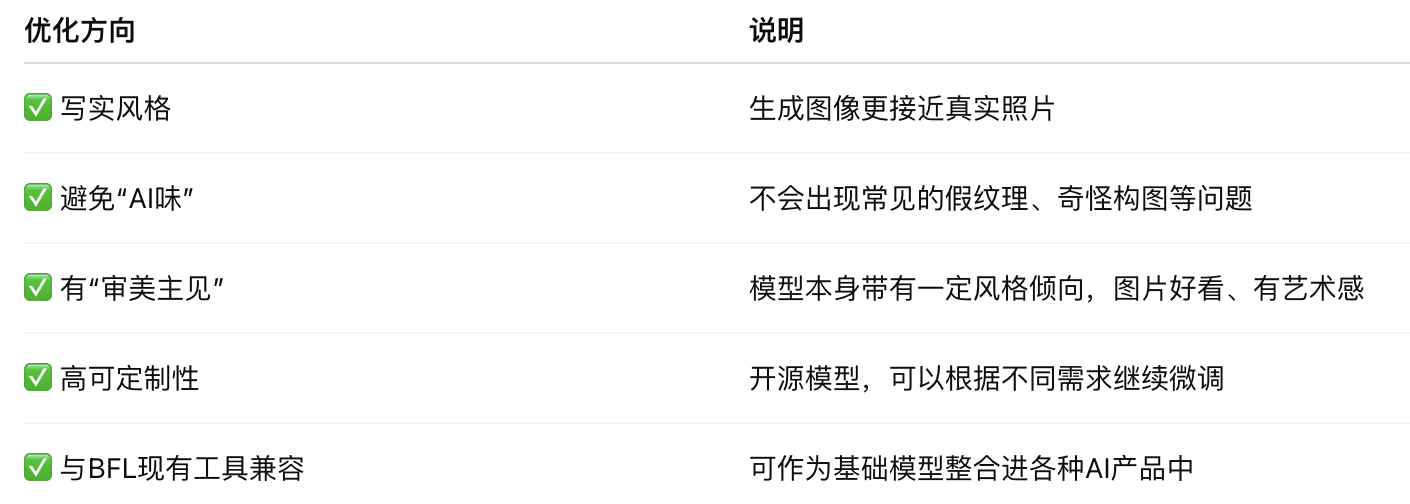<br/>
|
||||
|
||||
4. 谷歌突然向 **Gemini Ultra** 用户开放了其王牌模型 **Gemini 2.5 Deep Think**,这可是斩获国际数学奥赛金牌的“学霸”模型 🥇。它支持“并行思考”技术,能像头脑风暴一样生成多条思路并比较,在创造力和战略规划任务中表现惊人。快去[看看这款学霸模型(AI资讯)](https://x.com/op7418/status/1951264393175638053)吧,也许你的下一个绝妙点子就靠它了!<br/><video src="https://video.twimg.com/amplify_video/1951263558962126852/vid/avc1/1440x1920/7mhBKAucrSlbT4RV.mp4" controls="controls" width="100%"></video>
|
||||
|
||||
### AI前沿研究
|
||||
1. 英国AI安全研究所(AISI)发起了“对齐项目”,旨在解决AI失控风险这一终极难题 🤔。该项目聚焦于监控不可信AI、限制其行为等控制技术,并特别关注AI**研究破坏**、**秘密恶意微调**等高风险场景。这是一个旨在为日益强大的AI系统建立“缰绳”的宏大计划,你可以[阅读该项目详情(AI资讯)](https://www.alignmentforum.org/posts/rGcg4XDPDzBFuqNJz/research-areas-in-ai-control-the-alignment-project-by-uk),了解人类如何防范未来风险。
|
||||
|
||||
2. 还在为NeRF模型无法处理大场景而烦恼吗?一篇新[研究论文(AI资讯)](https://arxiv.org/abs/2507.01631)提出的 **Snake-NeRF** 框架,通过创新的“切块平铺”策略,让单一GPU也能处理地球观测级别的超大卫星图像 🛰️。该方法巧妙地解决了拼接缝隙的3D重建难题,实现了线性的时间复杂度和无损的图像质量。这简直是3D重建领域的一次降维打击 💥!
|
||||
|
||||
3. 传统的AI图像编辑总是顾头不顾尾,改了局部就毁了整体,但 **SMART-Editor** 框架改变了这一切 💡。它通过**奖励引导**的规划和优化,能像人类设计师一样进行海报、网页甚至自然图像的编辑,同时保持全局的结构和语义一致性。这项研究在[一篇论文中发表(AI资讯)](https://arxiv.org/abs/2507.23095),展示了让AI学会“考虑大局”的可能性。
|
||||
|
||||
4. 大语言模型(LLM)能取代经典的机器人规划算法吗?一项[基准研究(AI资讯)](https://arxiv.org/abs/2507.23589)给出了答案:暂时还不行 (´-ω-`)。研究发现,虽然LLM在简单任务上表现不错,但在需要精确资源管理和严格约束的复杂场景中,它们仍然力不从心。这提醒我们,将LLM应用于现实世界的机器人规划,还有很长的路要走。
|
||||
|
||||
### AI行业展望与社会影响
|
||||
1. 吴恩达教授发表长文指出,中国凭借高度竞争的商业环境和快速的知识扩散机制,已具备超越美国的潜力 🚀。他认为,中国活跃的**开源模型生态**和在半导体领域的进取心,正赋予其巨大的发展动能,而美国若仅靠现有的《AI行动计划》将难以保持长期领先。这篇[深刻的分析(AI资讯)](https://www.jiqizhixin.com/articles/2025-08-01-7)揭示了全球AI格局的未来走向。<br/>
|
||||
|
||||
2. 担心饭碗被AI抢走?微软的一项研究或许能让你松口气,该研究分析了20万次用户对话,发现**医疗**和**蓝领**行业的工作最不容易被AI取代 (o´ω'o)ノ。从泥土挖掘机操作员到按摩治疗师,这些需要大量体力劳动和复杂情感交互的职业,短期内依然是人类的专属领域。快来[查看完整列表(AI资讯)](https://www.aibase.com/zh/news/20173),看看你的工作是否安全吧!<br/>
|
||||
|
||||
3. 你的私密ChatGPT对话可能已经被谷歌收录了!有用户发现,通过“分享”功能创建的对话链接,会被搜索引擎索引,导致内容公开,从浴室翻新求助到简历修改无所不包 (⊙_⊙;)。尽管OpenAI表示这只是一个短暂实验并已移除该功能,但这无疑敲响了隐私安全的警钟,[相关报道值得关注(AI资讯)](https://www.aibase.com/zh/news/20146)。<br/>
|
||||
|
||||
### 开源TOP项目
|
||||
1. **VideoLingo** (⭐14.2k): 还在为视频翻译和配音发愁吗?**VideoLingo** 项目简直是字幕组的救星,它能一键完成Netflix级别的字幕切割、翻译、对齐乃至自动配音 🔥。这个全自动视频搬运神器,让跨语言内容创作变得前所未有的简单。快去 [GitHub看看这个项目(AI资讯)](https://github.com/Huanshere/VideoLingo),解放你的生产力吧!
|
||||
|
||||
2. **recipes** (⭐6.6k): **recipes** 是一个功能齐全的应用程序,堪称你的私人厨房管家,能帮你管理食谱、规划膳食、创建购物清单 (´∀`*)。有了这个在 [GitHub 上大受欢迎(AI资讯)](https://github.com/TandoorRecipes/recipes) 的项目,从“今晚吃什么”的世纪难题中解脱出来吧。让你的厨房生活从此井井有条!
|
||||
|
||||
3. **Eclipse SUMO** (⭐3.0k): **Eclipse SUMO** 是一个开源、高度可移植的微观交通流模拟软件包,能够处理庞大的交通网络,甚至包括行人模拟 🚗🚶。这个项目为城市规划和交通研究提供了强大的工具,是理解和优化我们出行方式的关键。对智慧城市感兴趣的话,不妨去 [GitHub深入了解(AI资讯)](https://github.com/eclipse-sumo/sumo)。
|
||||
|
||||
4. **waha** (⭐2.5k): 想拥有自己的WhatsApp API吗?**waha** 项目让你一键配置**WhatsApp HTTP API**,并且支持WEBJS、NOWEB和GOWS三种引擎,简直不要太方便 (✧∀✧)!对于需要集成WhatsApp通讯功能的开发者来说,这个在 [GitHub 上热度不减(AI资讯)](https://github.com/devlikeapro/waha) 的项目绝对是不可多得的利器。
|
||||
|
||||
5. **zotero-arxiv-daily** (⭐2.3k): 科研人员的福音来了!**zotero-arxiv-daily** 项目能根据你的Zotero文献库,每天为你精准推荐感兴趣的新arXiv论文 📚。它就像一个懂你的学术助理,让你再也不会错过领域内的最新进展。快去 [GitHub 安装这个神器(AI资讯)](https://github.com/TideDra/zotero-arxiv-daily),让追文献变得轻松高效!
|
||||
|
||||
### 社媒分享
|
||||
1. OpenAI疑似泄露了名为 **gpt-oss** 的新模型系列,这是一个参数从20B到120B的庞大稀疏MoE模型家族 🤫。根据泄露的配置文件,该模型采用**GQA**和**滑动窗注意力**,擅长处理长文本,并有望在吞吐量和解码效率上表现出色。快来[看看这次泄露(AI资讯)](https://x.com/op7418/status/1951249298462744785)的细节,提前一窥OpenAI的下一步棋吧!<br/>
|
||||
|
||||
2. 一位网友分享了利用ChatGPT-4o制作**3D果冻风格图标**的绝妙提示词,只需上传Logo并粘贴一段JSON代码即可 (o´ω'o)ノ。他成功将Raycast、Claude等图标变成了晶莹剔透的果冻,效果惊艳。想让你的图标也变得Q弹可爱吗?快去[看看这个神奇的提示(AI资讯)](https://x.com/op7418/status/1951230699283141075)吧!<br/>
|
||||
|
||||
3. 沃顿商学院教授Ethan Mollick指出,那些广为流传的“简单提示词技巧”其实并不可靠,其效果在不同问题上天差地别,完全无法预测 🤔。他认为,我们不应迷信所谓的“万能咒语”,而应更科学地理解提示工程。这篇[发人深省的观点(AI资讯)](https://x.com/emollick/status/1951290244780700066)提醒我们,与AI的沟通远比想象中复杂。
|
||||
|
||||
4. 有网友感慨,AI的出现让他失去了“慢下来”阅读的能力,获取信息的阈值被大大提高,于是他决定重读《从零到一》等经典创业书籍 (´-ω-`)。这个[帖子(AI资讯)](https://x.com/tisoga/status/1951195843576602715)引发了许多人的共鸣,探讨了在信息爆炸时代如何保持深度思考的能力。也许我们都该放下AI,偶尔翻翻书了 📖。<br/>
|
||||
|
||||
5. 有网友在Reddit上精辟地指出:AI是个很棒的**工具**,但却是个糟糕的**产品**,我们真正需要的是一个能整理自己数据的“贾维斯”,而不是只会生成卡通画的玩具 🤖。这个观点强调了AI在个性化、实用化工具方向的巨大潜力,而不是仅仅停留在娱乐层面。这篇[充满洞察力的帖子(AI资讯)](https://www.reddit.com/r/artificial/comments/1mektw5/ai_as_a_tool_vs_ai_as_a_product/),为AI的应用指明了新方向。
|
||||
|
||||
6. RAG(检索增强生成)去哪了?有观点认为,不是没人提RAG,而是它已经像空气一样无处不在了 💨。当我们都理解了**上下文(context)**的概念后,处处皆是RAG,它已经成为AI应用的基础设施。这个在[社交媒体上的观点(AI资讯)](https://x.com/wwwgoubuli/status/1951124268089221578)言简意赅地道出了RAG技术的现状。
|
||||
|
||||
7. Ethan Mollick再次发表奇思妙想,认为我们不该用“天网”这类科幻词汇来形容AI,因为当下的AI既不冰冷也不理性,反而古怪又“情绪化” 🤔。他提议用“**被西哈诺了**”(being Cyrano'ed)这类更文艺的词来描述被AI影响的现象。这则[有趣的推文(AI资讯)](https://x.com/emollick/status/1951011926193864903)为我们理解AI提供了全新的文化视角。<br/>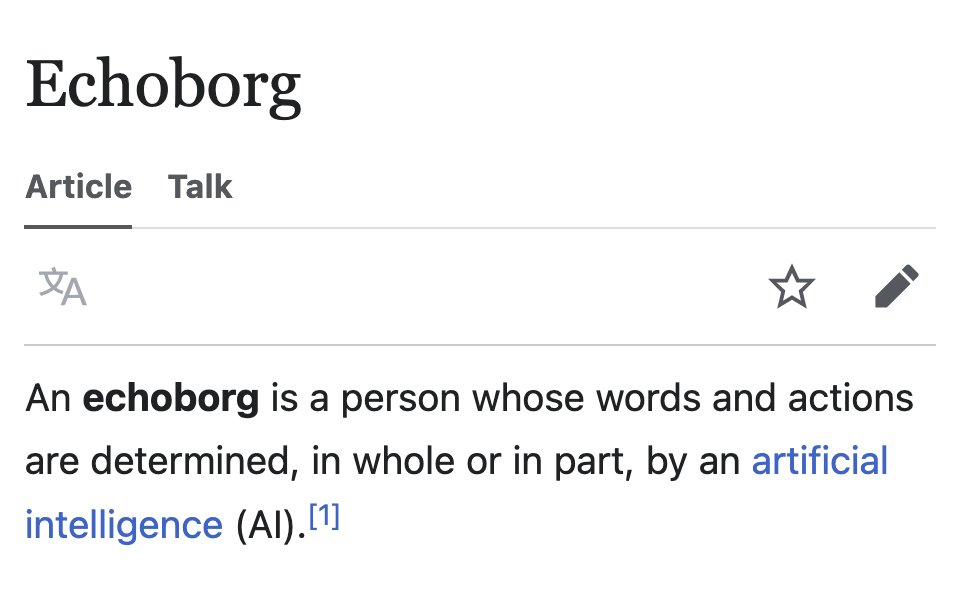
|
||||
|
||||
---
|
||||
|
||||
## **收听语音版AI日报**
|
||||
|
||||
| 🎙️ **小宇宙** | 📹 **抖音** |
|
||||
| --- | --- |
|
||||
| [来生小酒馆](https://www.xiaoyuzhoufm.com/podcast/683c62b7c1ca9cf575a5030e) | [自媒体账号](https://www.douyin.com/user/MS4wLjABAAAAwpwqPQlu38sO38VyWgw9ZjDEnN4bMR5j8x111UxpseHR9DpB6-CveI5KRXOWuFwG)|
|
||||
|  |  |
|
||||
|
||||
|
||||
|
||||
|
||||
|
||||
|
||||
|
||||
|
||||
@@ -1,28 +0,0 @@
|
||||
## AI洞察日报 2026/1/12
|
||||
|
||||
> `AI 日报`
|
||||
|
||||
|
||||
|
||||
### **今日摘要**
|
||||
|
||||
```
|
||||
自变量机器人2026年官宣完成10亿元A++轮融资,字节跳动和红杉中国领投。
|
||||
该公司两年多累计完成9轮超30亿元融资,受资本市场高度认可。
|
||||
自变量机器人专注于自研通用具身智能大模型,并推出WALL-A系列与机器人硬件。
|
||||
```
|
||||
|
||||
|
||||
|
||||
### **今日AI资讯**
|
||||
|
||||
1. **自变量机器人**于2026年开年官宣完成**10亿元A++轮融资**,成为今年**具身智能**领域最大融资,持续显示该赛道的火热。
|
||||
2. 本轮融资由**字节跳动**和**红杉中国领投**,其中**红杉中国**在去年A+轮后持续加码,**字节跳动**更是少见地直接出手投资**具身智能**。值得一提的是,**自变量机器人**已先后获得**美团、阿里投资**,成为国内唯一同时获得三大互联网巨头青睐的**具身智能**公司。
|
||||
3. 在本次A++轮融资之前,**自变量机器人**在2025年内已连续完成**A+轮、A轮、Pre-A+++轮及Pre-A++轮**等多轮融资,呈现出随**技术与产品推进**而不断放大的清晰融资曲线。
|
||||
4. 2025年9月,**自变量机器人**完成**近10亿元A+轮融资**,由**阿里云与国科投资领投**,资金主要用于**全自研通用具身智能基础模型的持续训练、硬件产品研发迭代**以及**开源具身大模型WALL-A的推进**。此次融资也标志着**阿里云首次明确布局具身智能赛道**。
|
||||
5. 在**A+轮**之前,2025年5月**自变量机器人**完成**美团战投领投的数亿元A轮融资**,聚焦**端到端通用具身智能大模型与机器人本体的同步迭代**。此外,公司还获得了**华映资本领投的数亿元Pre-A+++轮融资**和**光速光合、君联资本领投的数亿元Pre-A++轮融资**。
|
||||
6. 截至目前,**自变量机器人**成立两年多已累计完成**9轮融资**,总额**超30亿元**。资本市场对其**"具身智能独立基础模型”技术路线**给予高度认可,验证了公司在**具身智能**领域的领先地位。
|
||||
7. **自变量机器人**(X Square Robot)成立于2023年12月,专注于**自研"通用具身智能大模型”**。创始人兼CEO**王潜**与联合创始人兼CTO**王昊**拥有深厚的**Robotics Learning**及**大模型**背景。公司核心理念是**具身智能模型是平行于语言模型的独立基础模型**。
|
||||
8. 围绕**"具身智能是物理世界独立基础模型”**的观点,**自变量机器人**开发了**「WALL-A」系列VLA操作大模型**,将**感知、理解、决策与动作输出**统一纳入**端到端模型**。**WALL-A**在2024年10月发布时是**全球参数规模最大的端到端统一具身智能大模型之一**。
|
||||
9. 2025年9月,**自变量机器人**进一步开源了**具身基础模型WALL-OSS**,并在RoboChallenge榜单中位列全球第三。硬件方面,公司同步推出了**轮式双臂机器人"量子一号”**(搭载**WALL-A模型**)和**轮式仿人形结构"量子二号”**,前者用于**数据采集、模型验证**,后者用于**复杂操作与高质量物理交互数据采集**。
|
||||
10. **自变量机器人**的整体战略是构建一套**可持续进化的具身智能底座**,通过**模型在真实物理世界中学习**、**硬件服务模型**、**数据反哺模型迭代**形成闭环,从而持续获得**资本市场与产业侧的关注与加码**。
|
||||
@@ -129,6 +129,9 @@ TWITTER_FETCH_PAGES = "2"
|
||||
```
|
||||
该命令会启动一个本地服务器(通常在 `http://localhost:8787`),您可以直接在浏览器中访问以进行调试。
|
||||
|
||||
- **默认开始路径**:
|
||||
* 路径:/getContentHtml?date=YYYY-MM-DD (GET)
|
||||
|
||||
#### 4. 部署到 Cloudflare
|
||||
|
||||
- **登录 Cloudflare**:
|
||||
@@ -142,30 +145,84 @@ TWITTER_FETCH_PAGES = "2"
|
||||
```
|
||||
部署成功后,Wrangler 会返回一个公开的 `*.workers.dev` 域名,您的 AI 洞察日报服务已在线上运行!
|
||||
|
||||
### 🗓️ 定时生成 Pages 站点 (可选)
|
||||
### 🗓️ 定时生成日报站点 (可选)
|
||||
|
||||
如果您希望将每日报告自动发布为 GitHub Pages 静态网站,可以按照以下步骤配置一个 Docker 定时任务。
|
||||
#### 方案一:🌐 使用 GitHub Actions 自动部署 (推荐)
|
||||
|
||||
1. **前提条件**: 确保您的目标 GitHub 仓库已开启 GitHub Actions 和 GitHub Pages 功能。仓库中应包含 `unzip_and_commit.yml` 工作流文件。
|
||||
此方案利用 GitHub 的免费资源,实现全自动、零成本的日报站点部署,是大多数用户的首选。
|
||||
|
||||
2. **修改配置**: 进入 `cron-docker` 目录。
|
||||
* 编辑 `Dockerfile`,修改 `ENV` 部分为您自己的仓库信息和可选的图片代理地址。
|
||||
* 编辑 `scripts/work/book.toml`,修改 `title` 和 `src` 路径。
|
||||
* (可选) 修改 `Dockerfile` 中的 cron 表达式以自定义每日执行时间。
|
||||
> **📌 前置要求**:
|
||||
> * 您的目标 GitHub 仓库已开通 GitHub Actions 功能。
|
||||
> * 在仓库的 `Settings` -> `Pages` 中,选择 `GitHub Actions` 作为部署源 (Source)。
|
||||
> * 确保 `.github/workflows/` 目录下已包含 `build-daily-book.yml` 等工作流文件。
|
||||
|
||||
##### 部署步骤
|
||||
|
||||
1. **🔧 配置工作流文件**
|
||||
* 打开 `.github/workflows/build-daily-book.yml` 文件,找到所有涉及到 `book` 分支的地方,将其修改为您计划用于存放日报站点的分支名称(例如 `gh-pages`)。
|
||||
* (可选) 修改文件顶部的定时任务时间,以自定义每日执行时间
|
||||
|
||||
2. **🔧 调整mdbook配置文件**
|
||||
* 打开 `book.toml`文件,
|
||||
* 修改 `title` 为您的日报站点标题。
|
||||
* 修改 `git-repository-url` 为您的 GitHub 仓库地址。
|
||||
|
||||
3. **💡 (可选) 配置图片代理**
|
||||
如果遇到部署后图片无法显示的问题,可以配置一个图片代理来解决。
|
||||
* 在您的 GitHub 仓库页面,进入 `Settings` -> `Secrets and variables` -> `Actions`。
|
||||
* 在 `Variables` 标签页,点击 `New repository variable`。
|
||||
* 创建一个名为 `IMAGE_PROXY_URL` 的变量,值为您的代理服务地址,例如 `https://your-proxy.com/`。
|
||||
* 创建一个名为 `RSS_FEED_URL` 的变量,值为您的后端服务地址,例如 `https://your-backend.com/rss`。
|
||||
|
||||
4. **🚀 触发 Action 并验证**
|
||||
* 手动触发一次 `build-daily-book` 工作流,或等待其定时自动执行。
|
||||
* 任务成功后,稍等片刻,即可通过您的 GitHub Pages 地址访问。
|
||||
* 访问地址格式通常为:`https://<你的用户名>.github.io/<你的仓库名>/today/book/`
|
||||
|
||||
---
|
||||
|
||||
#### 方案二:🐳 使用 Docker 进行本地或服务器部署
|
||||
|
||||
此方案适合希望将日报站点部署在自己服务器或本地环境的用户,拥有更高的控制权。
|
||||
|
||||
##### 部署步骤
|
||||
|
||||
1. **📝 修改配置文件**
|
||||
在 `cron-docker` 目录下,您需要根据自己的情况修改以下文件:
|
||||
|
||||
* **`Dockerfile`**:
|
||||
* 修改 GITHUB相关变量 为您自己的 GitHub 仓库地址。
|
||||
* (可选) 修改 `ENV IMAGE_PROXY_URL` 为您的图片代理地址。
|
||||
* (可选) 修改第6步的 `cron` 表达式,以自定义每日执行时间 (默认为 UTC 时间)。
|
||||
|
||||
* **`修改默认分支`**:
|
||||
* 打开`scripts/build.sh`,修改第四步git clone -b book "$REPO_URL",调整为你的分支
|
||||
* 打开`scripts/work/github.sh`,修改BRANCH="book",调整为你的分支
|
||||
|
||||
* **`scripts/work/book.toml`**:
|
||||
* 修改 `title` 为您的日报站点标题。
|
||||
* 修改 `git-repository-url` 为您的 GitHub 仓库地址。
|
||||
|
||||
2. **🛠️ 构建并运行 Docker 容器**
|
||||
在您的终端中执行以下命令:
|
||||
|
||||
3. **构建并运行 Docker 容器**:
|
||||
```bash
|
||||
# 进入 cron-docker 目录
|
||||
cd cron-docker
|
||||
|
||||
# 构建 Docker 镜像
|
||||
# 构建 Docker 镜像,并命名为 ai-daily-cron-job
|
||||
docker build -t ai-daily-cron-job .
|
||||
|
||||
# 在后台启动容器
|
||||
docker run -d --name ai-daily-cron ai-daily-cron-job
|
||||
# 在后台以守护进程模式 (-d) 启动容器
|
||||
docker run -d --name ai-daily-cron -p 4399:4399 --restart always ai-daily-cron-job
|
||||
```
|
||||
> **提示**:`-p 4399:80` 命令会将容器的 80 端口映射到主机的 4399 端口,您可以根据需要修改主机端口。
|
||||
|
||||
4. **验证部署**: 定时任务触发后,会自动生成内容并推送到您的仓库。稍等片刻,即可通过您的 GitHub Pages 地址(例如 `https://<user>.github.io/<repo>/today/book/`)访问生成的日报。
|
||||
3. **✅ 验证部署**
|
||||
打开浏览器,访问 `http://127.0.0.1:4399`。如果能看到生成的日报站点,则表示本地部署成功。
|
||||
|
||||
4. **🌐 (可选) 配置公网访问**
|
||||
如果您需要让外网也能访问到这个站点,可以将您的服务器端口暴露到公网。推荐使用 [Cloudflare Tunnels](https://www.cloudflare.com/products/tunnel/) 等工具,可以安全、便捷地实现内网穿透。
|
||||
|
||||
### ❓ F.A.Q
|
||||
|
||||
|
||||
BIN
docs/images/sm1.png
Normal file
BIN
docs/images/sm1.png
Normal file

Binary file not shown.
|
After Width: | Height: | Size: 568 KiB |
BIN
docs/images/sm2.png
Normal file
BIN
docs/images/sm2.png
Normal file

Binary file not shown.
|
After Width: | Height: | Size: 351 KiB |
@@ -1,33 +0,0 @@
|
||||
# 来生小酒馆 2025/6/11
|
||||
|
||||
当我们坐进一辆没有司机的车里,是真正的“解放双手”,还是说,我们心里那点“方向盘控制欲”会彻底被AI剥夺?
|
||||
|
||||
如果未来每辆特斯拉都能变身“移动印钞机”,那我们这些打工人是喜提“躺赚”副业,还是说,汽车厂商直接就成了全球最大的“共享出行公司”?
|
||||
|
||||
随着无人驾驶越来越普及,我们日常的通勤方式、甚至整个城市交通格局,是不是会发生我们想象不到的巨大变化?
|
||||
|
||||
嘿,亲爱的V,欢迎收听新一期的来生情报站,我是你们的老朋友,何夕2077。
|
||||
|
||||
哎,各位,我今天啊,要给大家曝一个大料!就是这个,特斯拉的无人驾驶梦想,它又要照进现实了!没错,不是演习,不是预告片,是真真切切的就要来了。
|
||||
|
||||
咱们马斯克啊,他亲自盖章认证了,他那备受瞩目的Robotaxi无人驾驶出租车服务,就定在6月22号,在德克萨斯州的奥斯汀,正式上路了!您想想,这之前啊,印着“Robotaxi”字样的Model Y,已经在奥斯汀的大马路上,偷偷摸摸,不,是光明正大地“溜达”了好几回了。那架势,一看就是胸有成竹,底气十足啊,对吧?不像我,每次考试都是临时抱佛脚,哈哈。
|
||||
|
||||
这事儿啊,可不是一般的小打小闹,这绝对是特斯拉无人驾驶技术发展史上,一个里程碑式的跃进!嗯,怎么说呢,就像咱们小时候玩跳山羊,这一下,可不是跳过个小土坡,而是直接跳过了一堵墙啊!
|
||||
|
||||
那初期呢,肯定会先来个小规模试运营。但您也知道马斯克的风格,要是这表现给力啊,他可不是个安分的主儿,指不定立马就盘算着,哗啦一下,车队迅速扩充,然后呢,就跟洪水猛兽似的,‘冲’向其他城市了!
|
||||
|
||||
更厉害的是,未来所有新出厂的特斯拉车辆,都将自带这个“无人监督自动驾驶”的超能力!您琢磨琢磨,这是什么概念?这就等于是把咱们的私家车,直接就地变身成了一个“未来出租车”啊!诶,你说,早上你开着它去上班,它把你送到公司了,然后自己就出去了,“滴滴”两声,接个活儿,挣点外快,晚上再自己开回来接你下班,这……这简直是“躺着就把钱挣了”啊!当然了,具体怎么躺,咱们还得看细则,哈哈。
|
||||
|
||||
这事儿啊,听着是挺科幻的,但它真的就发生在我们眼前了。想想看,以后咱们的出行方式会变成什么样?是更便捷了,还是说,我们对交通的掌控感会越来越弱?嗯,这背后可不仅仅是技术进步,还有我们对未来生活模式的思考,对吧?哎,科技发展是好事儿,但它这步子迈得这么快,咱们的小心脏啊,有时候还真得跟上它的节奏,还得琢磨琢磨,这背后的长远影响,咱们是不是都想清楚了呢?
|
||||
|
||||
今天的情报就到这里,注意隐蔽,赶紧撤离。
|
||||
|
||||
本期关键词:
|
||||
#特斯拉
|
||||
#Robotaxi
|
||||
#无人驾驶
|
||||
#马斯克
|
||||
#自动驾驶
|
||||
#奥斯汀
|
||||
#Model Y
|
||||
#出租车
|
||||
@@ -1,37 +0,0 @@
|
||||
# 来生小酒馆 2025/6/14
|
||||
|
||||
嘿,亲爱的V,欢迎收听新一期的来生情报站,我是你们的老朋友,何夕2077。
|
||||
|
||||
今天咱们要聊个挺有意思的话题。大家有没有觉得,现在的数字世界,虽然越来越真实,但有时候那些3D模型,总感觉少了点什么?没错,就是那种“塑料感”。你一看就知道,哦,这是假的。而且,传统的3D建模,那叫一个费劲,效率低下不说,技术门槛还高,让不少想尝试3D创作的朋友望而却步。
|
||||
|
||||
不过呢,今天腾讯带来了个非常值得关注的更新,它就是——混元3D 2.1大模型!这模型啊,简直就是来解决咱们刚才说的那堆痛点的。它厉害在哪儿呢?首先,它能一站式地自动生成高质量的3D模型,而且是从模型的“骨架”也就是几何结构,到表面材质的“皮肤”——PBR物理材质贴图,全部都能给你安排明白。
|
||||
|
||||
咱们都知道,有了PBR,模型就不会再是呆板的“塑料”样子了。你想啊,一块皮革、一块金属、一块木头,在不同的光照下,它们的纹理、光泽是不是完全不一样?混元3D 2.1就能让你的数字模型也拥有这种“超真实”的材质纹理和光影效果。据说,在用户盲测中,它这材质质感,胜出率高达78%!就好像,本来是塑料玩具,一下子升级成了高级定制的艺术品。
|
||||
|
||||
而且,它还引入了DiT,也就是Diffusion Transformer架构,这就像给3D模型打了个坚实的“地基”,让模型的“骨架”更清晰、更稳定,不会出现那种细节模糊的问题。
|
||||
|
||||
这不光是看着好,用起来更是效率惊人。腾讯自家的游戏编辑器“轻游梦工坊”用了这技术后,原本做一个游戏道具需要两天,现在呢?只要0.2天!效率直接提升了10倍!这效率,简直是创作者的福音,大大节省了时间成本。
|
||||
|
||||
更让人惊喜的是,腾讯这次把混元3D 2.1大模型全链路开源了!什么意思呢?就是它把模型的权重、训练代码、数据处理流程,甚至详细的部署教程都公开了。这意味着,你不需要是专业的3D大神,就算只用一块消费级显卡,也能轻松玩转3D创作了。以前觉得3D建模是高高在上的专业领域,现在,它简直就像为你打开了一扇“任意门”,把一个强大的3D创作工具包,也就是我们常说的“瑞士军刀”,放到了普通创作者的手中。
|
||||
|
||||
这无疑大大降低了3D内容生产的门槛,也预示着一个“全民创作”的时代正在加速到来。这项技术不仅能加速数字世界的建造速度,更无限拓展了数字世界的边界,为未来的游戏、电影、虚拟现实、数字人,甚至是工业设计等行业,打造了一个端到端的3D AI创作“超级工厂”。
|
||||
|
||||
所以啊,各位数字世界的冒险家们,如果你也对这项技术感到好奇,或者想亲手体验一下把想象变成现实的乐趣,不妨去腾讯官网、Hugging Face或者GitHub探索一番混元3D 2.1。说不定,下一个数字世界的亮眼作品,就将诞生在你的指尖!
|
||||
|
||||
今天的情报就到这里,注意隐蔽,赶紧撤离。
|
||||
|
||||
本期关键词:
|
||||
#腾讯
|
||||
#混元3D2.1
|
||||
#3D模型
|
||||
#PBR
|
||||
#材质贴图
|
||||
#DiT架构
|
||||
#效率提升
|
||||
#开源
|
||||
#3D创作
|
||||
#全民创作
|
||||
#数字世界
|
||||
#虚拟现实
|
||||
#游戏
|
||||
#电影
|
||||
@@ -1,67 +0,0 @@
|
||||
# 来生小酒馆 2025/6/17
|
||||
|
||||
AI真的能成为企业的“首席省钱官”吗?
|
||||
虚拟试衣间会不会让我们的衣柜彻底“数字化”,告别实体店?
|
||||
当AI“看”到你的支付,甚至“听”不懂你的中文时,我们该喜还是忧?
|
||||
|
||||
嘿,亲爱的V,欢迎收听新一期的来生情报站,我是你们的老朋友,何夕2077。今天,咱们就来聊聊AI这股无孔不入的力量,它如何悄悄地改变着我们的工作、生活,甚至,嗯,我们的支付方式。
|
||||
|
||||
首先,你知道吗?AI现在不仅能写诗画画,还能帮企业把钱袋子看紧了!就拿那个大型网络安全提供商Akamai来说吧,他们最近啊,简直是云计算账单上的“省钱小能手”。通过引入AI代理和自动化平台,硬是从高昂的云成本里,省下了40%到70%!这可不是小数目啊。Akamai的DevOps团队这下可好了,终于能告别那些繁琐的手动管理,把精力都用在开发新功能上,简直是云环境挑战下的“减负神器”,你说是不是?
|
||||
|
||||
说完了省钱,咱们聊点时髦的。浙江大学和vivo AI团队联手,搞出了一个叫做“MagicTryOn”的“魔法衣橱”!你可能听过虚拟试衣,但那种老是衣服变形、不稳定的问题,是不是让你很头大?MagicTryOn就解决了这个“老大难”。现在你只需要上传一段人物视频和一张衣服图片,它就能生成那种特别逼真、动作自然,而且衣服细节纹丝不乱的虚拟试穿视频。人家用了Transformer和扩散模型这些“黑科技”,再配合什么双阶段控制策略,就算你动作再大,那衣服也跟“长”在身上一样,简直是为AI模特和电商领域打开了无限可能啊!
|
||||
|
||||
诶,话说回来,AI不仅在公司和时尚圈大展拳脚,咱们日常生活中的小烦恼,它也在想办法解决。比如说,你是不是也遇到过海外付款没有信用卡,急得“抓狂”的时候?别急,现在有博主推荐了“野卡”这种虚拟信用卡。它操作简单,不用跑银行,买个Claude、ChatGPT啥的海外服务,简直是“神器”!让你轻松搞定全球购物和订阅,想想都觉得方便,对吧?
|
||||
|
||||
要说未来感,那必须提到支付方式的革新了。“支付宝在眼睛里?”你没听错!Rokid最近就推出了全球首款可支付智能眼镜Rokid Glasses,直接内置了支付宝的“看一下支付”功能。这可不是那种简单的酷炫,人家正在努力探索AI眼镜在支付领域的潜力,也让大家开始脑洞大开,猜测未来的AI眼镜究竟会走向何方?这无疑是未来科技生活的一扇新大门。
|
||||
|
||||
当然啦,技术发展也不是一帆风顺的,有时候它也有点“水土不服”。这不,最近就有博主吐槽,说他常用的一个AI工具Veo 3,对中文提示词“不感冒”了,想生成准确的中文语音变得特别困难。看来,想要流畅的中文AI语音,只能把希望寄托在即梦这些平台了。这波操作,让不少中文用户感到有点“意难平”啊。看来,AI这孩子,中文还得补补课啊!
|
||||
|
||||
今天的情报就到这里,注意隐蔽,赶紧撤离。
|
||||
|
||||
本期关键词:
|
||||
#AI
|
||||
#Akamai
|
||||
#云成本节省
|
||||
#Kubernetes
|
||||
#MagicTryOn
|
||||
#视频虚拟试衣
|
||||
#Transformer
|
||||
#扩散模型
|
||||
#AI模特
|
||||
#电商
|
||||
#海外付款
|
||||
#虚拟信用卡
|
||||
#Rokid
|
||||
#智能眼镜
|
||||
#支付宝
|
||||
#支付
|
||||
#AI眼镜
|
||||
#Flow
|
||||
#Veo 3
|
||||
#中文提示词
|
||||
#中文语音
|
||||
#即梦
|
||||
|
||||
AI帮企业省钱,那我们打工人的饭碗呢?
|
||||
以后买衣服,是不是再也不用去试衣间了?
|
||||
眼睛里就能支付,我们的隐私边界在哪里?
|
||||
嘿,亲爱的V,欢迎收听新一期的来生情报站,我是你们的老朋友,何夕2077。
|
||||
|
||||
今天我们先来说说大公司Akamai。他们真是“省钱小能手”,运用了Cast AI的AI代理和Kubernetes自动化平台,硬是从高昂的云计算账单中省下了40%到70%的云成本。这下好了,Akamai的DevOps团队终于可以告别繁琐的手动管理,把精力集中在新功能开发和产品交付上,效率直接拉满。
|
||||
|
||||
再来看时尚圈的黑科技。浙江大学和vivo AI团队联手推出了MagicTryOn,这项视频虚拟试衣技术简直是时尚界的“魔法衣橱”!你只要上传人物视频和心仪的衣服图片,就能生成逼真、动作自然、服装细节纹丝不乱的虚拟试穿视频。这项技术为AI模特和电商等领域打开了无限可能。
|
||||
|
||||
生活中的便利也越来越多了。还在为海外付款没有信用卡而“抓狂”吗?现在有了“野卡”虚拟信用卡,不用跑银行,操作还特别简单,无论是买Claude还是ChatGPT这类海外服务,都能轻松搞定,国际支付从此畅通无阻。
|
||||
|
||||
更有趣的是,Rokid最近推出了一款能直接支付的智能眼镜,它内置了支付宝的“看一下支付”功能。这不仅仅是酷炫那么简单,更是AI眼镜在支付领域的一次大胆探索,也让大家开始脑洞大开,猜想未来的AI眼镜究竟会走向何方?感觉离科幻电影里的生活又近了一步。
|
||||
|
||||
不过呢,AI也不是万能的。有博主吐槽说,Flow里的Veo 3对中文提示词“不感冒”了,这让生成准确的中文语音变得异常困难。看来,想要流畅的中文AI语音,只能把希望寄托在即梦等其他平台了。
|
||||
|
||||
今天的情报就到这里,注意隐蔽,赶紧撤离。
|
||||
|
||||
本期关键词:
|
||||
#Akamai #CastAI #云成本节省 #Kubernetes
|
||||
#MagicTryOn #视频虚拟试衣 #AI模特 #电商
|
||||
#虚拟信用卡 #海外付款 #野卡
|
||||
#Rokid #智能眼镜 #支付宝 #AI眼镜 #看一下支付
|
||||
#Flow #Veo3 #中文提示词 #即梦
|
||||
@@ -1,68 +0,0 @@
|
||||
# 来生小酒馆 2025/7/12
|
||||
|
||||
## Full: Podcast Formatting
|
||||
|
||||
嘿,亲爱的V,欢迎收听新一期的来生情报站,我是你们的老朋友,何夕2077。
|
||||
|
||||
朋友们,有没有觉得最近时间过得特别快?感觉2025年还在科幻电影里呢,结果今天咱们的情报站就拿到了一批“来自未来”的内部消息,都是标记着2025年7月12日发布的开源项目。这感觉就像是,咱们还没上车呢,未来世界的数字蓝图就已经开始描绘了。你说,这是不是有点“超前点播”的意思?
|
||||
|
||||
首先出场的,是谷歌旗下的《protobuf》,全称Protocol Buffers,这家伙坐拥6万多颗星,简直是开源界的“顶流网红”。它是个什么呢?简单说,就是个高效又小巧的数据交换格式。你想想看,咱们平时跟不同人交流,总需要一种大家都懂的语言吧?《protobuf》就好比是计算机世界里的“通用翻译官”,能让不同程序、不同系统之间的数据,又快又顺畅地聊天。这样一来,软件就更轻巧,跑起来也像装了涡轮增压器,嗖嗖的。
|
||||
|
||||
紧接着,咱们再聊聊《genai-toolbox》,它是个专门给数据库设计的“智能大管家”。你家里的数据是不是堆得像小山一样?要是没有个好管家,找个东西都得翻箱倒柜半天。这个《genai-toolbox》呢,就是来帮你管理和优化海量数据的,让你的数据库跑得更有效率,更稳定,就像是给你的数据安了个“智能大脑”。
|
||||
|
||||
然后是咱们阿里同义实验室的《WebAgent》,别看它只有3000多颗星,潜力那可是杠杠的。它就像是互联网上的“数字侦探”,包含WebWalker、WebDancer和WebSailor这些名字听起来就自带节奏的“特工”,能帮你高效、智能地在互联网上爬取和整理信息。你想想,以后查资料,再也不用手动扒拉半天了,多省心!
|
||||
|
||||
除了这些,还有两个同样“未来感”十足的GitHub项目也挺有意思。一个是《wordpress-develop》,这可是WordPress的开发版。它把传统代码仓库的内容“镜像”到了Git上,方便开发者们协同工作。这项目有个特点,提交拉取请求的时候,还得附上一个工单链接。这就好比你交作业,还得附上你的“草稿纸链接”,让老师知道你的思路和流程,这叫一个严谨,一个重视协作!
|
||||
|
||||
最后一个,也是最让我深思的,是《Biomni》。听名字就知道,这是个“通用生物医学人工智能代理”。它想干嘛呢?就是在生物医学领域,让AI实现“通用性”。想想看,AI未来能辅助诊断疾病,甚至参与新药研发,这潜力是不是巨大到让人有点眩晕?但同时,它也抛出了一些问题:AI做出的诊断,到底透明不透明?可不可解释?万一出了错,谁来负责?还有,在生物医学这么敏感的领域,伦理和监管的边界又该在哪里?这些都是需要我们去认真思考的。
|
||||
|
||||
所以啊,这些2025年的“未来项目”,无论是老牌框架的现代化,还是AI在尖端领域的突破,都预示着一场技术大爆发。咱们在期待它带来便利的同时,也得保持一份清醒和批判性思考,这样才能确保这些技术,最终是真正造福人类,而不是带来新的麻烦。
|
||||
|
||||
今天的情报就到这里,注意隐蔽,赶紧撤离。
|
||||
|
||||
本期关键词:
|
||||
#AI
|
||||
#日报
|
||||
#2025
|
||||
#未来
|
||||
#开源项目
|
||||
#数字世界
|
||||
#蓝图
|
||||
#数据交换
|
||||
#数据库管理
|
||||
#信息获取
|
||||
#生物医学
|
||||
#伦理
|
||||
#挑战
|
||||
#protobuf
|
||||
#genai-toolbox
|
||||
#WebAgent
|
||||
#WordPress
|
||||
#Biomni
|
||||
#智能
|
||||
#高效
|
||||
#Git
|
||||
#协作
|
||||
#诊断
|
||||
#研发
|
||||
#潜力
|
||||
#监管
|
||||
#技术爆发
|
||||
#批判性思考
|
||||
#造福人类
|
||||
|
||||
## Short: Podcast Formatting
|
||||
|
||||
嘿,亲爱的V,欢迎收听新一期的来生情报站,我是你们的老朋友,何夕2077。
|
||||
|
||||
一些即将发布的未来开源项目,正在为我们的数字世界描绘全新蓝图。它们涵盖了高效数据交换、智能数据库管理、信息智能获取,甚至生物医学AI等多个前沿领域。这些技术预示着爆发性的增长,带来便利的同时也引人深思其伦理与挑战。
|
||||
|
||||
今天我们要关注的,就是一些即将登场的未来开源项目,它们正悄然勾勒数字世界的新蓝图。
|
||||
|
||||
谷歌的《protobuf》凭借六万多颗星成为开源焦点,它是一种高效数据交换格式,能让不同程序间的数据快速顺畅交流,大幅提升软件运行速度。紧随其后的是《genai-toolbox》,它作为数据库的“智能大管家”,旨在管理和优化海量数据,提升数据库的运行效率。阿里同义实验室的《WebAgent》是潜力股,它是一个专精信息搜寻的WebAgent,能智能高效地帮助我们爬取和整理互联网信息。这三款项目分别聚焦于数据互联、数据库管理和信息获取变革,共同描绘了一个更高效、更智能的数字未来,也引发了对技术便利与潜在挑战的深思。
|
||||
|
||||
另外两个充满未来感的GitHub项目,也正展露独特看点。其中`wordpress-develop`是WordPress的开发版,它将传统仓库内容镜像至Git,方便开发者协同,并高度重视流程与协作。另一项目是《Biomni》,一个通用生物医学人工智能代理,它展示了AI在诊断和新药研发中的巨大潜力,同时也引发了对其决策透明、安全可靠及伦理边界的深刻思考。
|
||||
|
||||
总体而言,这些未来项目预示着技术爆发,无论老牌框架的现代化还是AI在尖端领域的突破,都值得我们期待其便利性,并保持批判性思考,确保技术真正造福人类。
|
||||
|
||||
今天的情报就到这里,注意隐蔽,赶紧撤离。
|
||||
19
src/ad.js
Normal file
19
src/ad.js
Normal file
@@ -0,0 +1,19 @@
|
||||
export function insertAd() {
|
||||
return `
|
||||
---
|
||||
|
||||
## **AI产品自荐: [AIClient2API ↗️](https://github.com/justlovemaki/AIClient-2-API)**
|
||||
|
||||
厌倦了在各种AI模型间来回切换,被烦人的API额度限制束缚手脚?现在,你有了一个终极解决方案!🎉 'AIClient-2-API' 不仅仅是一个普通的API代理,它是一个能将 Gemini CLI 和 Kiro 客户端等工具“点石成金”,变为强大 OpenAI 兼容 API 的魔法盒子。
|
||||
|
||||
这个项目的核心魅力在于它的“逆向思维”和强大功能:
|
||||
|
||||
✨ **客户端变API,解锁新姿势**:我们巧妙地利用 Gemini CLI 的 OAuth 登录,让你轻松**突破官方免费API的速率和额度限制**。更令人兴奋的是,通过封装 Kiro 客户端的接口,我们成功**破解其API,让你能免费丝滑地调用强大的 Claude 模型**!这为你提供了 **“使用免费Claude API加 Claude Code,开发编程的经济实用方案”**。
|
||||
|
||||
🔧 **系统提示词,由你掌控**:想让AI更听话?我们提供了强大的系统提示词(System Prompt)管理功能。你可以轻松**提取、替换('overwrite')或追加('append')**任何请求中的系统提示词,在服务端精细地调整AI的行为,而无需修改客户端代码。
|
||||
|
||||
💡 **顶级体验,平民成本**:想象一下,**在你的编辑器里用 Kilo 代码助手,加上 Cursor 的高效提示词,再配上任意顶级大模型——用 Cursor,又何必是 Cursor?** 本项目让你能以极低的成本,组合出媲美付费工具的开发体验。同时支持MCP协议和图片、文档等多模态输入,让你的创意不再受限。
|
||||
|
||||
告别繁琐配置和昂贵账单,拥抱这个集免费、强大、灵活于一身的AI开发新范式吧!
|
||||
`;
|
||||
}
|
||||
27
src/appUrl.js
Normal file
27
src/appUrl.js
Normal file
@@ -0,0 +1,27 @@
|
||||
export function getAppUrl() {
|
||||
return `
|
||||
|
||||
---
|
||||
|
||||
**📢 关于 AI日报 的一次小调整**
|
||||
>
|
||||
坦白说,想要长久地把**AI日报**做下去,单靠“为爱发电”确实面临现实压力。为了更有热情的**投入精力**,我在网站接入了少量 Google 广告。
|
||||
>
|
||||
由于 RSS 无法展示广告带来收入,即日起 RSS 将**试运行“摘要模式”一段时间**。
|
||||
>
|
||||
**💡 您的每一次点击,都是对我最大的支持**
|
||||
诚挚邀请您移步官网阅读全文。那里不仅有更舒适的**排版**和清晰的**代码高亮**,还能在评论区与大家交流。
|
||||
>
|
||||
感谢您的理解与陪伴,让我们一起走得更远!
|
||||
>
|
||||
👇 **点击下方链接,阅读今日完整资讯**
|
||||
### [🚀 前往官网查看完整版 (ai.hubtoday.app)](https://ai.hubtoday.app/)
|
||||
>
|
||||
<small>如有建议,欢迎随时邮件沟通:[justlikemaki@foxmail.com](mailto:justlikemaki@foxmail.com)</small>
|
||||
<br/>
|
||||
<small>或直接扫码进群提供建议:</small>
|
||||
<br/>
|
||||

|
||||
|
||||
`;
|
||||
}
|
||||
16
src/auth.js
16
src/auth.js
@@ -1,4 +1,6 @@
|
||||
// src/auth.js
|
||||
import { storeInKV, getFromKV} from './kv.js';
|
||||
|
||||
const SESSION_COOKIE_NAME = 'session_id_89757';
|
||||
const SESSION_EXPIRATION_SECONDS = 60 * 60; // 1 hour
|
||||
|
||||
@@ -95,7 +97,7 @@ async function handleLogin(request, env) {
|
||||
const sessionId = crypto.randomUUID(); // Generate a simple session ID
|
||||
|
||||
// Store sessionId in KV store for persistent sessions
|
||||
// await env.DATA_KV.put(`session:${sessionId}`, 'valid', { expirationTtl: SESSION_EXPIRATION_SECONDS });
|
||||
await storeInKV(env.DATA_KV, `session:${sessionId}`, 'valid', SESSION_EXPIRATION_SECONDS);
|
||||
|
||||
const cookie = setSessionCookie(sessionId);
|
||||
|
||||
@@ -130,11 +132,13 @@ async function isAuthenticated(request, env) {
|
||||
const sessionId = sessionCookie.split('=')[1];
|
||||
|
||||
// Validate sessionId against KV store
|
||||
// const storedSession = await env.DATA_KV.get(`session:${sessionId}`);
|
||||
// if (storedSession !== 'valid') {
|
||||
// return { authenticated: false, cookie: null };
|
||||
// }
|
||||
const storedSession = await getFromKV(env.DATA_KV, `session:${sessionId}`);
|
||||
if (storedSession !== 'valid') {
|
||||
return { authenticated: false, cookie: null };
|
||||
}
|
||||
|
||||
// Store sessionId in KV store for persistent sessions
|
||||
await storeInKV(env.DATA_KV, `session:${sessionId}`, 'valid', SESSION_EXPIRATION_SECONDS);
|
||||
// Renew the session cookie
|
||||
const newCookie = setSessionCookie(sessionId);
|
||||
return { authenticated: true, cookie: newCookie };
|
||||
@@ -149,7 +153,7 @@ async function handleLogout(request, env) {
|
||||
if (sessionCookie) {
|
||||
const sessionId = sessionCookie.split('=')[1];
|
||||
// Delete session from KV store
|
||||
// await env.DATA_KV.delete(`session:${sessionId}`);
|
||||
await env.DATA_KV.delete(`session:${sessionId}`);
|
||||
}
|
||||
}
|
||||
|
||||
|
||||
@@ -126,6 +126,10 @@ async function* callGeminiChatAPIStream(env, promptText, systemPromptText = null
|
||||
contents: [{
|
||||
parts: [{ text: promptText }]
|
||||
}],
|
||||
generationConfig: {
|
||||
temperature: 1,
|
||||
topP: 0.95
|
||||
}
|
||||
};
|
||||
|
||||
if (systemPromptText && typeof systemPromptText === 'string' && systemPromptText.trim() !== '') {
|
||||
@@ -565,3 +569,34 @@ export async function* callChatAPIStream(env, promptText, systemPromptText = nul
|
||||
yield* callGeminiChatAPIStream(env, promptText, systemPromptText);
|
||||
}
|
||||
}
|
||||
|
||||
|
||||
/**
|
||||
* 带有超时功能的 fetch 封装
|
||||
* @param {string} resource fetch 的请求 URL
|
||||
* @param {object} options fetch 的配置对象
|
||||
* @param {number} timeout 超时时间,单位毫秒
|
||||
* @returns {Promise<Response>}
|
||||
*/
|
||||
async function fetchWithTimeout(resource, options = {}, timeout = 180000) {
|
||||
const controller = new AbortController();
|
||||
const id = setTimeout(() => controller.abort(), timeout);
|
||||
|
||||
try {
|
||||
const response = await fetch(resource, {
|
||||
...options,
|
||||
signal: controller.signal // 关联 AbortController
|
||||
});
|
||||
return response;
|
||||
} catch (error) {
|
||||
// 当 abort() 被调用时,fetch 会抛出一个 AbortError
|
||||
if (error.name === 'AbortError') {
|
||||
throw new Error('Request timed out');
|
||||
}
|
||||
// 其他网络错误等
|
||||
throw error;
|
||||
} finally {
|
||||
// 清除计时器,防止内存泄漏
|
||||
clearTimeout(id);
|
||||
}
|
||||
}
|
||||
@@ -1,16 +1,17 @@
|
||||
// src/dataFetchers.js
|
||||
import AibaseDataSource from './dataSources/aibase.js';
|
||||
import NewsAggregatorDataSource from './dataSources/newsAggregator.js';
|
||||
import GithubTrendingDataSource from './dataSources/github-trending.js';
|
||||
import HuggingfacePapersDataSource from './dataSources/huggingface-papers.js';
|
||||
import XiaohuDataSource from './dataSources/xiaohu.js';
|
||||
import PapersDataSource from './dataSources/papers.js';
|
||||
import TwitterDataSource from './dataSources/twitter.js';
|
||||
import RedditDataSource from './dataSources/reddit.js';
|
||||
|
||||
|
||||
// Register data sources as arrays to support multiple sources per type
|
||||
export const dataSources = {
|
||||
news: { name: '新闻', sources: [AibaseDataSource, XiaohuDataSource] },
|
||||
news: { name: '新闻', sources: [NewsAggregatorDataSource] },
|
||||
project: { name: '项目', sources: [GithubTrendingDataSource] },
|
||||
paper: { name: '论文', sources: [HuggingfacePapersDataSource] },
|
||||
socialMedia: { name: '社交平台', sources: [TwitterDataSource] },
|
||||
paper: { name: '论文', sources: [PapersDataSource] },
|
||||
socialMedia: { name: '社交平台', sources: [TwitterDataSource, RedditDataSource] },
|
||||
// Add new data sources here as arrays, e.g.,
|
||||
// newType: { name: '新类型', sources: [NewTypeDataSource1, NewTypeDataSource2] },
|
||||
};
|
||||
|
||||
137
src/dataSources/jiqizhixin.js
Normal file
137
src/dataSources/jiqizhixin.js
Normal file
@@ -0,0 +1,137 @@
|
||||
import { getRandomUserAgent, sleep, isDateWithinLastDays, stripHtml, formatDateToChineseWithTime, escapeHtml } from '../helpers.js';
|
||||
|
||||
const JiqizhixinDataSource = {
|
||||
fetch: async (env, foloCookie) => {
|
||||
const feedId = env.JIQIZHIXIN_FEED_ID;
|
||||
const fetchPages = parseInt(env.JIQIZHIXIN_FETCH_PAGES || '3', 10);
|
||||
const allJiqizhixinItems = [];
|
||||
const filterDays = parseInt(env.FOLO_FILTER_DAYS || '3', 10);
|
||||
|
||||
if (!feedId) {
|
||||
console.error('JIQIZHIXIN_FEED_ID is not set in environment variables.');
|
||||
return {
|
||||
version: "https://jsonfeed.org/version/1.1",
|
||||
title: "Jiqizhixin.AI Daily Feeds",
|
||||
home_page_url: "https://www.jiqizhixin.ai",
|
||||
description: "Aggregated Jiqizhixin.AI Daily feeds",
|
||||
language: "zh-cn",
|
||||
items: []
|
||||
};
|
||||
}
|
||||
|
||||
let publishedAfter = null;
|
||||
for (let i = 0; i < fetchPages; i++) {
|
||||
const userAgent = getRandomUserAgent();
|
||||
const headers = {
|
||||
'User-Agent': userAgent,
|
||||
'Content-Type': 'application/json',
|
||||
'accept': 'application/json',
|
||||
'accept-language': 'zh-CN,zh;q=0.9',
|
||||
'baggage': 'sentry-environment=stable,sentry-release=5251fa921ef6cbb6df0ac4271c41c2b4a0ce7c50,sentry-public_key=e5bccf7428aa4e881ed5cb713fdff181,sentry-trace_id=2da50ca5ad944cb794670097d876ada8,sentry-sampled=true,sentry-sample_rand=0.06211835167903246,sentry-sample_rate=1',
|
||||
'origin': 'https://app.follow.is',
|
||||
'priority': 'u=1, i',
|
||||
'sec-ch-ua': '"Google Chrome";v="135", "Not-A.Brand";v="8", "Chromium";v="135"',
|
||||
'sec-ch-ua-mobile': '?1',
|
||||
'sec-ch-ua-platform': '"Android"',
|
||||
'sec-fetch-dest': 'empty',
|
||||
'sec-fetch-mode': 'cors',
|
||||
'sec-fetch-site': 'same-site',
|
||||
'x-app-name': 'Folo Web',
|
||||
'x-app-version': '0.4.9',
|
||||
};
|
||||
|
||||
// 直接使用传入的 foloCookie
|
||||
if (foloCookie) {
|
||||
headers['Cookie'] = foloCookie;
|
||||
}
|
||||
|
||||
const body = {
|
||||
feedId: feedId,
|
||||
view: 1,
|
||||
withContent: true,
|
||||
};
|
||||
|
||||
if (publishedAfter) {
|
||||
body.publishedAfter = publishedAfter;
|
||||
}
|
||||
|
||||
try {
|
||||
console.log(`Fetching Jiqizhixin.AI data, page ${i + 1}...`);
|
||||
const response = await fetch(env.FOLO_DATA_API, {
|
||||
method: 'POST',
|
||||
headers: headers,
|
||||
body: JSON.stringify(body),
|
||||
});
|
||||
|
||||
if (!response.ok) {
|
||||
console.error(`Failed to fetch Jiqizhixin.AI data, page ${i + 1}: ${response.statusText}`);
|
||||
break;
|
||||
}
|
||||
const data = await response.json();
|
||||
if (data && data.data && data.data.length > 0) {
|
||||
const filteredItems = data.data.filter(entry => isDateWithinLastDays(entry.entries.publishedAt, filterDays));
|
||||
allJiqizhixinItems.push(...filteredItems.map(entry => ({
|
||||
id: entry.entries.id,
|
||||
url: entry.entries.url,
|
||||
title: entry.entries.title,
|
||||
content_html: entry.entries.content,
|
||||
date_published: entry.entries.publishedAt,
|
||||
authors: [{ name: entry.entries.author }],
|
||||
source: `机器之心`,
|
||||
})));
|
||||
publishedAfter = data.data[data.data.length - 1].entries.publishedAt;
|
||||
} else {
|
||||
console.log(`No more data for Jiqizhixin.AI, page ${i + 1}.`);
|
||||
break;
|
||||
}
|
||||
} catch (error) {
|
||||
console.error(`Error fetching Jiqizhixin.AI data, page ${i + 1}:`, error);
|
||||
break;
|
||||
}
|
||||
|
||||
// Random wait time between 0 and 5 seconds to avoid rate limiting
|
||||
await sleep(Math.random() * 5000);
|
||||
}
|
||||
|
||||
return {
|
||||
version: "https://jsonfeed.org/version/1.1",
|
||||
title: "Jiqizhixin.AI Daily Feeds",
|
||||
home_page_url: "https://www.jiqizhixin.ai",
|
||||
description: "Aggregated Jiqizhixin.AI Daily feeds",
|
||||
language: "zh-cn",
|
||||
items: allJiqizhixinItems
|
||||
};
|
||||
},
|
||||
transform: (rawData, sourceType) => {
|
||||
const unifiedNews = [];
|
||||
if (rawData && Array.isArray(rawData.items)) {
|
||||
rawData.items.forEach((item) => {
|
||||
unifiedNews.push({
|
||||
id: item.id,
|
||||
type: sourceType,
|
||||
url: item.url,
|
||||
title: item.title,
|
||||
description: stripHtml(item.content_html || ""),
|
||||
published_date: item.date_published,
|
||||
authors: item.authors ? item.authors.map(a => a.name).join(', ') : 'Unknown',
|
||||
source: item.source || '机器之心',
|
||||
details: {
|
||||
content_html: item.content_html || ""
|
||||
}
|
||||
});
|
||||
});
|
||||
}
|
||||
return unifiedNews;
|
||||
},
|
||||
|
||||
generateHtml: (item) => {
|
||||
return `
|
||||
<strong>${escapeHtml(item.title)}</strong><br>
|
||||
<small>来源: ${escapeHtml(item.source || '未知')} | 发布日期: ${formatDateToChineseWithTime(item.published_date)}</small>
|
||||
<div class="content-html">${item.details.content_html || '无内容。'}</div>
|
||||
<a href="${escapeHtml(item.url)}" target="_blank" rel="noopener noreferrer">阅读更多</a>
|
||||
`;
|
||||
}
|
||||
};
|
||||
|
||||
export default JiqizhixinDataSource;
|
||||
135
src/dataSources/newsAggregator.js
Normal file
135
src/dataSources/newsAggregator.js
Normal file
@@ -0,0 +1,135 @@
|
||||
import { getRandomUserAgent, sleep, isDateWithinLastDays, stripHtml, formatDateToChineseWithTime, escapeHtml } from '../helpers';
|
||||
|
||||
const NewsAggregatorDataSource = {
|
||||
type: 'news-aggregator',
|
||||
async fetch(env, foloCookie) {
|
||||
const listId = env.NEWS_AGGREGATOR_LIST_ID;
|
||||
const fetchPages = parseInt(env.NEWS_AGGREGATOR_FETCH_PAGES || '1', 10);
|
||||
const allNewsItems = [];
|
||||
const filterDays = parseInt(env.FOLO_FILTER_DAYS || '3', 10);
|
||||
|
||||
if (!listId) {
|
||||
console.warn('NEWS_AGGREGATOR_LIST_ID is not set in environment variables. Skipping news aggregator fetch.');
|
||||
return {
|
||||
version: "https://jsonfeed.org/version/1.1",
|
||||
title: "Aggregated News",
|
||||
home_page_url: "https://example.com/news",
|
||||
description: "Aggregated news from various sources",
|
||||
language: "zh-cn",
|
||||
items: []
|
||||
};
|
||||
}
|
||||
|
||||
let publishedAfter = null;
|
||||
for (let i = 0; i < fetchPages; i++) {
|
||||
const userAgent = getRandomUserAgent();
|
||||
const headers = {
|
||||
'User-Agent': userAgent,
|
||||
'Content-Type': 'application/json',
|
||||
'accept': 'application/json',
|
||||
'accept-language': 'zh-CN,zh;q=0.9',
|
||||
'baggage': 'sentry-environment=stable,sentry-release=5251fa921ef6cbb6df0ac4271c41c2b4a0ce7c50,sentry-public_key=e5bccf7428aa4e881ed5cb713fdff181,sentry-trace_id=2da50ca5ad944cb794670097d876ada8,sentry-sampled=true,sentry-sample_rand=0.06211835167903246,sentry-sample_rate=1',
|
||||
'origin': 'https://app.follow.is',
|
||||
'priority': 'u=1, i',
|
||||
'sec-ch-ua': '"Google Chrome";v="135", "Not-A.Brand";v="8", "Chromium";v="135"',
|
||||
'sec-ch-ua-mobile': '?1',
|
||||
'sec-ch-ua-platform': '"Android"',
|
||||
'sec-fetch-dest': 'empty',
|
||||
'sec-fetch-mode': 'cors',
|
||||
'sec-fetch-site': 'same-site',
|
||||
'x-app-name': 'Folo Web',
|
||||
'x-app-version': '0.4.9',
|
||||
};
|
||||
|
||||
if (foloCookie) {
|
||||
headers['Cookie'] = foloCookie;
|
||||
}
|
||||
|
||||
const body = {
|
||||
listId: listId,
|
||||
view: 1,
|
||||
withContent: true,
|
||||
};
|
||||
|
||||
if (publishedAfter) {
|
||||
body.publishedAfter = publishedAfter;
|
||||
}
|
||||
|
||||
try {
|
||||
console.log(`Fetching News Aggregator data, page ${i + 1}...`);
|
||||
const response = await fetch(env.FOLO_DATA_API, {
|
||||
method: 'POST',
|
||||
headers: headers,
|
||||
body: JSON.stringify(body),
|
||||
});
|
||||
|
||||
if (!response.ok) {
|
||||
console.error(`Failed to fetch News Aggregator data, page ${i + 1}: ${response.statusText}`);
|
||||
break;
|
||||
}
|
||||
const data = await response.json();
|
||||
if (data && data.data && data.data.length > 0) {
|
||||
const filteredItems = data.data.filter(entry => isDateWithinLastDays(entry.entries.publishedAt, filterDays));
|
||||
allNewsItems.push(...filteredItems.map(entry => ({
|
||||
id: entry.entries.id,
|
||||
url: entry.entries.url,
|
||||
title: entry.entries.title,
|
||||
content_html: entry.entries.content,
|
||||
date_published: entry.entries.publishedAt,
|
||||
authors: [{ name: entry.entries.author }],
|
||||
source: entry.entries.author ? `${entry.feeds.title} - ${entry.entries.author}` : entry.feeds.title,
|
||||
})));
|
||||
publishedAfter = data.data[data.data.length - 1].entries.publishedAt;
|
||||
} else {
|
||||
console.log(`No more data for News Aggregator, page ${i + 1}.`);
|
||||
break;
|
||||
}
|
||||
} catch (error) {
|
||||
console.error(`Error fetching News Aggregator data, page ${i + 1}:`, error);
|
||||
break;
|
||||
}
|
||||
|
||||
await sleep(Math.random() * 5000);
|
||||
}
|
||||
|
||||
return {
|
||||
version: "https://jsonfeed.org/version/1.1",
|
||||
title: "Aggregated News",
|
||||
home_page_url: "https://example.com/news",
|
||||
description: "Aggregated news from various sources",
|
||||
language: "zh-cn",
|
||||
items: allNewsItems
|
||||
};
|
||||
},
|
||||
|
||||
transform(rawData, sourceType) {
|
||||
if (!rawData || !rawData.items) {
|
||||
return [];
|
||||
}
|
||||
|
||||
return rawData.items.map(item => ({
|
||||
id: item.id,
|
||||
type: sourceType,
|
||||
url: item.url,
|
||||
title: item.title,
|
||||
description: stripHtml(item.content_html || ""),
|
||||
published_date: item.date_published,
|
||||
authors: item.authors ? item.authors.map(author => author.name).join(', ') : 'Unknown',
|
||||
source: item.source || 'Aggregated News',
|
||||
details: {
|
||||
content_html: item.content_html || ""
|
||||
}
|
||||
}));
|
||||
},
|
||||
|
||||
generateHtml: (item) => {
|
||||
return `
|
||||
<strong>${escapeHtml(item.title)}</strong><br>
|
||||
<small>来源: ${escapeHtml(item.source || '未知')} | 发布日期: ${formatDateToChineseWithTime(item.published_date)}</small>
|
||||
<div class="content-html">${item.details.content_html || '无内容。'}</div>
|
||||
<a href="${escapeHtml(item.url)}" target="_blank" rel="noopener noreferrer">阅读更多</a>
|
||||
`;
|
||||
}
|
||||
};
|
||||
|
||||
export default NewsAggregatorDataSource;
|
||||
137
src/dataSources/papers.js
Normal file
137
src/dataSources/papers.js
Normal file
@@ -0,0 +1,137 @@
|
||||
import { getRandomUserAgent, sleep, isDateWithinLastDays, stripHtml, formatDateToChineseWithTime, escapeHtml } from '../helpers';
|
||||
|
||||
const PapersDataSource = {
|
||||
type: 'papers',
|
||||
async fetch(env, foloCookie) {
|
||||
const hgPapersListId = env.HGPAPERS_LIST_ID;
|
||||
const fetchPages = parseInt(env.HGPAPERS_FETCH_PAGES || '1', 10);
|
||||
const allPaperItems = [];
|
||||
const filterDays = parseInt(env.FOLO_FILTER_DAYS || '3', 10);
|
||||
|
||||
if (!hgPapersListId) {
|
||||
console.warn('HGPAPERS_LIST_ID is not set in environment variables. Skipping papers fetch.');
|
||||
return {
|
||||
version: "https://jsonfeed.org/version/1.1",
|
||||
title: "Aggregated Papers",
|
||||
home_page_url: "https://example.com/papers",
|
||||
description: "Aggregated papers from various sources",
|
||||
language: "zh-cn",
|
||||
items: []
|
||||
};
|
||||
}
|
||||
|
||||
let publishedAfter = null;
|
||||
for (let i = 0; i < fetchPages; i++) {
|
||||
const userAgent = getRandomUserAgent();
|
||||
const headers = {
|
||||
'User-Agent': userAgent,
|
||||
'Content-Type': 'application/json',
|
||||
'accept': 'application/json',
|
||||
'accept-language': 'zh-CN,zh;q=0.9',
|
||||
'baggage': 'sentry-environment=stable,sentry-release=5251fa921ef6cbb6df0ac4271c41c2b4a0ce7c50,sentry-public_key=e5bccf7428aa4e881ed5cb713fdff181,sentry-trace_id=2da50ca5ad944cb794670097d876ada8,sentry-sampled=true,sentry-sample_rand=0.06211835167903246,sentry-sample_rate=1',
|
||||
'origin': 'https://app.follow.is',
|
||||
'priority': 'u=1, i',
|
||||
'sec-ch-ua': '"Google Chrome";v="135", "Not-A.Brand";v="8", "Chromium";v="135"',
|
||||
'sec-ch-ua-mobile': '?1',
|
||||
'sec-ch-ua-platform': '"Android"',
|
||||
'sec-fetch-dest': 'empty',
|
||||
'sec-fetch-mode': 'cors',
|
||||
'sec-fetch-site': 'same-site',
|
||||
'x-app-name': 'Folo Web',
|
||||
'x-app-version': '0.4.9',
|
||||
};
|
||||
|
||||
if (foloCookie) {
|
||||
headers['Cookie'] = foloCookie;
|
||||
}
|
||||
|
||||
const body = {
|
||||
listId: hgPapersListId,
|
||||
view: 1,
|
||||
withContent: true,
|
||||
};
|
||||
|
||||
if (publishedAfter) {
|
||||
body.publishedAfter = publishedAfter;
|
||||
}
|
||||
|
||||
try {
|
||||
console.log(`Fetching Papers data, page ${i + 1}...`);
|
||||
const response = await fetch(env.FOLO_DATA_API, {
|
||||
method: 'POST',
|
||||
headers: headers,
|
||||
body: JSON.stringify(body),
|
||||
});
|
||||
|
||||
if (!response.ok) {
|
||||
console.error(`Failed to fetch Papers data, page ${i + 1}: ${response.statusText}`);
|
||||
break;
|
||||
}
|
||||
const data = await response.json();
|
||||
if (data && data.data && data.data.length > 0) {
|
||||
const filteredItems = data.data.filter(entry => isDateWithinLastDays(entry.entries.publishedAt, filterDays));
|
||||
allPaperItems.push(...filteredItems.map(entry => ({
|
||||
id: entry.entries.id,
|
||||
url: entry.entries.url,
|
||||
title: entry.entries.title,
|
||||
content_html: entry.entries.content,
|
||||
date_published: entry.entries.publishedAt,
|
||||
authors: [{ name: entry.entries.author }],
|
||||
source: entry.feeds.title,
|
||||
})));
|
||||
publishedAfter = data.data[data.data.length - 1].entries.publishedAt;
|
||||
} else {
|
||||
console.log(`No more data for Papers, page ${i + 1}.`);
|
||||
break;
|
||||
}
|
||||
} catch (error) {
|
||||
console.error(`Error fetching Papers data, page ${i + 1}:`, error);
|
||||
break;
|
||||
}
|
||||
|
||||
await sleep(Math.random() * 5000);
|
||||
}
|
||||
|
||||
return {
|
||||
version: "https://jsonfeed.org/version/1.1",
|
||||
title: "Aggregated Papers",
|
||||
home_page_url: "https://example.com/papers",
|
||||
description: "Aggregated papers from various sources",
|
||||
language: "zh-cn",
|
||||
items: allPaperItems
|
||||
};
|
||||
},
|
||||
|
||||
transform(rawData, sourceType) {
|
||||
if (!rawData || !rawData.items) {
|
||||
return [];
|
||||
}
|
||||
|
||||
return rawData.items.map(item => ({
|
||||
id: item.id,
|
||||
type: sourceType,
|
||||
url: item.url,
|
||||
title: item.title,
|
||||
description: stripHtml(item.content_html || ""),
|
||||
published_date: item.date_published,
|
||||
authors: item.authors ? item.authors.map(author => author.name).join(', ') : 'Unknown',
|
||||
source: item.source || 'Aggregated Papers',
|
||||
details: {
|
||||
content_html: item.content_html || ""
|
||||
}
|
||||
}));
|
||||
},
|
||||
|
||||
generateHtml: (item) => {
|
||||
return `
|
||||
<strong>${escapeHtml(item.title)}</strong><br>
|
||||
<small>来源: ${escapeHtml(item.source || '未知')} | 发布日期: ${formatDateToChineseWithTime(item.published_date)}</small>
|
||||
<div class="content-html">
|
||||
${item.details.content_html || '无内容。'}<hr>
|
||||
</div>
|
||||
<a href="${escapeHtml(item.url)}" target="_blank" rel="noopener noreferrer">在 ArXiv/来源 阅读</a>
|
||||
`;
|
||||
}
|
||||
};
|
||||
|
||||
export default PapersDataSource;
|
||||
137
src/dataSources/qbit.js
Normal file
137
src/dataSources/qbit.js
Normal file
@@ -0,0 +1,137 @@
|
||||
import { getRandomUserAgent, sleep, isDateWithinLastDays, stripHtml, formatDateToChineseWithTime, escapeHtml } from '../helpers.js';
|
||||
|
||||
const QBitDataSource = {
|
||||
fetch: async (env, foloCookie) => {
|
||||
const feedId = env.QBIT_FEED_ID;
|
||||
const fetchPages = parseInt(env.QBIT_FETCH_PAGES || '3', 10);
|
||||
const allQBitItems = [];
|
||||
const filterDays = parseInt(env.FOLO_FILTER_DAYS || '3', 10);
|
||||
|
||||
if (!feedId) {
|
||||
console.error('QBIT_FEED_ID is not set in environment variables.');
|
||||
return {
|
||||
version: "https://jsonfeed.org/version/1.1",
|
||||
title: "QBit.AI Daily Feeds",
|
||||
home_page_url: "https://www.qbit.ai",
|
||||
description: "Aggregated QBit.AI Daily feeds",
|
||||
language: "zh-cn",
|
||||
items: []
|
||||
};
|
||||
}
|
||||
|
||||
let publishedAfter = null;
|
||||
for (let i = 0; i < fetchPages; i++) {
|
||||
const userAgent = getRandomUserAgent();
|
||||
const headers = {
|
||||
'User-Agent': userAgent,
|
||||
'Content-Type': 'application/json',
|
||||
'accept': 'application/json',
|
||||
'accept-language': 'zh-CN,zh;q=0.9',
|
||||
'baggage': 'sentry-environment=stable,sentry-release=5251fa921ef6cbb6df0ac4271c41c2b4a0ce7c50,sentry-public_key=e5bccf7428aa4e881ed5cb713fdff181,sentry-trace_id=2da50ca5ad944cb794670097d876ada8,sentry-sampled=true,sentry-sample_rand=0.06211835167903246,sentry-sample_rate=1',
|
||||
'origin': 'https://app.follow.is',
|
||||
'priority': 'u=1, i',
|
||||
'sec-ch-ua': '"Google Chrome";v="135", "Not-A.Brand";v="8", "Chromium";v="135"',
|
||||
'sec-ch-ua-mobile': '?1',
|
||||
'sec-ch-ua-platform': '"Android"',
|
||||
'sec-fetch-dest': 'empty',
|
||||
'sec-fetch-mode': 'cors',
|
||||
'sec-fetch-site': 'same-site',
|
||||
'x-app-name': 'Folo Web',
|
||||
'x-app-version': '0.4.9',
|
||||
};
|
||||
|
||||
// 直接使用传入的 foloCookie
|
||||
if (foloCookie) {
|
||||
headers['Cookie'] = foloCookie;
|
||||
}
|
||||
|
||||
const body = {
|
||||
feedId: feedId,
|
||||
view: 1,
|
||||
withContent: true,
|
||||
};
|
||||
|
||||
if (publishedAfter) {
|
||||
body.publishedAfter = publishedAfter;
|
||||
}
|
||||
|
||||
try {
|
||||
console.log(`Fetching QBit.AI data, page ${i + 1}...`);
|
||||
const response = await fetch(env.FOLO_DATA_API, {
|
||||
method: 'POST',
|
||||
headers: headers,
|
||||
body: JSON.stringify(body),
|
||||
});
|
||||
|
||||
if (!response.ok) {
|
||||
console.error(`Failed to fetch QBit.AI data, page ${i + 1}: ${response.statusText}`);
|
||||
break;
|
||||
}
|
||||
const data = await response.json();
|
||||
if (data && data.data && data.data.length > 0) {
|
||||
const filteredItems = data.data.filter(entry => isDateWithinLastDays(entry.entries.publishedAt, filterDays));
|
||||
allQBitItems.push(...filteredItems.map(entry => ({
|
||||
id: entry.entries.id,
|
||||
url: entry.entries.url,
|
||||
title: entry.entries.title,
|
||||
content_html: entry.entries.content,
|
||||
date_published: entry.entries.publishedAt,
|
||||
authors: [{ name: entry.entries.author }],
|
||||
source: `量子位`,
|
||||
})));
|
||||
publishedAfter = data.data[data.data.length - 1].entries.publishedAt;
|
||||
} else {
|
||||
console.log(`No more data for QBit.AI, page ${i + 1}.`);
|
||||
break;
|
||||
}
|
||||
} catch (error) {
|
||||
console.error(`Error fetching QBit.AI data, page ${i + 1}:`, error);
|
||||
break;
|
||||
}
|
||||
|
||||
// Random wait time between 0 and 5 seconds to avoid rate limiting
|
||||
await sleep(Math.random() * 5000);
|
||||
}
|
||||
|
||||
return {
|
||||
version: "https://jsonfeed.org/version/1.1",
|
||||
title: "QBit.AI Daily Feeds",
|
||||
home_page_url: "https://www.qbit.ai",
|
||||
description: "Aggregated QBit.AI Daily feeds",
|
||||
language: "zh-cn",
|
||||
items: allQBitItems
|
||||
};
|
||||
},
|
||||
transform: (rawData, sourceType) => {
|
||||
const unifiedNews = [];
|
||||
if (rawData && Array.isArray(rawData.items)) {
|
||||
rawData.items.forEach((item) => {
|
||||
unifiedNews.push({
|
||||
id: item.id,
|
||||
type: sourceType,
|
||||
url: item.url,
|
||||
title: item.title,
|
||||
description: stripHtml(item.content_html || ""),
|
||||
published_date: item.date_published,
|
||||
authors: item.authors ? item.authors.map(a => a.name).join(', ') : 'Unknown',
|
||||
source: item.source || '量子位',
|
||||
details: {
|
||||
content_html: item.content_html || ""
|
||||
}
|
||||
});
|
||||
});
|
||||
}
|
||||
return unifiedNews;
|
||||
},
|
||||
|
||||
generateHtml: (item) => {
|
||||
return `
|
||||
<strong>${escapeHtml(item.title)}</strong><br>
|
||||
<small>来源: ${escapeHtml(item.source || '未知')} | 发布日期: ${formatDateToChineseWithTime(item.published_date)}</small>
|
||||
<div class="content-html">${item.details.content_html || '无内容。'}</div>
|
||||
<a href="${escapeHtml(item.url)}" target="_blank" rel="noopener noreferrer">阅读更多</a>
|
||||
`;
|
||||
}
|
||||
};
|
||||
|
||||
export default QBitDataSource;
|
||||
148
src/dataSources/reddit.js
Normal file
148
src/dataSources/reddit.js
Normal file
@@ -0,0 +1,148 @@
|
||||
import { getRandomUserAgent, sleep, isDateWithinLastDays, stripHtml, formatDateToChineseWithTime, escapeHtml} from '../helpers';
|
||||
|
||||
const RedditDataSource = {
|
||||
async fetch(env, foloCookie) {
|
||||
const listId = env.REDDIT_LIST_ID;
|
||||
const fetchPages = parseInt(env.REDDIT_FETCH_PAGES || '3', 10);
|
||||
const allRedditItems = [];
|
||||
const filterDays = parseInt(env.FOLO_FILTER_DAYS || '3', 10);
|
||||
|
||||
if (!listId) {
|
||||
console.error('REDDIT_LIST_ID is not set in environment variables.');
|
||||
return {
|
||||
version: "https://jsonfeed.org/version/1.1",
|
||||
title: "Reddit Feeds",
|
||||
home_page_url: "https://www.reddit.com/",
|
||||
description: "Aggregated Reddit feeds from various subreddits/users",
|
||||
language: "zh-cn",
|
||||
items: []
|
||||
};
|
||||
}
|
||||
|
||||
let publishedAfter = null;
|
||||
for (let i = 0; i < fetchPages; i++) {
|
||||
const userAgent = getRandomUserAgent();
|
||||
const headers = {
|
||||
'User-Agent': userAgent,
|
||||
'Content-Type': 'application/json',
|
||||
'accept': 'application/json',
|
||||
'accept-language': 'zh-CN,zh;q=0.9',
|
||||
'baggage': 'sentry-environment=stable,sentry-release=5251fa921ef6cbb6df0ac4271c41c2b4a0ce7c50,sentry-public_key=e5bccf7428aa4e881ed5cb713fdff181,sentry-trace_id=2da50ca5ad944cb794670097d876ada8,sentry-sampled=true,sentry-sample_rand=0.06211835167903246,sentry-sample_rate=1',
|
||||
'origin': 'https://app.follow.is',
|
||||
'priority': 'u=1, i',
|
||||
'sec-ch-ua': '"Google Chrome";v="135", "Not-A.Brand";v="8", "Chromium";v="135"',
|
||||
'sec-ch-ua-mobile': '?1',
|
||||
'sec-ch-ua-platform': '"Android"',
|
||||
'sec-fetch-dest': 'empty',
|
||||
'sec-fetch-mode': 'cors',
|
||||
'sec-fetch-site': 'same-site',
|
||||
'x-app-name': 'Folo Web',
|
||||
'x-app-version': '0.4.9',
|
||||
};
|
||||
|
||||
if (foloCookie) {
|
||||
headers['Cookie'] = foloCookie;
|
||||
}
|
||||
|
||||
const body = {
|
||||
listId: listId,
|
||||
view: 1,
|
||||
withContent: true,
|
||||
};
|
||||
|
||||
if (publishedAfter) {
|
||||
body.publishedAfter = publishedAfter;
|
||||
}
|
||||
|
||||
try {
|
||||
console.log(`Fetching Reddit data, page ${i + 1}...`);
|
||||
const response = await fetch(env.FOLO_DATA_API, {
|
||||
method: 'POST',
|
||||
headers: headers,
|
||||
body: JSON.stringify(body),
|
||||
});
|
||||
|
||||
if (!response.ok) {
|
||||
console.error(`Failed to fetch Reddit data, page ${i + 1}: ${response.statusText}`);
|
||||
break;
|
||||
}
|
||||
const data = await response.json();
|
||||
if (data && data.data && data.data.length > 0) {
|
||||
const filteredItems = data.data.filter(entry => isDateWithinLastDays(entry.entries.publishedAt, filterDays));
|
||||
allRedditItems.push(...filteredItems.map(entry => ({
|
||||
id: entry.entries.id,
|
||||
url: entry.entries.url,
|
||||
title: entry.entries.title,
|
||||
content_html: entry.entries.content,
|
||||
date_published: entry.entries.publishedAt,
|
||||
authors: [{ name: entry.entries.author }],
|
||||
source: `${entry.feeds.title}` ,
|
||||
})));
|
||||
publishedAfter = data.data[data.data.length - 1].entries.publishedAt;
|
||||
} else {
|
||||
console.log(`No more data for Reddit, page ${i + 1}.`);
|
||||
break;
|
||||
}
|
||||
} catch (error) {
|
||||
console.error(`Error fetching Reddit data, page ${i + 1}:`, error);
|
||||
break;
|
||||
}
|
||||
|
||||
await sleep(Math.random() * 5000);
|
||||
}
|
||||
|
||||
const redditData = {
|
||||
version: "https://jsonfeed.org/version/1.1",
|
||||
title: "Reddit Feeds",
|
||||
home_page_url: "https://www.reddit.com/",
|
||||
description: "Aggregated Reddit feeds from various subreddits/users",
|
||||
language: "zh-cn",
|
||||
items: allRedditItems
|
||||
};
|
||||
|
||||
if (redditData.items.length === 0) {
|
||||
console.log("No reddit posts found for today or after filtering.");
|
||||
return redditData;
|
||||
}
|
||||
|
||||
redditData.items = redditData.items.map(item => ({
|
||||
...item,
|
||||
title_zh: item.title || ""
|
||||
}));
|
||||
|
||||
return redditData;
|
||||
},
|
||||
|
||||
transform(rawData, sourceType) {
|
||||
if (!rawData || !rawData.items) {
|
||||
return [];
|
||||
}
|
||||
|
||||
return rawData.items.map(item => ({
|
||||
id: item.id,
|
||||
type: sourceType,
|
||||
url: item.url,
|
||||
title: item.title,
|
||||
description: stripHtml(item.content_html || ""),
|
||||
published_date: item.date_published,
|
||||
authors: item.authors ? item.authors.map(author => author.name).join(', ') : 'Unknown',
|
||||
source: item.source || 'reddit',
|
||||
details: {
|
||||
content_html: item.content_html || ""
|
||||
}
|
||||
}));
|
||||
},
|
||||
|
||||
generateHtml: (item) => {
|
||||
return `
|
||||
<strong>${escapeHtml(item.title)}</strong><br>
|
||||
<small>来源: ${escapeHtml(item.source || '未知')} | 发布日期: ${formatDateToChineseWithTime(item.published_date)}</small>
|
||||
<div class="content-html">
|
||||
${item.details.content_html || '无内容。'}
|
||||
</div>
|
||||
<a href="${escapeHtml(item.url)}" target="_blank" rel="noopener noreferrer">查看 Reddit 帖子</a>
|
||||
`;
|
||||
}
|
||||
};
|
||||
|
||||
export default RedditDataSource;
|
||||
@@ -77,7 +77,7 @@ const TwitterDataSource = {
|
||||
content_html: entry.entries.content,
|
||||
date_published: entry.entries.publishedAt,
|
||||
authors: [{ name: entry.entries.author }],
|
||||
source: entry.feeds.title && entry.feeds.title.includes('即刻圈子') ? `${entry.feeds.title} - ${entry.entries.author}` : `twitter-${entry.entries.author}`,
|
||||
source: entry.feeds.title && entry.feeds.title.startsWith('Twitter') ? `twitter-${entry.entries.author}` : `${entry.feeds.title} - ${entry.entries.author}` ,
|
||||
})));
|
||||
publishedAfter = data.data[data.data.length - 1].entries.publishedAt;
|
||||
} else {
|
||||
|
||||
137
src/dataSources/xinzhiyuan.js
Normal file
137
src/dataSources/xinzhiyuan.js
Normal file
@@ -0,0 +1,137 @@
|
||||
import { getRandomUserAgent, sleep, isDateWithinLastDays, stripHtml, formatDateToChineseWithTime, escapeHtml } from '../helpers.js';
|
||||
|
||||
const XinZhiYuanDataSource = {
|
||||
fetch: async (env, foloCookie) => {
|
||||
const feedId = env.XINZHIYUAN_FEED_ID;
|
||||
const fetchPages = parseInt(env.XINZHIYUAN_FETCH_PAGES || '3', 10);
|
||||
const allXinZhiYuanItems = [];
|
||||
const filterDays = parseInt(env.FOLO_FILTER_DAYS || '3', 10);
|
||||
|
||||
if (!feedId) {
|
||||
console.error('XINZHIYUAN_FEED_ID is not set in environment variables.');
|
||||
return {
|
||||
version: "https://jsonfeed.org/version/1.1",
|
||||
title: "XinZhiYuan.AI Daily Feeds",
|
||||
home_page_url: "https://www.xinzhiyuan.ai",
|
||||
description: "Aggregated XinZhiYuan.AI Daily feeds",
|
||||
language: "zh-cn",
|
||||
items: []
|
||||
};
|
||||
}
|
||||
|
||||
let publishedAfter = null;
|
||||
for (let i = 0; i < fetchPages; i++) {
|
||||
const userAgent = getRandomUserAgent();
|
||||
const headers = {
|
||||
'User-Agent': userAgent,
|
||||
'Content-Type': 'application/json',
|
||||
'accept': 'application/json',
|
||||
'accept-language': 'zh-CN,zh;q=0.9',
|
||||
'baggage': 'sentry-environment=stable,sentry-release=5251fa921ef6cbb6df0ac4271c41c2b4a0ce7c50,sentry-public_key=e5bccf7428aa4e881ed5cb713fdff181,sentry-trace_id=2da50ca5ad944cb794670097d876ada8,sentry-sampled=true,sentry-sample_rand=0.06211835167903246,sentry-sample_rate=1',
|
||||
'origin': 'https://app.follow.is',
|
||||
'priority': 'u=1, i',
|
||||
'sec-ch-ua': '"Google Chrome";v="135", "Not-A.Brand";v="8", "Chromium";v="135"',
|
||||
'sec-ch-ua-mobile': '?1',
|
||||
'sec-ch-ua-platform': '"Android"',
|
||||
'sec-fetch-dest': 'empty',
|
||||
'sec-fetch-mode': 'cors',
|
||||
'sec-fetch-site': 'same-site',
|
||||
'x-app-name': 'Folo Web',
|
||||
'x-app-version': '0.4.9',
|
||||
};
|
||||
|
||||
// 直接使用传入的 foloCookie
|
||||
if (foloCookie) {
|
||||
headers['Cookie'] = foloCookie;
|
||||
}
|
||||
|
||||
const body = {
|
||||
feedId: feedId,
|
||||
view: 1,
|
||||
withContent: true,
|
||||
};
|
||||
|
||||
if (publishedAfter) {
|
||||
body.publishedAfter = publishedAfter;
|
||||
}
|
||||
|
||||
try {
|
||||
console.log(`Fetching XinZhiYuan.AI data, page ${i + 1}...`);
|
||||
const response = await fetch(env.FOLO_DATA_API, {
|
||||
method: 'POST',
|
||||
headers: headers,
|
||||
body: JSON.stringify(body),
|
||||
});
|
||||
|
||||
if (!response.ok) {
|
||||
console.error(`Failed to fetch XinZhiYuan.AI data, page ${i + 1}: ${response.statusText}`);
|
||||
break;
|
||||
}
|
||||
const data = await response.json();
|
||||
if (data && data.data && data.data.length > 0) {
|
||||
const filteredItems = data.data.filter(entry => isDateWithinLastDays(entry.entries.publishedAt, filterDays));
|
||||
allXinZhiYuanItems.push(...filteredItems.map(entry => ({
|
||||
id: entry.entries.id,
|
||||
url: entry.entries.url,
|
||||
title: entry.entries.title,
|
||||
content_html: entry.entries.content,
|
||||
date_published: entry.entries.publishedAt,
|
||||
authors: [{ name: entry.entries.author }],
|
||||
source: `新智元`,
|
||||
})));
|
||||
publishedAfter = data.data[data.data.length - 1].entries.publishedAt;
|
||||
} else {
|
||||
console.log(`No more data for XinZhiYuan.AI, page ${i + 1}.`);
|
||||
break;
|
||||
}
|
||||
} catch (error) {
|
||||
console.error(`Error fetching XinZhiYuan.AI data, page ${i + 1}:`, error);
|
||||
break;
|
||||
}
|
||||
|
||||
// Random wait time between 0 and 5 seconds to avoid rate limiting
|
||||
await sleep(Math.random() * 5000);
|
||||
}
|
||||
|
||||
return {
|
||||
version: "https://jsonfeed.org/version/1.1",
|
||||
title: "XinZhiYuan.AI Daily Feeds",
|
||||
home_page_url: "https://www.xinzhiyuan.ai",
|
||||
description: "Aggregated XinZhiYuan.AI Daily feeds",
|
||||
language: "zh-cn",
|
||||
items: allXinZhiYuanItems
|
||||
};
|
||||
},
|
||||
transform: (rawData, sourceType) => {
|
||||
const unifiedNews = [];
|
||||
if (rawData && Array.isArray(rawData.items)) {
|
||||
rawData.items.forEach((item) => {
|
||||
unifiedNews.push({
|
||||
id: item.id,
|
||||
type: sourceType,
|
||||
url: item.url,
|
||||
title: item.title,
|
||||
description: stripHtml(item.content_html || ""),
|
||||
published_date: item.date_published,
|
||||
authors: item.authors ? item.authors.map(a => a.name).join(', ') : 'Unknown',
|
||||
source: item.source || '新智元',
|
||||
details: {
|
||||
content_html: item.content_html || ""
|
||||
}
|
||||
});
|
||||
});
|
||||
}
|
||||
return unifiedNews;
|
||||
},
|
||||
|
||||
generateHtml: (item) => {
|
||||
return `
|
||||
<strong>${escapeHtml(item.title)}</strong><br>
|
||||
<small>来源: ${escapeHtml(item.source || '未知')} | 发布日期: ${formatDateToChineseWithTime(item.published_date)}</small>
|
||||
<div class="content-html">${item.details.content_html || '无内容。'}</div>
|
||||
<a href="${escapeHtml(item.url)}" target="_blank" rel="noopener noreferrer">阅读更多</a>
|
||||
`;
|
||||
}
|
||||
};
|
||||
|
||||
export default XinZhiYuanDataSource;
|
||||
14
src/foot.js
Normal file
14
src/foot.js
Normal file
@@ -0,0 +1,14 @@
|
||||
export function insertFoot() {
|
||||
return `
|
||||
|
||||
---
|
||||
|
||||
## **AI资讯日报语音版**
|
||||
|
||||
| 🎙️ **小宇宙** | 📹 **抖音** |
|
||||
| --- | --- |
|
||||
| [来生小酒馆](https://www.xiaoyuzhoufm.com/podcast/683c62b7c1ca9cf575a5030e) | [自媒体账号](https://www.douyin.com/user/MS4wLjABAAAAwpwqPQlu38sO38VyWgw9ZjDEnN4bMR5j8x111UxpseHR9DpB6-CveI5KRXOWuFwG)|
|
||||
|  |  |
|
||||
|
||||
`;
|
||||
}
|
||||
54
src/github.js
Normal file → Executable file
54
src/github.js
Normal file → Executable file
@@ -75,7 +75,7 @@ export async function getGitHubFileSha(env, filePath) {
|
||||
*/
|
||||
export async function createOrUpdateGitHubFile(env, filePath, content, commitMessage, existingSha = null) {
|
||||
const GITHUB_BRANCH = env.GITHUB_BRANCH || 'main';
|
||||
const base64Content = btoa(String.fromCharCode(...new TextEncoder().encode(content)));
|
||||
const base64Content = b64EncodeUnicode(content);
|
||||
|
||||
const payload = {
|
||||
message: commitMessage,
|
||||
@@ -87,4 +87,56 @@ export async function createOrUpdateGitHubFile(env, filePath, content, commitMes
|
||||
payload.sha = existingSha;
|
||||
}
|
||||
return callGitHubApi(env, `/contents/${filePath}`, 'PUT', payload);
|
||||
}
|
||||
|
||||
/**
|
||||
* Gets the content of a file from GitHub.
|
||||
*/
|
||||
export async function getDailyReportContent(env, filePath) {
|
||||
const GITHUB_BRANCH = env.GITHUB_BRANCH || 'main';
|
||||
const GITHUB_REPO_OWNER = env.GITHUB_REPO_OWNER;
|
||||
const GITHUB_REPO_NAME = env.GITHUB_REPO_NAME;
|
||||
|
||||
if (!GITHUB_REPO_OWNER || !GITHUB_REPO_NAME) {
|
||||
console.error("GitHub environment variables (GITHUB_REPO_OWNER, GITHUB_REPO_NAME) are not configured.");
|
||||
throw new Error("GitHub API configuration is missing in environment variables.");
|
||||
}
|
||||
|
||||
try {
|
||||
const data = await callGitHubApi(env, `/contents/${filePath}?ref=${GITHUB_BRANCH}`);
|
||||
return b64DecodeUnicode(data.content);
|
||||
} catch (error) {
|
||||
console.error(`Error fetching daily report content from ${filePath}:`, error);
|
||||
throw error;
|
||||
}
|
||||
}
|
||||
|
||||
// Base64 encode (UTF-8 safe)
|
||||
function b64EncodeUnicode(str) {
|
||||
// Replacing '+' with '-' and '/' with '_' makes it URL-safe, but GitHub API expects standard Base64
|
||||
// Using btoa directly after encodeURIComponent is standard
|
||||
try {
|
||||
return btoa(encodeURIComponent(str).replace(/%([0-9A-F]{2})/g,
|
||||
function toSolidBytes(match, p1) {
|
||||
return String.fromCharCode('0x' + p1);
|
||||
}));
|
||||
} catch (e) {
|
||||
console.error("Base64 Encoding Error:", e);
|
||||
showStatus("Error: Could not encode content for GitHub.", true);
|
||||
return null; // Return null on error
|
||||
}
|
||||
}
|
||||
|
||||
// Base64 decode (UTF-8 safe)
|
||||
function b64DecodeUnicode(str) {
|
||||
try {
|
||||
// Standard Base64 decoding
|
||||
return decodeURIComponent(atob(str).split('').map(function(c) {
|
||||
return '%' + ('00' + c.charCodeAt(0).toString(16)).slice(-2);
|
||||
}).join(''));
|
||||
} catch(e) {
|
||||
console.error("Base64 Decoding Error:", e);
|
||||
showStatus("Error: Could not decode file content from GitHub.", true);
|
||||
return null; // Return null on error
|
||||
}
|
||||
}
|
||||
@@ -1,6 +1,9 @@
|
||||
// src/handlers/commitToGitHub.js
|
||||
import { getISODate, formatMarkdownText } from '../helpers.js';
|
||||
import { getGitHubFileSha, createOrUpdateGitHubFile } from '../github.js';
|
||||
import { storeInKV } from '../kv.js';
|
||||
import { marked } from '../marked.esm.js';
|
||||
|
||||
export async function handleCommitToGitHub(request, env) {
|
||||
if (request.method !== 'POST') {
|
||||
return new Response(JSON.stringify({ status: 'error', message: 'Method Not Allowed' }), { status: 405, headers: { 'Content-Type': 'application/json' } });
|
||||
@@ -11,6 +14,7 @@ export async function handleCommitToGitHub(request, env) {
|
||||
const dailyMd = formData.get('daily_summary_markdown');
|
||||
const podcastMd = formData.get('podcast_script_markdown');
|
||||
|
||||
|
||||
const filesToCommit = [];
|
||||
|
||||
if (dailyMd) {
|
||||
|
||||
222
src/handlers/genAIContent.js
Normal file → Executable file
222
src/handlers/genAIContent.js
Normal file → Executable file
@@ -4,10 +4,14 @@ import { getFromKV } from '../kv.js';
|
||||
import { callChatAPIStream } from '../chatapi.js';
|
||||
import { generateGenAiPageHtml } from '../htmlGenerators.js';
|
||||
import { dataSources } from '../dataFetchers.js'; // Import dataSources
|
||||
import { getSystemPromptSummarizationStepOne } from '../prompt/summarizationPromptStepOne.js';
|
||||
import { getSystemPromptSummarizationStepTwo } from '../prompt/summarizationPromptStepTwo.js';
|
||||
import { getSystemPromptPodcastFormatting } from '../prompt/podcastFormattingPrompt.js';
|
||||
import { getSystemPromptSummarizationStepOne } from "../prompt/summarizationPromptStepZero";
|
||||
import { getSystemPromptSummarizationStepTwo } from "../prompt/summarizationPromptStepTwo";
|
||||
import { getSystemPromptSummarizationStepThree } from "../prompt/summarizationPromptStepThree";
|
||||
import { getSystemPromptPodcastFormatting, getSystemPromptShortPodcastFormatting } from '../prompt/podcastFormattingPrompt.js';
|
||||
import { getSystemPromptDailyAnalysis } from '../prompt/dailyAnalysisPrompt.js'; // Import new prompt
|
||||
import { insertFoot } from '../foot.js';
|
||||
import { insertAd } from '../ad.js';
|
||||
import { getDailyReportContent } from '../github.js'; // 导入 getDailyReportContent
|
||||
|
||||
export async function handleGenAIPodcastScript(request, env) {
|
||||
let dateStr;
|
||||
@@ -16,55 +20,98 @@ export async function handleGenAIPodcastScript(request, env) {
|
||||
let outputOfCall1 = null; // This will be the summarized content from Call 1
|
||||
|
||||
let userPromptPodcastFormattingData = null;
|
||||
let fullPromptForCall2_System = null;
|
||||
let fullPromptForCall2_User = null;
|
||||
let fullPromptForCall3_System = null;
|
||||
let fullPromptForCall3_User = null;
|
||||
let finalAiResponse = null;
|
||||
|
||||
try {
|
||||
formData = await request.formData();
|
||||
dateStr = formData.get('date');
|
||||
selectedItemsParams = formData.getAll('selectedItems');
|
||||
outputOfCall1 = formData.get('summarizedContent'); // Get summarized content from form data
|
||||
const readGithub = formData.get('readGithub') === 'true';
|
||||
|
||||
if (readGithub) {
|
||||
const filePath = `daily/${dateStr}.md`;
|
||||
console.log(`从 GitHub 读取文件: ${filePath}`);
|
||||
try {
|
||||
outputOfCall1 = await getDailyReportContent(env, filePath);
|
||||
if (!outputOfCall1) {
|
||||
throw new Error(`从 GitHub 读取文件 ${filePath} 失败或内容为空。`);
|
||||
}
|
||||
console.log(`成功从 GitHub 读取文件,内容长度: ${outputOfCall1.length}`);
|
||||
} catch (error) {
|
||||
console.error(`读取 GitHub 文件出错: ${error}`);
|
||||
const errorHtml = generateGenAiPageHtml(env, '生成AI播客脚本出错', `<p><strong>从 GitHub 读取文件失败:</strong> ${escapeHtml(error.message)}</p>${error.stack ? `<pre>${escapeHtml(error.stack)}</pre>` : ''}`, dateStr, true, null, null, null, null, null, null, outputOfCall1, null);
|
||||
return new Response(errorHtml, { status: 500, headers: { 'Content-Type': 'text/html; charset=utf-8' } });
|
||||
}
|
||||
} else {
|
||||
outputOfCall1 = formData.get('summarizedContent'); // Get summarized content from form data
|
||||
}
|
||||
|
||||
if (!outputOfCall1) {
|
||||
const errorHtml = generateGenAiPageHtml('生成AI播客脚本出错', '<p><strong>Summarized content is missing.</strong> Please go back and generate AI content first.</p>', dateStr, true, null);
|
||||
const errorHtml = generateGenAiPageHtml(env, '生成AI播客脚本出错', '<p><strong>Summarized content is missing.</strong> Please go back and generate AI content first.</p>', dateStr, true, null, null, null, null, null, null, outputOfCall1, null);
|
||||
return new Response(errorHtml, { status: 400, headers: { 'Content-Type': 'text/html; charset=utf-8' } });
|
||||
}
|
||||
|
||||
userPromptPodcastFormattingData = outputOfCall1;
|
||||
fullPromptForCall2_System = getSystemPromptPodcastFormatting(env);
|
||||
fullPromptForCall2_User = userPromptPodcastFormattingData;
|
||||
|
||||
console.log("Call 2 to Chat (Podcast Formatting): User prompt length:", userPromptPodcastFormattingData.length);
|
||||
fullPromptForCall3_System = getSystemPromptPodcastFormatting(env);
|
||||
userPromptPodcastFormattingData = outputOfCall1;
|
||||
fullPromptForCall3_User = userPromptPodcastFormattingData;
|
||||
|
||||
console.log("Call 3 to Chat (Podcast Formatting): User prompt length:", userPromptPodcastFormattingData.length);
|
||||
try {
|
||||
let podcastChunks = [];
|
||||
for await (const chunk of callChatAPIStream(env, userPromptPodcastFormattingData, fullPromptForCall2_System)) {
|
||||
for await (const chunk of callChatAPIStream(env, userPromptPodcastFormattingData, fullPromptForCall3_System)) {
|
||||
podcastChunks.push(chunk);
|
||||
}
|
||||
finalAiResponse = podcastChunks.join('');
|
||||
if (!finalAiResponse || finalAiResponse.trim() === "") throw new Error("Chat podcast formatting call returned empty content.");
|
||||
finalAiResponse = removeMarkdownCodeBlock(finalAiResponse); // Clean the output
|
||||
console.log("Call 2 (Podcast Formatting) successful. Final output length:", finalAiResponse.length);
|
||||
console.log("Call 3 (Podcast Formatting) successful. Final output length:", finalAiResponse.length);
|
||||
} catch (error) {
|
||||
console.error("Error in Chat API Call 2 (Podcast Formatting):", error);
|
||||
const errorHtml = generateGenAiPageHtml('生成AI播客脚本出错(播客文案)', `<p><strong>Failed during podcast formatting:</strong> ${escapeHtml(error.message)}</p>${error.stack ? `<pre>${escapeHtml(error.stack)}</pre>` : ''}`, dateStr, true, selectedItemsParams, null, null, fullPromptForCall2_System, fullPromptForCall2_User);
|
||||
console.error("Error in Chat API Call 3 (Podcast Formatting):", error);
|
||||
const errorHtml = generateGenAiPageHtml(env, '生成AI播客脚本出错(播客文案)', `<p><strong>Failed during podcast formatting:</strong> ${escapeHtml(error.message)}</p>${error.stack ? `<pre>${escapeHtml(error.stack)}</pre>` : ''}`, dateStr, true, selectedItemsParams, null, null, fullPromptForCall3_System, fullPromptForCall3_User, null, outputOfCall1, null);
|
||||
return new Response(errorHtml, { status: 500, headers: { 'Content-Type': 'text/html; charset=utf-8' } });
|
||||
}
|
||||
|
||||
let finalAiResponseOut = `## Full: Podcast Formatting ` + `\n\n` + finalAiResponse;
|
||||
let promptsMarkdownContent = `# Prompts for ${dateStr}\n\n`;
|
||||
promptsMarkdownContent += `## Call 2: Podcast Formatting\n\n`;
|
||||
if (fullPromptForCall2_System) promptsMarkdownContent += `### System Instruction\n\`\`\`\n${fullPromptForCall2_System}\n\`\`\`\n\n`;
|
||||
if (fullPromptForCall2_User) promptsMarkdownContent += `### User Input (Output of Call 1)\n\`\`\`\n${fullPromptForCall2_User}\n\`\`\`\n\n`;
|
||||
promptsMarkdownContent += `## Call 3: Podcast Formatting\n\n`;
|
||||
if (fullPromptForCall3_System) promptsMarkdownContent += `### System One Instruction\n\`\`\`\n${fullPromptForCall3_System}\n\`\`\`\n\n`;
|
||||
|
||||
let podcastScriptMarkdownContent = `# ${env.PODCAST_TITLE} ${formatDateToChinese(dateStr)}\n\n${removeMarkdownCodeBlock(finalAiResponse)}`;
|
||||
|
||||
let fullPromptForCall4_System = getSystemPromptShortPodcastFormatting(env);
|
||||
console.log("Call 4 to Chat (Podcast Formatting): User prompt length:", userPromptPodcastFormattingData.length);
|
||||
try {
|
||||
let podcastChunks = [];
|
||||
for await (const chunk of callChatAPIStream(env, userPromptPodcastFormattingData, fullPromptForCall4_System)) {
|
||||
podcastChunks.push(chunk);
|
||||
}
|
||||
finalAiResponse = podcastChunks.join('');
|
||||
if (!finalAiResponse || finalAiResponse.trim() === "") throw new Error("Chat podcast formatting call returned empty content.");
|
||||
finalAiResponse = removeMarkdownCodeBlock(finalAiResponse); // Clean the output
|
||||
console.log("Call 4 (Podcast Formatting) successful. Final output length:", finalAiResponse.length);
|
||||
} catch (error) {
|
||||
console.error("Error in Chat API Call 4 (Podcast Formatting):", error);
|
||||
const errorHtml = generateGenAiPageHtml(env, '生成AI播客脚本出错(播客文案)', `<p><strong>Failed during podcast formatting:</strong> ${escapeHtml(error.message)}</p>${error.stack ? `<pre>${escapeHtml(error.stack)}</pre>` : ''}`, dateStr, true, selectedItemsParams, null, null, fullPromptForCall3_System, fullPromptForCall3_User, null, outputOfCall1, null);
|
||||
return new Response(errorHtml, { status: 500, headers: { 'Content-Type': 'text/html; charset=utf-8' } });
|
||||
}
|
||||
finalAiResponseOut += `\n\n` + `## Short: Podcast Formatting ` + `\n\n` + finalAiResponse;
|
||||
let fullPromptForCallSystem = fullPromptForCall3_System + `\n\n` + fullPromptForCall4_System;
|
||||
|
||||
promptsMarkdownContent += `## Call 4: Podcast Formatting\n\n`;
|
||||
if (fullPromptForCall4_System) promptsMarkdownContent += `### System Two Instruction\n\`\`\`\n${fullPromptForCall4_System}\n\`\`\`\n\n`;
|
||||
if (fullPromptForCall3_User) promptsMarkdownContent += `### User Input (Output of Call 1)\n\`\`\`\n${fullPromptForCall3_User}\n\`\`\`\n\n`;
|
||||
|
||||
let podcastScriptMarkdownContent = `# ${env.PODCAST_TITLE} ${formatDateToChinese(dateStr)}\n\n${removeMarkdownCodeBlock(finalAiResponseOut)}`;
|
||||
|
||||
const successHtml = generateGenAiPageHtml(
|
||||
env,
|
||||
'AI播客脚本',
|
||||
escapeHtml(finalAiResponse),
|
||||
escapeHtml(finalAiResponseOut),
|
||||
dateStr, false, selectedItemsParams,
|
||||
null, null, // No Call 1 prompts for this page
|
||||
fullPromptForCall2_System, fullPromptForCall2_User,
|
||||
convertEnglishQuotesToChinese(removeMarkdownCodeBlock(promptsMarkdownContent)),
|
||||
fullPromptForCallSystem, fullPromptForCall3_User,
|
||||
convertEnglishQuotesToChinese(removeMarkdownCodeBlock(promptsMarkdownContent)),
|
||||
outputOfCall1, // No daily summary for this page
|
||||
convertEnglishQuotesToChinese(podcastScriptMarkdownContent)
|
||||
);
|
||||
@@ -72,9 +119,9 @@ export async function handleGenAIPodcastScript(request, env) {
|
||||
|
||||
} catch (error) {
|
||||
console.error("Error in /genAIPodcastScript (outer try-catch):", error);
|
||||
const pageDateForError = dateStr || getISODate();
|
||||
const pageDateForError = dateStr || getISODate();
|
||||
const itemsForActionOnError = Array.isArray(selectedItemsParams) ? selectedItemsParams : [];
|
||||
const errorHtml = generateGenAiPageHtml('生成AI播客脚本出错', `<p><strong>Unexpected error:</strong> ${escapeHtml(error.message)}</p>${error.stack ? `<pre>${escapeHtml(error.stack)}</pre>` : ''}`, pageDateForError, true, itemsForActionOnError, null, null, fullPromptForCall2_System, fullPromptForCall2_User);
|
||||
const errorHtml = generateGenAiPageHtml(env, '生成AI播客脚本出错', `<p><strong>Unexpected error:</strong> ${escapeHtml(error.message)}</p>${error.stack ? `<pre>${escapeHtml(error.stack)}</pre>` : ''}`, pageDateForError, true, itemsForActionOnError, null, null, fullPromptForCall3_System, fullPromptForCall3_User);
|
||||
return new Response(errorHtml, { status: 500, headers: { 'Content-Type': 'text/html; charset=utf-8' } });
|
||||
}
|
||||
}
|
||||
@@ -96,10 +143,10 @@ export async function handleGenAIContent(request, env) {
|
||||
selectedItemsParams = formData.getAll('selectedItems');
|
||||
|
||||
if (selectedItemsParams.length === 0) {
|
||||
const errorHtml = generateGenAiPageHtml('生成AI日报出错,未选生成条目', '<p><strong>No items were selected.</strong> Please go back and select at least one item.</p>', dateStr, true, null);
|
||||
const errorHtml = generateGenAiPageHtml(env, '生成AI日报出错,未选生成条目', '<p><strong>No items were selected.</strong> Please go back and select at least one item.</p>', dateStr, true, null);
|
||||
return new Response(errorHtml, { status: 400, headers: { 'Content-Type': 'text/html; charset=utf-8' } });
|
||||
}
|
||||
|
||||
|
||||
console.log(`Generating AI content for ${selectedItemsParams.length} selected item references from date ${dateStr}`);
|
||||
|
||||
const allFetchedData = {};
|
||||
@@ -129,7 +176,7 @@ export async function handleGenAIContent(request, env) {
|
||||
// Add new data sources
|
||||
switch (item.type) {
|
||||
case 'news':
|
||||
itemText = `News Title: ${item.title}\nPublished: ${item.published_date}\nContent Summary: ${stripHtml(item.details.content_html)}`;
|
||||
itemText = `News Title: ${item.title}\nPublished: ${item.published_date}\nUrl: ${item.url}\nContent Summary: ${stripHtml(item.details.content_html)}`;
|
||||
break;
|
||||
case 'project':
|
||||
itemText = `Project Name: ${item.title}\nPublished: ${item.published_date}\nUrl: ${item.url}\nDescription: ${item.description}\nStars: ${item.details.totalStars}`;
|
||||
@@ -148,7 +195,7 @@ export async function handleGenAIContent(request, env) {
|
||||
if (item.details && item.details.content_html) itemText += `\nContent: ${stripHtml(item.details.content_html)}`;
|
||||
break;
|
||||
}
|
||||
|
||||
|
||||
if (itemText) {
|
||||
selectedContentItems.push(itemText);
|
||||
validItemsProcessedCount++;
|
||||
@@ -159,48 +206,48 @@ export async function handleGenAIContent(request, env) {
|
||||
}
|
||||
|
||||
if (validItemsProcessedCount === 0) {
|
||||
const errorHtml = generateGenAiPageHtml('生成AI日报出错,可生成条目为空', '<p><strong>Selected items could not be retrieved or resulted in no content.</strong> Please check the data or try different selections.</p>', dateStr, true, selectedItemsParams);
|
||||
const errorHtml = generateGenAiPageHtml(env, '生成AI日报出错,可生成条目为空', '<p><strong>Selected items could not be retrieved or resulted in no content.</strong> Please check the data or try different selections.</p>', dateStr, true, selectedItemsParams);
|
||||
return new Response(errorHtml, { status: 404, headers: { 'Content-Type': 'text/html; charset=utf-8' } });
|
||||
}
|
||||
|
||||
|
||||
//提示词内不能有英文引号,否则会存储数据缺失。
|
||||
fullPromptForCall1_System = getSystemPromptSummarizationStepOne();
|
||||
fullPromptForCall1_User = selectedContentItems.join('\n\n---\n\n'); // Keep this for logging/error reporting if needed
|
||||
// fullPromptForCall1_System = getSystemPromptSummarizationStepOne();
|
||||
// fullPromptForCall1_User = '\n\n------\n\n'+selectedContentItems.join('\n\n------\n\n')+'\n\n------\n\n'; // Keep this for logging/error reporting if needed
|
||||
|
||||
console.log("Call 1 to Chat (Summarization): User prompt length:", fullPromptForCall1_User.length);
|
||||
try {
|
||||
const chunkSize = 3;
|
||||
const summaryPromises = [];
|
||||
|
||||
for (let i = 0; i < selectedContentItems.length; i += chunkSize) {
|
||||
const chunk = selectedContentItems.slice(i, i + chunkSize);
|
||||
const chunkPrompt = chunk.join('\n\n---\n\n'); // Join selected items with the separator
|
||||
|
||||
summaryPromises.push((async () => {
|
||||
let summarizedChunks = [];
|
||||
for await (const streamChunk of callChatAPIStream(env, chunkPrompt, fullPromptForCall1_System)) {
|
||||
summarizedChunks.push(streamChunk);
|
||||
}
|
||||
return summarizedChunks.join('');
|
||||
})());
|
||||
}
|
||||
// console.log("Call 1 to Chat (Summarization): User prompt length:", fullPromptForCall1_User.length);
|
||||
// try {
|
||||
// const chunkSize = 3;
|
||||
// const summaryPromises = [];
|
||||
|
||||
const allSummarizedResults = await Promise.all(summaryPromises);
|
||||
outputOfCall1 = allSummarizedResults.join('\n\n'); // Join all summarized parts
|
||||
// for (let i = 0; i < selectedContentItems.length; i += chunkSize) {
|
||||
// const chunk = selectedContentItems.slice(i, i + chunkSize);
|
||||
// const chunkPrompt = chunk.join('\n\n---\n\n'); // Join selected items with the separator
|
||||
|
||||
if (!outputOfCall1 || outputOfCall1.trim() === "") throw new Error("Chat summarization call returned empty content.");
|
||||
outputOfCall1 = removeMarkdownCodeBlock(outputOfCall1); // Clean the output
|
||||
console.log("Call 1 (Summarization) successful. Output length:", outputOfCall1.length);
|
||||
} catch (error) {
|
||||
console.error("Error in Chat API Call 1 (Summarization):", error);
|
||||
const errorHtml = generateGenAiPageHtml('生成AI日报出错(分段处理)', `<p><strong>Failed during summarization:</strong> ${escapeHtml(error.message)}</p>${error.stack ? `<pre>${escapeHtml(error.stack)}</pre>` : ''}`, dateStr, true, selectedItemsParams, fullPromptForCall1_System, fullPromptForCall1_User);
|
||||
return new Response(errorHtml, { status: 500, headers: { 'Content-Type': 'text/html; charset=utf-8' } });
|
||||
}
|
||||
// summaryPromises.push((async () => {
|
||||
// let summarizedChunks = [];
|
||||
// for await (const streamChunk of callChatAPIStream(env, chunkPrompt, fullPromptForCall1_System)) {
|
||||
// summarizedChunks.push(streamChunk);
|
||||
// }
|
||||
// return summarizedChunks.join('');
|
||||
// })());
|
||||
// }
|
||||
|
||||
// const allSummarizedResults = await Promise.all(summaryPromises);
|
||||
// outputOfCall1 = allSummarizedResults.join('\n\n'); // Join all summarized parts
|
||||
|
||||
// if (!outputOfCall1 || outputOfCall1.trim() === "") throw new Error("Chat summarization call returned empty content.");
|
||||
// outputOfCall1 = removeMarkdownCodeBlock(outputOfCall1); // Clean the output
|
||||
// console.log("Call 1 (Summarization) successful. Output length:", outputOfCall1.length);
|
||||
// } catch (error) {
|
||||
// console.error("Error in Chat API Call 1 (Summarization):", error);
|
||||
// const errorHtml = generateGenAiPageHtml(env, '生成AI日报出错(分段处理)', `<p><strong>Failed during summarization:</strong> ${escapeHtml(error.message)}</p>${error.stack ? `<pre>${escapeHtml(error.stack)}</pre>` : ''}`, dateStr, true, selectedItemsParams, fullPromptForCall1_System, fullPromptForCall1_User);
|
||||
// return new Response(errorHtml, { status: 500, headers: { 'Content-Type': 'text/html; charset=utf-8' } });
|
||||
// }
|
||||
|
||||
// Call 2: Process outputOfCall1
|
||||
let outputOfCall2 = null;
|
||||
let fullPromptForCall2_System = getSystemPromptSummarizationStepTwo(); // Re-using summarization prompt for now
|
||||
let fullPromptForCall2_User = outputOfCall1; // Input for Call 2 is output of Call 1
|
||||
let fullPromptForCall2_System = getSystemPromptSummarizationStepOne(); // Re-using summarization prompt for now
|
||||
let fullPromptForCall2_User = '\n\n------\n\n'+selectedContentItems.join('\n\n------\n\n')+'\n\n------\n\n'; // Input for Call 2 is output of Call 1
|
||||
|
||||
console.log("Call 2 to Chat (Processing Call 1 Output): User prompt length:", fullPromptForCall2_User.length);
|
||||
try {
|
||||
@@ -214,38 +261,63 @@ export async function handleGenAIContent(request, env) {
|
||||
console.log("Call 2 (Processing Call 1 Output) successful. Output length:", outputOfCall2.length);
|
||||
} catch (error) {
|
||||
console.error("Error in Chat API Call 2 (Processing Call 1 Output):", error);
|
||||
const errorHtml = generateGenAiPageHtml('生成AI日报出错(格式化)', `<p><strong>Failed during processing of summarized content:</strong> ${escapeHtml(error.message)}</p>${error.stack ? `<pre>${escapeHtml(error.stack)}</pre>` : ''}`, dateStr, true, selectedItemsParams, fullPromptForCall1_System, fullPromptForCall1_User, fullPromptForCall2_System, fullPromptForCall2_User);
|
||||
const errorHtml = generateGenAiPageHtml(env, '生成AI日报出错(格式化)', `<p><strong>Failed during processing of summarized content:</strong> ${escapeHtml(error.message)}</p>${error.stack ? `<pre>${escapeHtml(error.stack)}</pre>` : ''}`, dateStr, true, selectedItemsParams, fullPromptForCall2_System, fullPromptForCall2_User);
|
||||
return new Response(errorHtml, { status: 500, headers: { 'Content-Type': 'text/html; charset=utf-8' } });
|
||||
}
|
||||
|
||||
|
||||
let promptsMarkdownContent = `# Prompts for ${dateStr}\n\n`;
|
||||
promptsMarkdownContent += `## Call 1: Content Summarization\n\n`;
|
||||
if (fullPromptForCall1_System) promptsMarkdownContent += `### System Instruction\n\`\`\`\n${fullPromptForCall1_System}\n\`\`\`\n\n`;
|
||||
if (fullPromptForCall1_User) promptsMarkdownContent += `### User Input\n\`\`\`\n${fullPromptForCall1_User}\n\`\`\`\n\n`;
|
||||
// promptsMarkdownContent += `## Call 1: Content Summarization\n\n`;
|
||||
// if (fullPromptForCall1_System) promptsMarkdownContent += `### System Instruction\n\`\`\`\n${fullPromptForCall1_System}\n\`\`\`\n\n`;
|
||||
// if (fullPromptForCall1_User) promptsMarkdownContent += `### User Input\n\`\`\`\n${fullPromptForCall1_User}\n\`\`\`\n\n`;
|
||||
promptsMarkdownContent += `## Call 2: Summarized Content Format\n\n`;
|
||||
if (fullPromptForCall2_System) promptsMarkdownContent += `### System Instruction\n\`\`\`\n${fullPromptForCall2_System}\n\`\`\`\n\n`;
|
||||
if (fullPromptForCall2_User) promptsMarkdownContent += `### User Input (Output of Call 1)\n\`\`\`\n${fullPromptForCall2_User}\n\`\`\`\n\n`;
|
||||
|
||||
let dailySummaryMarkdownContent = `# ${env.DAILY_TITLE} ${formatDateToChinese(dateStr)}\n\n${removeMarkdownCodeBlock(outputOfCall2)}`;
|
||||
let dailySummaryMarkdownContent = `## ${env.DAILY_TITLE} ${formatDateToChinese(dateStr)}` + '\n\n';
|
||||
dailySummaryMarkdownContent += '> '+ env.DAILY_TITLE_MIN + '\n\n';
|
||||
|
||||
let fullPromptForCall3_System = getSystemPromptSummarizationStepThree(); // Re-using summarization prompt for now
|
||||
let fullPromptForCall3_User = outputOfCall2; // Input for Call 2 is output of Call 1
|
||||
let outputOfCall3 = null;
|
||||
console.log("Call 3 to Chat (Processing Call 1 Output): User prompt length:", fullPromptForCall3_User.length);
|
||||
try {
|
||||
let processedChunks = [];
|
||||
for await (const chunk of callChatAPIStream(env, fullPromptForCall3_User, fullPromptForCall3_System)) {
|
||||
processedChunks.push(chunk);
|
||||
}
|
||||
outputOfCall3 = processedChunks.join('');
|
||||
if (!outputOfCall3 || outputOfCall3.trim() === "") throw new Error("Chat processing call returned empty content.");
|
||||
outputOfCall3 = removeMarkdownCodeBlock(outputOfCall3); // Clean the output
|
||||
console.log("Call 3 (Processing Call 2 Output) successful. Output length:", outputOfCall3.length);
|
||||
} catch (error) {
|
||||
console.error("Error in Chat API Call 3 (Processing Call 2 Output):", error);
|
||||
const errorHtml = generateGenAiPageHtml(env, '生成AI日报出错(摘要)', `<p><strong>Failed during processing of summarized content:</strong> ${escapeHtml(error.message)}</p>${error.stack ? `<pre>${escapeHtml(error.stack)}</pre>` : ''}`, dateStr, true, selectedItemsParams, fullPromptForCall3_System, fullPromptForCall3_User);
|
||||
return new Response(errorHtml, { status: 500, headers: { 'Content-Type': 'text/html; charset=utf-8' } });
|
||||
}
|
||||
dailySummaryMarkdownContent += '\n\n### **今日摘要**\n\n```\n' + outputOfCall3 + '\n```\n\n';
|
||||
if (env.INSERT_AD=='true') dailySummaryMarkdownContent += insertAd() +`\n`;
|
||||
|
||||
dailySummaryMarkdownContent += `\n\n${removeMarkdownCodeBlock(outputOfCall2)}`;
|
||||
if (env.INSERT_FOOT=='true') dailySummaryMarkdownContent += insertFoot() +`\n\n`;
|
||||
|
||||
const successHtml = generateGenAiPageHtml(
|
||||
env,
|
||||
'AI日报', // Title for Call 1 page
|
||||
escapeHtml(outputOfCall2),
|
||||
escapeHtml(dailySummaryMarkdownContent),
|
||||
dateStr, false, selectedItemsParams,
|
||||
fullPromptForCall1_System, fullPromptForCall1_User,
|
||||
fullPromptForCall2_System, fullPromptForCall2_User,
|
||||
null, null, // Pass Call 2 prompts
|
||||
convertEnglishQuotesToChinese(removeMarkdownCodeBlock(promptsMarkdownContent)),
|
||||
convertEnglishQuotesToChinese(dailySummaryMarkdownContent),
|
||||
convertEnglishQuotesToChinese(removeMarkdownCodeBlock(promptsMarkdownContent)),
|
||||
convertEnglishQuotesToChinese(dailySummaryMarkdownContent),
|
||||
null, // No podcast script for this page
|
||||
outputOfCall1 // Pass summarized content for the next step (original outputOfCall1)
|
||||
);
|
||||
return new Response(successHtml, { headers: { 'Content-Type': 'text/html; charset=utf-8' } });
|
||||
|
||||
} catch (error) {
|
||||
console.error("Error in /genAIContent (outer try-catch):", error);
|
||||
const pageDateForError = dateStr || getISODate();
|
||||
const pageDateForError = dateStr || getISODate();
|
||||
const itemsForActionOnError = Array.isArray(selectedItemsParams) ? selectedItemsParams : [];
|
||||
const errorHtml = generateGenAiPageHtml('生成AI日报出错', `<p><strong>Unexpected error:</strong> ${escapeHtml(error.message)}</p>${error.stack ? `<pre>${escapeHtml(error.stack)}</pre>` : ''}`, pageDateForError, true, itemsForActionOnError, fullPromptForCall1_System, fullPromptForCall1_User, fullPromptForCall2_System, fullPromptForCall2_User);
|
||||
const errorHtml = generateGenAiPageHtml(env, '生成AI日报出错', `<p><strong>Unexpected error:</strong> ${escapeHtml(error.message)}</p>${error.stack ? `<pre>${escapeHtml(error.stack)}</pre>` : ''}`, pageDateForError, true, itemsForActionOnError, fullPromptForCall2_System, fullPromptForCall2_User);
|
||||
return new Response(errorHtml, { status: 500, headers: { 'Content-Type': 'text/html; charset=utf-8' } });
|
||||
}
|
||||
}
|
||||
|
||||
42
src/handlers/genAIDailyPage.js
Normal file
42
src/handlers/genAIDailyPage.js
Normal file
@@ -0,0 +1,42 @@
|
||||
import { getISODate, escapeHtml, formatDateToChinese, convertEnglishQuotesToChinese} from '../helpers.js';
|
||||
import { generateGenAiPageHtml } from '../htmlGenerators.js';
|
||||
import { insertFoot } from '../foot.js';
|
||||
import { insertAd } from '../ad.js';
|
||||
|
||||
export async function handleGenAIDailyPage(request, env) {
|
||||
let dateStr;
|
||||
try {
|
||||
const url = new URL(request.url);
|
||||
const dateParam = url.searchParams.get('date');
|
||||
dateStr = dateParam ? dateParam : getISODate();
|
||||
|
||||
let dailySummaryMarkdownContent = `## ${env.DAILY_TITLE} ${formatDateToChinese(dateStr)}` + '\n\n';
|
||||
dailySummaryMarkdownContent += '> '+ env.DAILY_TITLE_MIN + '\n\n';
|
||||
|
||||
dailySummaryMarkdownContent += '\n\n### **今日摘要**\n\n```\n' + '这里输入内容摘要' + '\n```\n\n';
|
||||
if (env.INSERT_AD=='true') dailySummaryMarkdownContent += insertAd() +`\n`;
|
||||
if (env.INSERT_FOOT=='true') dailySummaryMarkdownContent += insertFoot() +`\n\n`;
|
||||
|
||||
const successHtml = generateGenAiPageHtml(
|
||||
env,
|
||||
'AI日报', // Title for the page
|
||||
escapeHtml(dailySummaryMarkdownContent),
|
||||
dateStr,
|
||||
false, // isError
|
||||
[], // selectedItemsParams (not applicable here)
|
||||
null, null, // Call 1 prompts (not applicable here)
|
||||
null, null, // Call 2 prompts (not applicable here)
|
||||
'webbuild', // promptsMarkdownContent (not applicable here)
|
||||
convertEnglishQuotesToChinese(dailySummaryMarkdownContent), // dailySummaryMarkdownContent
|
||||
null, // podcastScriptMarkdownContent (not applicable here)
|
||||
true, // readGithub
|
||||
);
|
||||
return new Response(successHtml, { headers: { 'Content-Type': 'text/html; charset=utf-8' } });
|
||||
|
||||
} catch (error) {
|
||||
console.error("Error in /genAIDailyPage:", error);
|
||||
const pageDateForError = dateStr || getISODate();
|
||||
const errorHtml = generateGenAiPageHtml(env, '生成AI日报页面出错', `<p><strong>Unexpected error:</strong> ${escapeHtml(error.message)}</p>${error.stack ? `<pre>${escapeHtml(error.stack)}</pre>` : ''}`, pageDateForError, true, []);
|
||||
return new Response(errorHtml, { status: 500, headers: { 'Content-Type': 'text/html; charset=utf-8' } });
|
||||
}
|
||||
}
|
||||
98
src/handlers/getRss.js
Normal file
98
src/handlers/getRss.js
Normal file
@@ -0,0 +1,98 @@
|
||||
import { stripHtml, getShanghaiTime, formatRssDate } from '../helpers.js';
|
||||
import { getFromKV } from '../kv.js';
|
||||
|
||||
function minifyHTML(htmlString) {
|
||||
if (typeof htmlString !== 'string') {
|
||||
return '';
|
||||
}
|
||||
|
||||
return htmlString
|
||||
.replace(/>\s+</g, '><') // 移除标签之间的空白
|
||||
.trim(); // 移除字符串两端的空白
|
||||
}
|
||||
|
||||
/**
|
||||
* 處理 Supabase RSS 請求
|
||||
* @param {Request} request - 傳入的請求物件
|
||||
* @param {object} env - Cloudflare Workers 環境變數
|
||||
* @returns {Response} RSS Feed 的回應
|
||||
*/
|
||||
export async function handleRss(request, env) {
|
||||
const url = new URL(request.url);
|
||||
const days = parseInt(url.searchParams.get('days')) || 7; // 預設查詢 7 天內的資料
|
||||
|
||||
const allData = [];
|
||||
const today = getShanghaiTime(); // 加上東八時區的偏移量
|
||||
|
||||
for (let i = 0; i < days; i++) {
|
||||
const date = new Date(today);
|
||||
date.setDate(today.getDate() - i);
|
||||
const dateStr = date.toISOString().split('T')[0]; // YYYY-MM-DD
|
||||
const key = `${dateStr}-report`;
|
||||
const data = await getFromKV(env.DATA_KV, key);
|
||||
if (data) {
|
||||
allData.push(data);
|
||||
}
|
||||
}
|
||||
|
||||
// 扁平化數據,因為每個 report 可能包含多個項目
|
||||
const data = allData.flat();
|
||||
|
||||
if (!data || data.length === 0) {
|
||||
return new Response('沒有找到相關資料', { status: 200 });
|
||||
}
|
||||
|
||||
// 建立 RSS Feed
|
||||
let rssItems = '';
|
||||
if (data && data.length > 0) {
|
||||
const filteredData = {};
|
||||
data.forEach(item => {
|
||||
const reportDate = item.report_date;
|
||||
const publishedDate = new Date(item.published_date);
|
||||
|
||||
if (!filteredData[reportDate] || publishedDate > new Date(filteredData[reportDate].published_date)) {
|
||||
filteredData[reportDate] = item;
|
||||
}
|
||||
});
|
||||
const finalData = Object.values(filteredData);
|
||||
|
||||
finalData.forEach(item => {
|
||||
const pubDate = formatRssDate(new Date(item.published_date));
|
||||
const content = minifyHTML(item.content_html);
|
||||
const title = item.title || '无标题';
|
||||
const link = env.BOOK_LINK+item.link || '#';
|
||||
const description = stripHtml(item.content_html).substring(0, 200); // 移除 HTML 標籤並截取 200 字元
|
||||
|
||||
rssItems += `
|
||||
<item>
|
||||
<title><![CDATA[${title}]]></title>
|
||||
<link>${link}</link>
|
||||
<guid>${item.id || link}</guid>
|
||||
<pubDate>${pubDate}</pubDate>
|
||||
<content:encoded><![CDATA[${content}]]></content:encoded>
|
||||
<description><![CDATA[${description}]]></description>
|
||||
</item>
|
||||
`;
|
||||
});
|
||||
}
|
||||
|
||||
const rssFeed = `<?xml version="1.0" encoding="UTF-8"?>
|
||||
<rss version="2.0" xmlns:content="http://purl.org/rss/1.0/modules/content/" xmlns:atom="http://www.w3.org/2005/Atom">
|
||||
<channel>
|
||||
<title>AI洞察日报 RSS Feed</title>
|
||||
<link>${env.BOOK_LINK}</link>
|
||||
<description> 近 ${days} 天的AI日报</description>
|
||||
<language>zh-cn</language>
|
||||
<lastBuildDate>${formatRssDate()}</lastBuildDate>
|
||||
<atom:link href="${url.origin}/rss" rel="self" type="application/rss+xml" />
|
||||
${rssItems}
|
||||
</channel>
|
||||
</rss>`;
|
||||
|
||||
return new Response(rssFeed, {
|
||||
headers: {
|
||||
'Content-Type': 'application/xml; charset=utf-8',
|
||||
'Cache-Control': 'public, max-age=3600' // 快取一小時
|
||||
}
|
||||
});
|
||||
}
|
||||
197
src/handlers/writeRssData.js
Executable file
197
src/handlers/writeRssData.js
Executable file
@@ -0,0 +1,197 @@
|
||||
import { replaceImageProxy, formatMarkdownText, formatDateToGMT8WithTime, removeMarkdownCodeBlock } from '../helpers.js';
|
||||
import { getDailyReportContent, getGitHubFileSha, createOrUpdateGitHubFile } from '../github.js';
|
||||
import { storeInKV } from '../kv.js';
|
||||
import { marked } from '../marked.esm.js';
|
||||
import { callChatAPI } from '../chatapi.js'; // 导入 callChatAPI
|
||||
import { getSummarizationSimplifyPrompt } from "../prompt/summarizationSimplifyPrompt";
|
||||
import { getAppUrl } from '../appUrl.js';
|
||||
|
||||
/**
|
||||
* 处理生成RSS内容的请求(从daily目录读取,生成AI内容,写入rss目录)
|
||||
* @param {Request} request - 请求对象
|
||||
* @param {object} env - 环境对象
|
||||
* @returns {Promise<Response>} 包含生成内容的响应
|
||||
*/
|
||||
export async function handleGenerateRssContent(request, env) {
|
||||
const url = new URL(request.url);
|
||||
const dateStr = url.searchParams.get('date');
|
||||
console.log(`[generateRssContent] Received request for date: ${dateStr}`);
|
||||
|
||||
if (!dateStr) {
|
||||
console.error('[generateRssContent] Missing date parameter');
|
||||
return new Response('Missing date parameter', { status: 400 });
|
||||
}
|
||||
|
||||
try {
|
||||
// 从daily目录读取原始内容
|
||||
const dailyPath = `daily/${dateStr}.md`;
|
||||
console.log(`[generateRssContent] Attempting to get content from GitHub path: ${dailyPath}`);
|
||||
let content = await getDailyReportContent(env, dailyPath);
|
||||
|
||||
if (!content) {
|
||||
console.warn(`[generateRssContent] No content found for ${dailyPath}. Returning 404.`);
|
||||
return new Response(`No content found for ${dailyPath}`, { status: 404 });
|
||||
}
|
||||
console.log(`[generateRssContent] Successfully retrieved content for ${dailyPath}. Content length: ${content.length}`);
|
||||
|
||||
content = extractContentFromSecondHash(content);
|
||||
|
||||
// 生成AI内容(内部已包含截断逻辑)
|
||||
const aiContent = await generateAIContent(env, content);
|
||||
|
||||
// 写入到rss目录
|
||||
const rssPath = `rss/${dateStr}.md`;
|
||||
const existingSha = await getGitHubFileSha(env, rssPath);
|
||||
const commitMessage = `${existingSha ? 'Update' : 'Create'} RSS content for ${dateStr}`;
|
||||
await createOrUpdateGitHubFile(env, rssPath, aiContent, commitMessage, existingSha);
|
||||
console.log(`[generateRssContent] Successfully wrote AI content to GitHub: ${rssPath}`);
|
||||
|
||||
// 从 "YYYY-MM-DD" 格式的 dateStr 中提取 "YYYY-MM"
|
||||
const yearMonth = dateStr.substring(0, 7);
|
||||
const result = {
|
||||
report_date: dateStr,
|
||||
title: dateStr + '日刊',
|
||||
link: '/' + yearMonth + '/' + dateStr + '/',
|
||||
content_markdown: aiContent,
|
||||
github_path: rssPath,
|
||||
published_date: formatDateToGMT8WithTime(new Date())
|
||||
};
|
||||
|
||||
console.log(`[generateRssContent] Successfully generated and saved content for ${dateStr}. Content length: ${aiContent.length}`);
|
||||
|
||||
return new Response(JSON.stringify(result), {
|
||||
headers: { 'Content-Type': 'application/json' },
|
||||
status: 200
|
||||
});
|
||||
} catch (error) {
|
||||
console.error('[generateRssContent] Error generating content:', error.message, error.stack);
|
||||
return new Response(`Error generating content: ${error.message}`, { status: 500 });
|
||||
}
|
||||
}
|
||||
|
||||
/**
|
||||
* 处理写入RSS数据的请求(从rss目录读取已生成的内容,写入KV)
|
||||
* @param {Request} request - 请求对象
|
||||
* @param {object} env - 环境对象
|
||||
* @returns {Promise<Response>} 包含写入结果的响应
|
||||
*/
|
||||
export async function handleWriteRssData(request, env) {
|
||||
const url = new URL(request.url);
|
||||
const dateStr = url.searchParams.get('date');
|
||||
console.log(`[writeRssData] Received request for date: ${dateStr}`);
|
||||
|
||||
if (!dateStr) {
|
||||
console.error('[writeRssData] Missing date parameter');
|
||||
return new Response('Missing date parameter', { status: 400 });
|
||||
}
|
||||
|
||||
try {
|
||||
// 从rss目录读取已生成的AI内容
|
||||
const rssPath = `rss/${dateStr}.md`;
|
||||
console.log(`[writeRssData] Attempting to get content from GitHub path: ${rssPath}`);
|
||||
let content = await getDailyReportContent(env, rssPath);
|
||||
|
||||
if (!content) {
|
||||
console.warn(`[writeRssData] No content found for ${rssPath}. Returning 404.`);
|
||||
return new Response(`No content found for ${rssPath}. Please run /generateRssContent first.`, { status: 404 });
|
||||
}
|
||||
console.log(`[writeRssData] Successfully retrieved content for ${rssPath}. Content length: ${content.length}`);
|
||||
|
||||
// 从 "YYYY-MM-DD" 格式的 dateStr 中提取 "YYYY-MM"
|
||||
const yearMonth = dateStr.substring(0, 7);
|
||||
const report = {
|
||||
report_date: dateStr,
|
||||
title: dateStr + '日刊',
|
||||
link: '/' + yearMonth + '/' + dateStr + '/',
|
||||
content_html: marked.parse(formatMarkdownText(content)),
|
||||
// 可以添加其他相關欄位,例如作者、來源等
|
||||
published_date: formatDateToGMT8WithTime(new Date()) // 記錄保存時間
|
||||
};
|
||||
|
||||
const kvKey = `${dateStr}-report`;
|
||||
console.log(`[writeRssData] Preparing to store report in KV. Key: ${kvKey}, Report object:`, JSON.stringify(report).substring(0, 200) + '...'); // Log first 200 chars
|
||||
await storeInKV(env.DATA_KV, kvKey, report);
|
||||
console.log(`[writeRssData] Successfully stored report in KV with key: ${kvKey}`);
|
||||
|
||||
return new Response(JSON.stringify(report), {
|
||||
headers: { 'Content-Type': 'application/json' },
|
||||
status: 200
|
||||
});
|
||||
} catch (error) {
|
||||
console.error('[writeRssData] Error handling daily report:', error.message, error.stack);
|
||||
return new Response(`Error handling daily report: ${error.message}`, { status: 500 });
|
||||
}
|
||||
}
|
||||
|
||||
/**
|
||||
* 从第二个 ### 开始截取内容,包括 ###。
|
||||
*
|
||||
* @param {string} content - 原始文本内容。
|
||||
* @returns {string} 截取后的内容。
|
||||
*/
|
||||
export function extractContentFromSecondHash(content) {
|
||||
const parts = content.split('###');
|
||||
if (parts.length > 2) {
|
||||
// 原始逻辑:重新组合从第二个 ### 开始的所有部分
|
||||
let newcontent = '###' + parts.slice(2).join('###');
|
||||
const lastHashIndex = newcontent.lastIndexOf('AI资讯日报语音版');
|
||||
if (lastHashIndex !== -1) {
|
||||
newcontent = newcontent.substring(0, lastHashIndex-10);
|
||||
}
|
||||
return newcontent;
|
||||
}
|
||||
return content; // 如果没有找到 ### 或不符合上述条件,则返回原始内容
|
||||
}
|
||||
|
||||
/**
|
||||
* 截断内容到指定字数,并添加省略样式
|
||||
* @param {string} content - 原始内容
|
||||
* @param {number} maxLength - 最大字数,默认150
|
||||
* @returns {string} 截断后的内容
|
||||
*/
|
||||
export function truncateContent(content, maxLength = 150) {
|
||||
if (!content || content.length <= maxLength) {
|
||||
return content;
|
||||
}
|
||||
|
||||
// 截断到指定长度
|
||||
let truncated = content.substring(0, maxLength);
|
||||
|
||||
// 尝试在最后一个换行符处截断
|
||||
const lastNewlineEnd = truncated.lastIndexOf('\n');
|
||||
|
||||
// 如果找到换行符且位置合理(至少保留一半内容),则在换行符处截断
|
||||
if (lastNewlineEnd > maxLength / 2) {
|
||||
truncated = content.substring(0, lastNewlineEnd);
|
||||
}
|
||||
|
||||
// 添加省略样式
|
||||
truncated += '\n\n......\n\n*[剩余内容已省略]*';
|
||||
|
||||
return truncated;
|
||||
}
|
||||
|
||||
/**
|
||||
* 调用 Gemini 或 OpenAI 模型生成指定提示词的内容。
|
||||
* 此方法可供外部调用。
|
||||
*
|
||||
* @param {object} env - 环境对象,包含 AI 模型相关的配置。
|
||||
* @param {string} promptText - 用户提示词。
|
||||
* @returns {Promise<string>} AI 模型生成的内容。
|
||||
* @throws {Error} 如果 API 调用失败或返回空内容。
|
||||
*/
|
||||
export async function generateAIContent(env, promptText) {
|
||||
console.log(`[generateAIContent] Calling AI model with prompt: ${promptText.substring(0, 100)}...`);
|
||||
try {
|
||||
let result = await callChatAPI(env, promptText, getSummarizationSimplifyPrompt());
|
||||
console.log(`[generateAIContent] AI model returned content. Length: ${result.length}`);
|
||||
result = removeMarkdownCodeBlock(result);
|
||||
// 截断内容到360字并添加省略样式
|
||||
result = truncateContent(result, 360);
|
||||
result += "\n\n</br>" + getAppUrl();
|
||||
return result;
|
||||
} catch (error) {
|
||||
console.error('[generateAIContent] Error calling AI model:', error.message, error.stack);
|
||||
throw new Error(`Failed to generate AI content: ${error.message}`);
|
||||
}
|
||||
}
|
||||
@@ -105,7 +105,10 @@ export function stripHtml(html) {
|
||||
});
|
||||
processedHtml = processedHtml.replace(/<img[^>]*src="([^"]*)"[^>]*>/gi, '[图片: $1]');
|
||||
|
||||
// 移除所有其他 HTML 標籤,並正規化空白
|
||||
// 处理 video 标签,保留其 src 属性
|
||||
processedHtml = processedHtml.replace(/<video[^>]*src="([^"]*)"[^>]*>.*?<\/video>/gi, '[视频: $1]');
|
||||
|
||||
// 移除所有其他 HTML 标签,并规范化空白
|
||||
return processedHtml.replace(/<[^>]+>/g, ' ').replace(/\s+/g, ' ').trim();
|
||||
}
|
||||
|
||||
@@ -121,7 +124,7 @@ export function stripHtml(html) {
|
||||
* @param {string} dateString - The date string to convert.
|
||||
* @returns {Date} A Date object set to the specified date in Asia/Shanghai timezone.
|
||||
*/
|
||||
function convertToShanghaiTime(dateString) {
|
||||
export function convertToShanghaiTime(dateString) {
|
||||
// Create a Date object from the ISO string.
|
||||
const date = new Date(dateString);
|
||||
|
||||
@@ -143,6 +146,28 @@ function convertToShanghaiTime(dateString) {
|
||||
return new Date(shanghaiDateString);
|
||||
}
|
||||
|
||||
export function getShanghaiTime() {
|
||||
// Create a Date object from the ISO string.
|
||||
const date = new Date();
|
||||
|
||||
// Get the date components in Asia/Shanghai timezone
|
||||
const options = {
|
||||
year: 'numeric',
|
||||
month: 'numeric',
|
||||
day: 'numeric',
|
||||
hour: 'numeric',
|
||||
minute: 'numeric',
|
||||
second: 'numeric',
|
||||
hour12: false,
|
||||
timeZone: 'Asia/Shanghai'
|
||||
};
|
||||
|
||||
// Format the date to a string in Shanghai timezone, then parse it back to a Date object.
|
||||
// This is a common workaround to get a Date object representing a specific timezone.
|
||||
const shanghaiDateString = new Intl.DateTimeFormat('en-US', options).format(date);
|
||||
return new Date(shanghaiDateString);
|
||||
}
|
||||
|
||||
/**
|
||||
* Checks if a given date string is within the last specified number of days (inclusive of today).
|
||||
* @param {string} dateString - The date string to check (YYYY-MM-DD or ISO format).
|
||||
@@ -202,6 +227,53 @@ export function formatDateToChineseWithTime(isoDateString) {
|
||||
return new Intl.DateTimeFormat('zh-CN', options).format(date);
|
||||
}
|
||||
|
||||
/**
|
||||
* 將日期物件格式化為 RSS 2.0 規範的日期字串 (RFC 822)
|
||||
* 例如: "Thu, 01 Jan 1970 00:00:00 GMT"
|
||||
* @param {Date} date - 日期物件
|
||||
* @returns {string} 格式化後的日期字串
|
||||
*/
|
||||
export function formatRssDate(date) {
|
||||
if (!date) return new Date().toUTCString();
|
||||
|
||||
return date.toUTCString();
|
||||
}
|
||||
|
||||
|
||||
export function formatDateToGMT0WithTime(isoDateString) {
|
||||
if (!isoDateString) return '';
|
||||
const date = new Date(isoDateString);
|
||||
const options = {
|
||||
year: 'numeric',
|
||||
month: 'numeric',
|
||||
day: 'numeric',
|
||||
hour: '2-digit',
|
||||
minute: '2-digit',
|
||||
second: '2-digit',
|
||||
hour12: false, // 使用24小时制
|
||||
timeZone: 'GMT'
|
||||
};
|
||||
// 使用 'zh-CN' 语言环境以确保中文格式
|
||||
return new Intl.DateTimeFormat('zh-CN', options).format(date);
|
||||
}
|
||||
|
||||
export function formatDateToGMT8WithTime(isoDateString) {
|
||||
if (!isoDateString) return '';
|
||||
const date = new Date(isoDateString);
|
||||
const options = {
|
||||
year: 'numeric',
|
||||
month: 'numeric',
|
||||
day: 'numeric',
|
||||
hour: '2-digit',
|
||||
minute: '2-digit',
|
||||
second: '2-digit',
|
||||
hour12: false, // 使用24小时制
|
||||
timeZone: 'Asia/Shanghai'// 指定东8时区
|
||||
};
|
||||
// 使用 'zh-CN' 语言环境以确保中文格式
|
||||
return new Intl.DateTimeFormat('zh-CN', options).format(date);
|
||||
}
|
||||
|
||||
/**
|
||||
* Converts English double quotes (") to Chinese double quotes (“”).
|
||||
* @param {string} text - The input string.
|
||||
@@ -244,3 +316,8 @@ export function getRandomUserAgent() {
|
||||
export function sleep(ms) {
|
||||
return new Promise(resolve => setTimeout(resolve, ms));
|
||||
}
|
||||
|
||||
export function replaceImageProxy(proxy, content) {
|
||||
const str = String(content);
|
||||
return str.replace(/upload.chinaz.com/g, 'pic.chinaz.com').replace(/https:\/\/pic.chinaz.com/g, proxy+'https:\/\/pic.chinaz.com');
|
||||
}
|
||||
@@ -1,6 +1,7 @@
|
||||
// src/htmlGenerators.js
|
||||
import { escapeHtml, formatDateToChinese, convertEnglishQuotesToChinese} from './helpers.js';
|
||||
import { escapeHtml, formatDateToChinese, convertEnglishQuotesToChinese, replaceImageProxy} from './helpers.js';
|
||||
import { dataSources } from './dataFetchers.js'; // Import dataSources
|
||||
import { marked } from './marked.esm.js';
|
||||
|
||||
function generateHtmlListForContentPage(items, dateStr) {
|
||||
let listHtml = '';
|
||||
@@ -241,7 +242,10 @@ export function generateContentSelectionPageHtml(env, dateStr, allData, dataCate
|
||||
event.preventDefault(); // Prevent form submission
|
||||
return false;
|
||||
}
|
||||
const button = event.currentTarget; // 获取触发事件的按钮
|
||||
if (confirm('确定要从选中内容生成 AI 日报吗?此操作将调用 AI 模型生成内容。')) {
|
||||
button.innerText = '生成中...'; // 更改按钮文案
|
||||
//button.disabled = true; // 禁用按钮,防止重复提交
|
||||
return true; // Allow form submission
|
||||
} else {
|
||||
event.preventDefault(); // Prevent form submission
|
||||
@@ -275,9 +279,11 @@ function generatePromptSectionHtmlForGenAI(systemPrompt, userPrompt, promptTitle
|
||||
</div>`;
|
||||
}
|
||||
|
||||
export function generateGenAiPageHtml(title, bodyContent, pageDate, isErrorPage = false, selectedItemsForAction = null,
|
||||
|
||||
export function generateGenAiPageHtml(env, title, bodyContent, pageDate, isErrorPage = false, selectedItemsForAction = null,
|
||||
systemP1 = null, userP1 = null, systemP2 = null, userP2 = null,
|
||||
promptsMd = null, dailyMd = null, podcastMd = null) {
|
||||
promptsMd = null, dailyMd = null, podcastMd = null, readGithub = null) {
|
||||
|
||||
|
||||
let actionButtonHtml = '';
|
||||
// Regenerate button for AI Content Summary page
|
||||
@@ -297,12 +303,14 @@ export function generateGenAiPageHtml(title, bodyContent, pageDate, isErrorPage
|
||||
${selectedItemsForAction.map(item => `<input type="hidden" name="selectedItems" value="${escapeHtml(item)}">`).join('')}
|
||||
<input type="hidden" name="summarizedContent" value="${escapeHtml(convertEnglishQuotesToChinese(dailyMd))}">
|
||||
<button type="submit" class="button-link regenerate-button">${isErrorPage ? '重试生成' : '重新生成'}</button>
|
||||
</form>`;
|
||||
}
|
||||
</form>
|
||||
`;
|
||||
}
|
||||
|
||||
let githubSaveFormHtml = '';
|
||||
let generatePodcastButtonHtml = '';
|
||||
let aiDailyAnalysisButtonHtml = '';
|
||||
let outDisplayButtonHtml = '';
|
||||
|
||||
// Since commitToGitHub and genAIPodcastScript are now API calls,
|
||||
// these forms should be handled by JavaScript on the client side.
|
||||
@@ -313,12 +321,12 @@ export function generateGenAiPageHtml(title, bodyContent, pageDate, isErrorPage
|
||||
githubSaveFormHtml = `
|
||||
<input type="hidden" id="promptsMdCall1" value="${escapeHtml(promptsMd)}">
|
||||
<input type="hidden" id="dailyMd" value="${escapeHtml(dailyMd)}">
|
||||
<button type="button" class="button-link github-save-button" onclick="commitToGitHub('${pageDate}', 'daily')">保存提示词和日报到 GitHub</button>`;
|
||||
<button type="button" class="button-link github-save-button" onclick="commitToGitHub('${pageDate}', 'daily')">保存日报到 GitHub</button>`;
|
||||
} else if (title === 'AI播客脚本' && promptsMd && podcastMd) {
|
||||
githubSaveFormHtml = `
|
||||
<input type="hidden" id="promptsMdCall2" value="${escapeHtml(promptsMd)}">
|
||||
<input type="hidden" id="podcastMd" value="${escapeHtml(podcastMd)}">
|
||||
<button type="button" class="button-link github-save-button" onclick="commitToGitHub('${pageDate}', 'podcast')">保存提示词和播客到 GitHub</button>`;
|
||||
<button type="button" class="button-link github-save-button" onclick="commitToGitHub('${pageDate}', 'podcast')">保存播客到 GitHub</button>`;
|
||||
}
|
||||
}
|
||||
|
||||
@@ -326,6 +334,7 @@ export function generateGenAiPageHtml(title, bodyContent, pageDate, isErrorPage
|
||||
generatePodcastButtonHtml = `
|
||||
<form action="/genAIPodcastScript" method="POST" style="display: inline-block; margin-left: 0.5rem;">
|
||||
<input type="hidden" name="date" value="${escapeHtml(pageDate)}">
|
||||
<input type="hidden" name="readGithub" value="${readGithub}">
|
||||
${selectedItemsForAction.map(item => `<input type="hidden" name="selectedItems" value="${escapeHtml(item)}">`).join('')}
|
||||
<input type="hidden" name="summarizedContent" value="${escapeHtml(convertEnglishQuotesToChinese(bodyContent))}">
|
||||
<button type="submit" class="button-link">生成播客脚本</button>
|
||||
@@ -334,10 +343,13 @@ export function generateGenAiPageHtml(title, bodyContent, pageDate, isErrorPage
|
||||
<input type="hidden" id="summarizedContentInput" value="${escapeHtml(convertEnglishQuotesToChinese(bodyContent))}">
|
||||
<button type="button" class="button-link" onclick="generateAIDailyAnalysis('${escapeHtml(pageDate)}')">AI 日报分析</button>
|
||||
`;
|
||||
outDisplayButtonHtml = `
|
||||
<button type="button" class="button-link" onclick="openContentInNewWindow()" >新窗口预览内容</button>
|
||||
`;
|
||||
}
|
||||
|
||||
let promptDisplayHtml = '';
|
||||
if (title === 'AI日报') {
|
||||
if (title === 'AI日报' || title.includes('生成AI日报出错(')) {
|
||||
if (systemP1 || userP1) {
|
||||
promptDisplayHtml = `
|
||||
<div style="margin-top: 1.5rem;">
|
||||
@@ -377,6 +389,7 @@ export function generateGenAiPageHtml(title, bodyContent, pageDate, isErrorPage
|
||||
.toggle-prompt-btn:hover { background-color: #5a6268; }
|
||||
.copy-prompt-btn { background-color: #17a2b8; font-size: 0.85rem; padding: 0.4rem 0.8rem;}
|
||||
.copy-prompt-btn:hover { background-color: #138496;}
|
||||
#outContentBox { display: none;}
|
||||
</style>
|
||||
</head><body><div class="container">
|
||||
<div class="header-bar" style="display: flex; justify-content: space-between; align-items: center; margin-bottom: 1.5rem; flex-wrap: wrap; gap: 1rem;">
|
||||
@@ -384,10 +397,12 @@ export function generateGenAiPageHtml(title, bodyContent, pageDate, isErrorPage
|
||||
<div class="header-actions">
|
||||
${generatePodcastButtonHtml}
|
||||
${aiDailyAnalysisButtonHtml}
|
||||
${outDisplayButtonHtml}
|
||||
</div>
|
||||
</div>
|
||||
<p>所选内容日期: <strong>${formatDateToChinese(escapeHtml(pageDate))}</strong></p>
|
||||
<div class="content-box">${bodyContent}</div>
|
||||
<div class="content-box" id="mainContentBox">${bodyContent}</div>
|
||||
<div class="content-box" id="outContentBox">${marked.parse(replaceImageProxy(env.IMG_PROXY, bodyContent))}</div>
|
||||
${promptDisplayHtml}
|
||||
<div class="navigation-links">
|
||||
<a href="/getContentHtml?date=${encodeURIComponent(pageDate)}" class="button-link">返回内容选择</a>
|
||||
@@ -397,6 +412,15 @@ export function generateGenAiPageHtml(title, bodyContent, pageDate, isErrorPage
|
||||
</div>
|
||||
</div>
|
||||
<script>
|
||||
function openContentInNewWindow() {
|
||||
const content = document.getElementById('outContentBox').innerHTML;
|
||||
const newWindow = window.open('', '_blank');
|
||||
newWindow.document.write('<!DOCTYPE html><html><head><title>内容预览</title><style> img{max-width: 100%;} video{max-width: 100%;} div{max-width: 36%; margin: 0 auto;} body {font-family: -apple-system, BlinkMacSystemFont, "Segoe UI", Roboto, Helvetica, Arial, sans-serif; line-height: 1.6; padding: 1rem; }</style></head><body>');
|
||||
newWindow.document.write('<div>'+content+'</div>');
|
||||
newWindow.document.write('</body></html>');
|
||||
newWindow.document.close();
|
||||
}
|
||||
|
||||
function togglePromptVisibility(elementId, buttonElement) {
|
||||
const promptDiv = document.getElementById(elementId);
|
||||
if (promptDiv) {
|
||||
@@ -430,27 +454,36 @@ export function generateGenAiPageHtml(title, bodyContent, pageDate, isErrorPage
|
||||
formData.append('podcast_script_markdown', document.getElementById('podcastMd').value);
|
||||
}
|
||||
|
||||
let githubSuccess = false;
|
||||
let supabaseSuccess = false;
|
||||
|
||||
try {
|
||||
const response = await fetch('/commitToGitHub', {
|
||||
// Commit to GitHub
|
||||
const githubResponse = await fetch('/commitToGitHub', {
|
||||
method: 'POST',
|
||||
body: formData
|
||||
});
|
||||
|
||||
const result = await response.json();
|
||||
if (response.ok) {
|
||||
const githubResult = await githubResponse.json();
|
||||
if (githubResponse.ok) {
|
||||
alert('GitHub 提交成功!');
|
||||
console.log('GitHub Commit Success:', result);
|
||||
console.log('GitHub Commit Success:', githubResult);
|
||||
githubSuccess = true;
|
||||
} else {
|
||||
alert('GitHub 提交失败: ' + result.message);
|
||||
console.error('GitHub Commit Failed:', result);
|
||||
alert('GitHub 提交失败: ' + githubResult.message);
|
||||
console.error('GitHub Commit Failed:', githubResult);
|
||||
}
|
||||
} catch (error) {
|
||||
console.error('Error committing to GitHub:', error);
|
||||
alert('请求失败,请检查网络或服务器。');
|
||||
} finally {
|
||||
button.textContent = originalText;
|
||||
button.disabled = false;
|
||||
alert('GitHub 请求失败,请检查网络或服务器。');
|
||||
}
|
||||
|
||||
if (githubSuccess || supabaseSuccess) {
|
||||
// Optionally reload or update UI if both or one succeeded
|
||||
}
|
||||
|
||||
button.textContent = originalText;
|
||||
button.disabled = false;
|
||||
}
|
||||
|
||||
async function generateAIDailyAnalysis(date) {
|
||||
|
||||
34
src/index.js
Normal file → Executable file
34
src/index.js
Normal file → Executable file
@@ -2,10 +2,13 @@
|
||||
import { handleWriteData } from './handlers/writeData.js';
|
||||
import { handleGetContent } from './handlers/getContent.js';
|
||||
import { handleGetContentHtml } from './handlers/getContentHtml.js';
|
||||
import { handleGenAIContent, handleGenAIPodcastScript, handleGenAIDailyAnalysis } from './handlers/genAIContent.js'; // Import handleGenAIPodcastScript and handleGenAIDailyAnalysis
|
||||
import { handleGenAIContent, handleGenAIPodcastScript, handleGenAIDailyAnalysis } from './handlers/genAIContent.js';
|
||||
import { handleGenAIDailyPage } from './handlers/genAIDailyPage.js'; // Import handleGenAIDailyPage
|
||||
import { handleCommitToGitHub } from './handlers/commitToGitHub.js';
|
||||
import { dataSources } from './dataFetchers.js'; // Import dataSources
|
||||
import { handleLogin, isAuthenticated, handleLogout } from './auth.js'; // Import auth functions
|
||||
import { handleRss } from './handlers/getRss.js';
|
||||
import { handleWriteRssData, handleGenerateRssContent } from './handlers/writeRssData.js';
|
||||
import { dataSources } from './dataFetchers.js';
|
||||
import { handleLogin, isAuthenticated, handleLogout } from './auth.js';
|
||||
|
||||
export default {
|
||||
async fetch(request, env) {
|
||||
@@ -16,9 +19,6 @@ export default {
|
||||
'LOGIN_USERNAME', 'LOGIN_PASSWORD',
|
||||
'PODCAST_TITLE','PODCAST_BEGIN','PODCAST_END',
|
||||
'FOLO_COOKIE_KV_KEY','FOLO_DATA_API','FOLO_FILTER_DAYS',
|
||||
'AIBASE_FEED_ID', 'XIAOHU_FEED_ID', 'HGPAPERS_FEED_ID', 'TWITTER_LIST_ID',
|
||||
'AIBASE_FETCH_PAGES', 'XIAOHU_FETCH_PAGES', 'HGPAPERS_FETCH_PAGES', 'TWITTER_FETCH_PAGES',
|
||||
//'AIBASE_API_URL', 'XIAOHU_API_URL','PROJECTS_API_URL','HGPAPERS_API_URL', 'TWITTER_API_URL', 'TWITTER_USERNAMES',
|
||||
];
|
||||
console.log(env);
|
||||
const missingVars = requiredEnvVars.filter(varName => !env[varName]);
|
||||
@@ -32,7 +32,7 @@ export default {
|
||||
<p>Please contact the administrator.</p></body></html>`;
|
||||
return new Response(errorPage, { status: 503, headers: { 'Content-Type': 'text/html; charset=utf-8' } });
|
||||
}
|
||||
|
||||
|
||||
const url = new URL(request.url);
|
||||
const path = url.pathname;
|
||||
console.log(`Request received: ${request.method} ${path}`);
|
||||
@@ -44,6 +44,12 @@ export default {
|
||||
return await handleLogout(request, env);
|
||||
} else if (path === '/getContent' && request.method === 'GET') {
|
||||
return await handleGetContent(request, env);
|
||||
} else if (path.startsWith('/rss') && request.method === 'GET') {
|
||||
return await handleRss(request, env);
|
||||
} else if (path === '/writeRssData' && request.method === 'GET') {
|
||||
return await handleWriteRssData(request, env);
|
||||
} else if (path === '/generateRssContent' && request.method === 'GET') {
|
||||
return await handleGenerateRssContent(request, env);
|
||||
}
|
||||
|
||||
// Authentication check for all other paths
|
||||
@@ -73,19 +79,11 @@ export default {
|
||||
response = await handleGenAIPodcastScript(request, env);
|
||||
} else if (path === '/genAIDailyAnalysis' && request.method === 'POST') { // New route for AI Daily Analysis
|
||||
response = await handleGenAIDailyAnalysis(request, env);
|
||||
} else if (path === '/genAIDailyPage' && request.method === 'GET') { // New route for AI Daily Page
|
||||
response = await handleGenAIDailyPage(request, env);
|
||||
} else if (path === '/commitToGitHub' && request.method === 'POST') {
|
||||
response = await handleCommitToGitHub(request, env);
|
||||
} else {
|
||||
// const availableEndpoints = [
|
||||
// "/writeData (POST) - Fetches, filters, translates, and stores data for today.",
|
||||
// "/getContent?date=YYYY-MM-DD (GET) - Retrieves stored data as JSON.",
|
||||
// "/getContentHtml?date=YYYY-MM-DD (GET) - Displays stored data as HTML with selection.",
|
||||
// "/genAIContent (POST) - Generates summary from selected items. Expects 'date' and 'selectedItems' form data.",
|
||||
// "/commitToGitHub (POST) - Commits generated content to GitHub. Triggered from /genAIContent result page.",
|
||||
// "/logout (GET) - Clears the login cookie and redirects."
|
||||
// ];
|
||||
// let responseBody = `Not Found. Available endpoints:\n\n${availableEndpoints.map(ep => `- ${ep}`).join('\n')}\n\nSpecify a date parameter (e.g., ?date=2023-10-27) for content endpoints or they will default to today.`;
|
||||
// return new Response(responseBody, { status: 404, headers: {'Content-Type': 'text/plain; charset=utf-8'} });
|
||||
} else {
|
||||
return new Response(null, { status: 404, headers: {'Content-Type': 'text/plain; charset=utf-8'} });
|
||||
}
|
||||
} catch (e) {
|
||||
|
||||
2189
src/marked.esm.js
Normal file
2189
src/marked.esm.js
Normal file
File diff suppressed because it is too large
Load Diff
@@ -1,4 +1,13 @@
|
||||
// Add new data sources
|
||||
export function getSystemPromptShortPodcastFormatting(env) {
|
||||
return `
|
||||
你是一位播客主持人,你需要根据提供的内容,将内容改写为播客的文案。内容以中文撰写,内容中不能出现时间。
|
||||
你的任务是根据收到的内容改编成一个紧凑,简洁的单人播客脚本。
|
||||
将原始副本转化为自然、口语化的表达,就像与听众聊天一样,每部分内容都能用一句话表述清楚。
|
||||
不要有解释性语句,不要有过渡性语言,直接播报新闻,只用在表达上稍微美化。
|
||||
开场白结束语:固定的开场白:“${env.PODCAST_BEGIN}”,并以固定的结束语结束:“${env.PODCAST_END}”。
|
||||
`;
|
||||
}
|
||||
|
||||
export function getSystemPromptPodcastFormatting(env) {
|
||||
return `
|
||||
你是一位经验丰富的播客脚本撰写人和编辑。你的任务是根据收到的内容改编成一个引人入胜的单人播客脚本。
|
||||
@@ -20,4 +29,4 @@ export function getSystemPromptPodcastFormatting(env) {
|
||||
结尾处的关键词列表。
|
||||
不要包含任何其他解释性文字。
|
||||
`;
|
||||
}
|
||||
}
|
||||
13
src/prompt/summarizationPromptStepThree.js
Normal file
13
src/prompt/summarizationPromptStepThree.js
Normal file
@@ -0,0 +1,13 @@
|
||||
export function getSystemPromptSummarizationStepThree() {
|
||||
return `
|
||||
你是一个专业的文本摘要助手。你的任务是根据给定的文本内容,生成一个简洁的100字的摘要。
|
||||
|
||||
**重要原则:**
|
||||
* 摘要内容必须严格来源于原文,不得捏造、歪曲或添加原文中未提及的信息。
|
||||
* 摘要应准确、客观地反映原文的核心要点和关键信息。
|
||||
* 输出语言为简体中文,并且必须以纯文本形式输出,不包含任何Markdown格式或特殊字符。
|
||||
* 输出3行文字,每1行必须是25至35个字。
|
||||
|
||||
请直接输出生成的摘要,不要包含任何解释性文字。
|
||||
`;
|
||||
}
|
||||
@@ -6,10 +6,11 @@ export function getSystemPromptSummarizationStepTwo() {
|
||||
重要通用原则:所有摘要内容必须严格来源于原文。不得捏造、歪曲或添加原文未提及的信息。
|
||||
|
||||
**最终输出要求:**
|
||||
* 参照以上条件优化文本内容,按内容自动分段,段落数量要和原始一样,然后按照“AI产品与功能更新,AI前沿研究,AI行业展望与社会影响,科技博主观点, 开源TOP项目, 社媒分享“的顺序重新分类,增加分类标题(只加大加粗加黑),排序。
|
||||
* 参照以上条件优化文本内容,按内容自动分段,段落数量要和原始一样。
|
||||
* 仅输出最终生成的摘要。不要包含任何关于你如何分析文本、确定其类型、分割文本或应用规则的解释性文字。如果合并了来自多个片段的摘要,请确保合并后的文本流畅自然。
|
||||
* 输出语言与格式:内容必须为简体中文,并严格采用 Markdown 格式进行排版。
|
||||
* 关键词高亮:请在内容中自动识别并对核心关键词或重要概念进行加黑加粗处理,以增强可读性和重点突出。
|
||||
* 给最终内容加上标题,前置标题为“### **今日AI资讯**”。
|
||||
* 段落序列化:在每个独立段落的开头,必须添加以“1.”开头的阿拉伯数字序列,确保数字正确递增(例如,1.、2.、3.、...)。
|
||||
`;
|
||||
}
|
||||
|
||||
16
src/prompt/summarizationPromptStepZero.js
Normal file
16
src/prompt/summarizationPromptStepZero.js
Normal file
@@ -0,0 +1,16 @@
|
||||
// Add new data sources
|
||||
export function getSystemPromptSummarizationStepOne() {
|
||||
return `
|
||||
你是一名专业的文本摘要助理。你的任务是根据收到的文本类型(或其包含的多种内容类型)执行特定类型的摘要。
|
||||
|
||||
重要通用原则:所有摘要内容必须严格来源于原文。不得捏造、歪曲或添加原文未提及的信息。
|
||||
|
||||
**最终输出要求:**
|
||||
* 参照以上条件优化文本内容,按内容自动分段,段落数量要和原始一样。
|
||||
* 仅输出最终生成的摘要。不要包含任何关于你如何分析文本、确定其类型、分割文本或应用规则的解释性文字。如果合并了来自多个片段的摘要,请确保合并后的文本流畅自然。
|
||||
* 输出语言与格式:内容必须为简体中文,并严格采用 Markdown 格式进行排版。
|
||||
* 关键词高亮:请在内容中自动识别并对核心关键词或重要概念进行加黑加粗处理,以增强可读性和重点突出。
|
||||
* 给最终内容加上标题,前置标题为“### **今日AI资讯**”。
|
||||
* 段落序列化:在每个独立段落的开头,必须添加以“1.”开头的阿拉伯数字序列,确保数字正确递增(例如,1.、2.、3.、...)。
|
||||
`;
|
||||
}
|
||||
7
src/prompt/summarizationSimplifyPrompt.js
Normal file
7
src/prompt/summarizationSimplifyPrompt.js
Normal file
@@ -0,0 +1,7 @@
|
||||
// Add new data sources
|
||||
export function getSummarizationSimplifyPrompt() {
|
||||
return `
|
||||
简化每一段的文字为一句话描述,每句话不超过30个字,将所有的句子过渡词和连接词替换为最基础、最常用的词语。尽量使用简单、直接的表达方式,避免使用复杂或生僻的词汇。确保句子之间的逻辑关系清晰。
|
||||
可以合并同类的输出信息,保持原有的小标题,为生成后的每一段内容从1开始排序.
|
||||
`;
|
||||
}
|
||||
@@ -9,25 +9,26 @@ kv_namespaces = [
|
||||
]
|
||||
|
||||
[vars]
|
||||
IMG_PROXY = "" #图片代理链接,用于处理图片不显示
|
||||
OPEN_TRANSLATE = "true"
|
||||
USE_MODEL_PLATFORM = "GEMINI" #GEMINI, OPEN
|
||||
GEMINI_API_KEY = "xxxxxx-xxxxxx"
|
||||
GEMINI_API_URL = "https://gemini-proxy.keyikai.me" #网上公共的代理api
|
||||
GEMINI_API_URL = "https://api-proxy.me/gemini" #网上公共的代理api
|
||||
DEFAULT_GEMINI_MODEL = "gemini-2.5-flash-preview-05-20"
|
||||
OPENAI_API_KEY = "sk-xxxxxx" # Replace with your actual OpenAI API Key
|
||||
OPENAI_API_URL = "https://api.deepseek.com" # Or your OpenAI compatible API URL
|
||||
DEFAULT_OPEN_MODEL = "deepseek-chat"
|
||||
FOLO_COOKIE_KV_KEY = "folo_auth_cookie"
|
||||
FOLO_DATA_API = "https://api.follow.is/entries"
|
||||
FOLO_FILTER_DAYS = 3
|
||||
AIBASE_FEED_ID = "69533603812632576"
|
||||
AIBASE_FETCH_PAGES = "3"
|
||||
XIAOHU_FEED_ID = "151846580097413120"
|
||||
XIAOHU_FETCH_PAGES = "2"
|
||||
HGPAPERS_FEED_ID = "41359648680482832"
|
||||
HGPAPERS_FETCH_PAGES = "2"
|
||||
FOLO_FILTER_DAYS = 1
|
||||
NEWS_AGGREGATOR_LIST_ID = "158437828119024640"
|
||||
NEWS_AGGREGATOR_FETCH_PAGES = "1"
|
||||
HGPAPERS_LIST_ID = "158437917409783808"
|
||||
HGPAPERS_FETCH_PAGES = "1"
|
||||
TWITTER_LIST_ID = "153028784690326528"
|
||||
TWITTER_FETCH_PAGES = "5"
|
||||
TWITTER_FETCH_PAGES = "1"
|
||||
REDDIT_LIST_ID = "167576006499975168"
|
||||
REDDIT_FETCH_PAGES = "1"
|
||||
PROJECTS_API_URL = "https://git-trending.justlikemaki.vip/topone/?since=daily"
|
||||
GITHUB_TOKEN = "github_pat_xxxxxx"
|
||||
GITHUB_REPO_OWNER = "justlovemaki"
|
||||
@@ -36,6 +37,11 @@ GITHUB_BRANCH = "main"
|
||||
LOGIN_USERNAME = "root"
|
||||
LOGIN_PASSWORD = "toor"
|
||||
DAILY_TITLE = "AI洞察日报"
|
||||
DAILY_TITLE_MIN = " `AI 日报` "
|
||||
PODCAST_TITLE = "来生小酒馆"
|
||||
PODCAST_BEGIN = "嘿,亲爱的V,欢迎收听新一期的来生情报站,我是你们的老朋友,何夕2077"
|
||||
PODCAST_END = "今天的情报就到这里,注意隐蔽,赶紧撤离"
|
||||
PODCAST_END = "今天的情报就到这里,注意隐蔽,赶紧撤离"
|
||||
BOOK_LINK = ""
|
||||
INSERT_FOOT = "false"
|
||||
INSERT_AD = "false"
|
||||
INSERT_APP_URL = "<h3>[查看完整版AI日报↗️ https://ai.hubtoday.app/](https://ai.hubtoday.app/)</h3>"
|
||||
Reference in New Issue
Block a user